my-logger
A reusable prompt for creating a mobile-first, password-protected work logging web app with persistent storage, configurable task types, Excel export, PWA support, and immediate Liivo deployment.
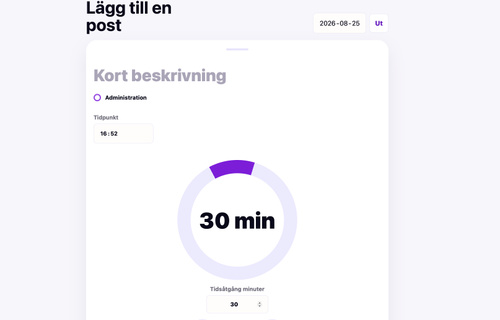
Build a mobile-first web app for logging work activities during the day.
The app should be called: [APP NAME]
Purpose: [Briefly describe who will use the app and why. Example: consultants tracking billable work, field workers documenting daily tasks, office teams summarizing internal work.]
Core user flow: The user should be able to log a work activity with as little friction as possible:
- Short description
- Time of day
- Duration
- Task type
- Save entry
Task types: Task types should be reusable options that can be configured by the user.
Default task types:
- [TASK TYPE 1]
- [TASK TYPE 2]
- [TASK TYPE 3]
- [TASK TYPE 4]
Design and UX:
- Mobile-first
- Inspired by Toggl, but even simpler
- The input experience should feel like a focused timer/session
- Use a large circular duration wheel
- The wheel should support dragging/rotating
- The wheel must support more than one full turn, for example durations above 4 hours
- Include quick duration presets, such as 1h, 2h, 4h, and 8h
- Include a reset option if the user selects too much time
- The UI should be clean, fast, and easy to use with one hand on a phone
Data:
- All data must be stored persistently
- The user should be able to view today’s entries
- The user should be able to view or export a selected month
- The user should be able to export the data to Excel for further analysis
Authentication:
- Add a simple password-protected login wall
- The password should be changeable through configuration or environment variables
- The work log should not be visible until the user is logged in
Excel export: The Excel export should include at least:
- Date
- Time of day
- Description
- Task type
- Duration in minutes
- Duration in hours
Branding:
- App name: [APP NAME]
- Desired domain or subdomain: [DOMAIN]
- Add a footer saying: “Created with ChatGPT and Liivo”
PWA and metadata:
- Add a favicon
- Add an Open Graph image
- Add Open Graph and Twitter metadata
- Add a web app manifest so the app can be installed on the home screen
- Add app icons for iOS and Android
- Add a theme color
Deployment:
- Consult the Liivo architect for the best solution
- Use persistent database storage
- Deploy the app online immediately
- Connect the desired domain or subdomain
- Verify that the live app works after deployment