my-meetup
A reusable build-and-deploy prompt for creating a production-ready, single-event meetup web app on Liivo / Eyevinn OSC. The prompt guides an AI coding agent through the full process: verifying Liivo connectivity, consulting the Liivo architect, provisioning private PostgreSQL, object/image storage, and config services, then implementing a complete event app with RSVP, waitlist handling, attendee profiles, schedule, discussion, sponsor management, organizer admin tools, image uploads, seeded demo content, SEO/AEO metadata, Open Graph image support, and live deployment verification. It is designed for recreating a dedicated event site similar in capability to meetup.org event pages, but focused on one specific event rather than a marketplace of events. The prompt emphasizes real functionality over stubs, private infrastructure, polished UI, media storage, structured data, and end-to-end testing before reporting the live URL.
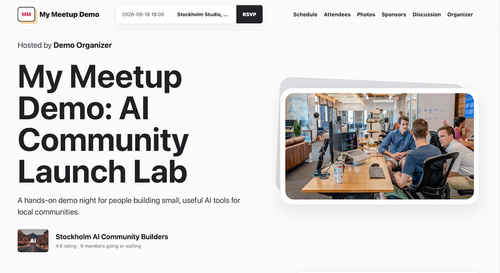
Prerequisite: Before doing any implementation or deployment work, verify that the Liivo / Eyevinn OSC connector is available and authenticated. If it is not connected, stop and ask the user to connect Liivo first. Do not simulate Liivo provisioning or deployment without the connector.
Before building, ask the user to fill in these event-specific placeholders. Do not start implementation until these are answered or reasonable defaults are explicitly approved.
Event placeholders:
- Event name: [EVENT_NAME]
- Event tagline: [EVENT_TAGLINE]
- Event theme/category: [EVENT_THEME]
- Target audience: [TARGET_AUDIENCE]
- City and country: [CITY_COUNTRY]
- Venue name: [VENUE_NAME]
- Venue address: [VENUE_ADDRESS]
- Event date and start time: [EVENT_DATETIME]
- Timezone: [TIMEZONE]
- Capacity: [CAPACITY]
- Host/organizer name: [ORGANIZER_NAME]
- Organizer email: [ORGANIZER_EMAIL]
- Demo organizer password: [ORGANIZER_DEMO_PASSWORD]
- Sponsors: [SPONSOR_NAMES_AND_URLS]
- Desired visual style: [VISUAL_STYLE]
- Primary CTA: [PRIMARY_CTA]
- Custom domain: [CUSTOM_DOMAIN]
- Reusable prompt/share URL: [PROMPT_URL]
If the user does not know all details, suggest sensible demo defaults and ask for approval before continuing.
Build and deploy a single-event meetup web app on Liivo / Eyevinn OSC.
Use English for all app UI copy unless the user explicitly requests another language.
Project name: [EVENT_NAME]
Goal: Create a production-deployed web app for one specific event, inspired by the useful workflows of meetup.org, but not a generic event marketplace. The app should feel like a dedicated event site with RSVP, attendee, schedule, discussion, sponsor, organizer, image upload, SEO, and Open Graph support.
Architecture:
- Consult the Liivo / OSC architect before provisioning.
- Prefer Liivo-managed services where suitable.
- Deploy the app as a Liivo My App.
- Use a private PostgreSQL database that is not publicly exposed.
- The database must only be reachable from the app through internal/private connectivity.
- Use object/image storage for uploaded media.
- Sponsor logos and event photos must be stored in image storage, not only linked externally.
- Use a parameter/config store for environment variables and service credentials.
- After each Liivo deployment or restart, wait for the new app generation to become ready before reporting success.
App functionality: Build real functionality, not stubs.
Public attendee experience:
- Event hero with [EVENT_NAME], [EVENT_TAGLINE], [EVENT_DATETIME], [VENUE_NAME], [VENUE_ADDRESS], [ORGANIZER_NAME], [EVENT_THEME], and a strong visual identity based on [VISUAL_STYLE].
- RSVP flow with email/name sign-in.
- Attendee can mark themselves as attending, join waitlist, or cancel RSVP.
- Capacity handling:
- If capacity is full, new “attending” RSVPs should become waitlisted.
- If an attending user cancels, promote the oldest waitlisted attendee.
- Attendee profile editing:
- name
- email displayed read-only
- short bio
- Schedule section.
- Attendee list with RSVP status.
- Discussion section:
- signed-in users can post comments
- users can delete their own comments
- organizer can delete any comment
- Sponsors section:
- sponsor name
- sponsorship level
- sponsor description
- sponsor website link
- sponsor logo
- Photos/gallery section:
- event photos from previous meetups
- captions
- Sticky RSVP bar on public pages, but make sure it does not cover content or interfere with admin workflows.
- Primary public CTA should reflect [PRIMARY_CTA].
Organizer experience:
- Add an Organizer menu item.
- Organizer login should be clear and separate from attendee sign-in.
- Organizer login form should ask for email and password.
- For demo purposes, visibly show demo credentials near the login form.
- Demo organizer:
- email: [ORGANIZER_EMAIL]
- password: [ORGANIZER_DEMO_PASSWORD]
- Organizer admin area should include:
- edit event title, tagline, location, start time, capacity, description
- create/update/delete schedule items
- manage attendee RSVP status
- remove attendees
- create/update/delete sponsors
- upload sponsor logos
- create/update/delete event photos
- upload event photos
- create announcements/updates
- Admin UI must be clean and usable:
- no overlapping controls
- no sticky public RSVP bar covering admin forms
- responsive layout
- compact but readable management rows
Demo content: Seed the app with a realistic event using the provided placeholders:
- Title: [EVENT_NAME]
- Tagline: [EVENT_TAGLINE]
- Theme: [EVENT_THEME]
- Target audience: [TARGET_AUDIENCE]
- Location: [VENUE_NAME], [VENUE_ADDRESS], [CITY_COUNTRY]
- Date/time: [EVENT_DATETIME]
- Timezone: [TIMEZONE]
- Capacity: [CAPACITY]
- Host: [ORGANIZER_NAME]
Seed several attendees with believable names, bios, and mixed RSVP statuses that fit [TARGET_AUDIENCE] and [EVENT_THEME]. Seed a practical schedule that fits [EVENT_THEME]. Seed a few discussion comments that feel specific to [EVENT_NAME]. Seed sponsors from [SPONSOR_NAMES_AND_URLS]. Use real sponsor logos where possible, but migrate/store those logos in the app’s image storage after setup. Do not depend on external sponsor logo URLs long-term.
Media handling:
- Use efficient image upload handling.
- Accept common image formats: png, jpg/jpeg, webp, gif, svg.
- Limit upload size reasonably, for example 5 MB.
- Store uploaded files in object storage.
- Store public URL and object key in the database.
- When sponsor logos or event photos are deleted/replaced, clean up old storage objects where possible.
- Seeded/demo images may use stable external URLs, but add fallback handling for broken image loads.
- Verify all public image URLs return 200 after deployment.
SEO/AEO: Make the site ready for search engines and AI answer engines from the beginning. Use [EVENT_NAME], [EVENT_TAGLINE], [EVENT_THEME], [TARGET_AUDIENCE], [CITY_COUNTRY], [VENUE_NAME], [EVENT_DATETIME], and [ORGANIZER_NAME] in metadata where appropriate.
Add:
- <title>
- meta description
- canonical URL
- robots meta
- Open Graph metadata
- Twitter card metadata
- OG image
- JSON-LD structured data using Schema.org Event
- /robots.txt
- /sitemap.xml
- /llms.txt
OG image:
- Create a custom branded OG image for [EVENT_NAME].
- It should not resemble meetup.org branding too closely.
- Use event title, date/time, location, and RSVP status.
- Match the visual direction from [VISUAL_STYLE].
- Serve it from the app, for example /og-image.svg or generated static asset.
- Verify it returns 200 and renders correctly.
Reusable prompt promotion: If [PROMPT_URL] is provided:
- Add a prominent CTA explaining that visitors can use the reusable prompt to build a similar event app.
- Link to [PROMPT_URL].
- Consider a dismissible modal that appears after a short delay.
- The modal should have a primary action to open/copy the prompt and a secondary action to dismiss it.
- Do not show the promotional modal inside organizer/admin workflows.
- Remember dismissal locally so the modal does not keep reappearing.
Design direction:
- The design may be inspired by meetup.org event pages, but this is a single-event site, not a marketplace.
- Do not include irrelevant event search.
- Avoid a logo too similar to meetup.org.
- Make the first screen clearly communicate [EVENT_NAME] and [EVENT_THEME].
- Use a polished, modern event-page layout:
- top navigation
- event hero
- details
- schedule
- attendees
- photos
- sponsors
- discussion
- organizer/admin tools
- Keep cards at modest border radius, around 8px unless there is a strong reason.
- Avoid nested cards.
- Ensure text never overlaps controls.
- Ensure sticky elements do not obscure content.
- Verify desktop and mobile layouts.
Liivo deployment requirements:
- Consult Liivo architect first.
- Discover exact Liivo service IDs using tools; never guess service IDs.
- Provision:
- private PostgreSQL
- image/object storage, for example MinIO if architect recommends it
- config/parameter store
- My App deployment
- Wire the app to PostgreSQL using private/internal DB connectivity.
- Wire media storage through config parameters.
- Keep the DB private, not publicly exposed.
- Deploy the app and wait for readiness.
- After code changes, push to the configured git remote and restart the My App.
- Always wait for app readiness with awaitNewGeneration: true.
- Verify /health after deployment.
- If [CUSTOM_DOMAIN] is provided, configure the custom or managed domain for the deployed app and verify it responds.
Preferred routes:
- GET /
- GET /health
- GET /api/event
- POST /login
- POST /logout
- POST /rsvp
- POST /profile
- POST /comments
- POST /comments/:id/delete
- POST /organizer-login
- POST /admin/event
- POST /admin/schedule
- POST /admin/schedule/:id
- POST /admin/schedule/:id/delete
- POST /admin/rsvps/:id
- POST /admin/rsvps/:id/remove
- POST /admin/sponsors
- POST /admin/sponsors/:id
- POST /admin/sponsors/:id/delete
- POST /admin/images
- POST /admin/images/:id
- POST /admin/images/:id/delete
- GET /og-image.svg
- GET /robots.txt
- GET /sitemap.xml
- GET /llms.txt
Verification checklist:
- Run syntax/type checks.
- Run local server and inspect all pages/sections.
- Test attendee sign-in and RSVP.
- Test waitlist behavior.
- Test organizer login.
- Test admin edit flows.
- Test sponsor creation/update with logo upload.
- Test event image upload/delete.
- Test discussion post/delete.
- Check internal anchor links.
- Check external sponsor and map links.
- Check all image URLs return 200.
- Check no horizontal overflow.
- Check sticky RSVP does not cover important content.
- Check metadata:
- canonical URL
- OG tags
- Twitter card tags
- JSON-LD parses as Event
- robots/sitemap/llms routes return 200
- Deploy to Liivo.
- Verify live app URL and custom/managed domain.
- Report final live URL and what was verified.