open-live-camera-demo
Set up an Open Live demo on Liivo/OSC using a new Open Live backend, Studio, CouchDB, an existing cloud Strom instance, and a local camera source via open-live-ingest.
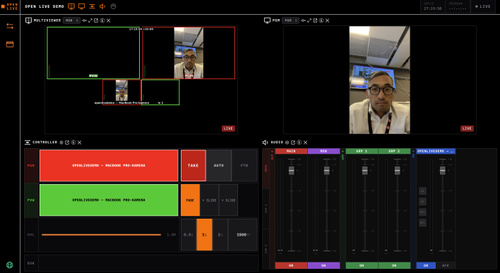
Name/slug: open-live-camera-demo Type: skill Description: Set up an Open Live demo on Liivo/OSC with Open Live backend, Studio, CouchDB, existing cloud Strom, and a local camera source via open-live-ingest. Tags: open-live, liivo, osc, strom, srt, camera
Open Live Camera Demo on Liivo/OSC
Use this skill to set up an Open Live demo on Eyevinn OSC/Liivo with Open Live backend, Open Live Studio, CouchDB or required database, an existing cloud Strom instance, local camera via open-live-ingest / open-live-gateway, and one production with the camera assigned to video_in_0.
Ask for: existing cloud Strom URL, cloud Strom token/API key if required, permission to create/use an OSC Personal Access Token, and optional preferred instance names. Do not write secrets into tracked files. Use service secrets, parameter stores, temp files, or env vars.
Provision Open Live on OSC
- List available OSC services. Do not guess service IDs.
- Read schemas for Open Live backend, Open Live Studio, and CouchDB/database.
- Create/reuse database, normally CouchDB.
- Create/update Open Live backend with database URL, CORS origin set to Studio URL, existing cloud Strom URL, Strom auth mode/token as required, and secrets via OSC secrets/parameter store when supported.
- Create/update Studio with backend API URL. If Studio bakes API URL at build time, set it before build or rebuild/recreate.
- Wait for every instance to be ready.
- Verify backend status: DB OK, Strom OK, CORS OK.
- Verify Studio loads and reaches backend.
OSC auth
OSC-hosted Open Live is behind an OSC proxy. Do not send OSC PAT directly as bearer token to Open Live API. Exchange OSC PAT for an Open Live Service Access Token using OSC token service and service ID eyevinn-open-live. Use returned service token as bearer token for Open Live API calls.
For gateway: set OLG_OPEN_LIVE_API_KEY to the OSC PAT and set open_live.auth_mode = "osc" in gateway config.
Local gateway
Clone/build:
git clone https://github.com/Eyevinn/open-live-ingest.git
cd open-live-ingest
cargo build --release
Install local Strom if missing.
On macOS/Homebrew, these env vars may be needed:
export DYLD_LIBRARY_PATH="/opt/homebrew/lib"
export GI_TYPELIB_PATH="/opt/homebrew/lib/girepository-1.0"
export GST_PLUGIN_SYSTEM_PATH_1_0="/opt/homebrew/lib/gstreamer-1.0"
Create gateway.local.toml without secrets:
[gateway]
name = "openlivedemo"

[strom]
url = "http://127.0.0.1:8080"
manage = true
binary = "/usr/local/bin/strom"
data_dir = "<workspace>/strom-data"

[open_live]
url = "<OPEN_LIVE_API_URL>"
auth_mode = "osc"
register = true

[uplink]
mode = "caller"
port_range = "47110-47129"
latency_ms = 200

[video]
codec = "h264"
bitrate_kbps = 1200
encoder_preference = "auto"
quality_preset = "ultrafast"
tune = "zerolatency"
rate_control = "cbr"
keyframe_interval = 30

[capture]
video_resolution = "640x480"
video_framerate = "15/1"

[log]
level = "info"
Check supported camera formats:
gst-device-monitor-1.0 Video/Source
Only use formats the camera advertises. 640x480@15 is a conservative MacBook demo profile.
Start gateway:
./open-live-ingest/target/release/open-live-gateway --config ./gateway.local.toml up --devices "<camera name fragment>"
Ask before starting, because this transmits video from the user's camera.
Create and activate production
Use Open Live API with service token:
- List sources and find the gateway camera source.
- Create production with body
{"name":"Open Live Demo"}. - Assign source with body
{"sourceId":"<sourceId>","mixerInput":"video_in_0"}. - Activate production.
- Verify status is
active,tally.pgmisvideo_in_0,pgmWhepEndpointexists, gateway status shows flow running and Open Live active, and SRT send rate is greater than zero.
Troubleshooting
If Studio cannot reach backend, check Studio API URL, backend CORS origin, and backend status from Studio origin.
If backend cannot reach Strom, verify cloud Strom URL/token/auth mode and check backend status/logs.
If Open Live API auth fails, exchange OSC PAT for service token first.
If camera is frozen or choppy, check local Strom logs for capture:videoconvert falling behind, lower resolution/fps/bitrate, and verify supported formats with gst-device-monitor-1.0 Video/Source.
If GStreamer says not-negotiated, the requested camera format is unsupported. Pick a listed format.
Shutdown
- Deactivate production.
- Stop gateway with Ctrl-C.
- Verify production is inactive and temporary camera source is gone.
Safety rules
Do not expose or print tokens in final output. Do not put secrets in config files committed to source control. Ask before starting a real camera stream. Ask before deleting service instances or persistent resources. Prefer updating existing service instances when supported.