barber-booking-site
A booking website for a small appointment business, built for a barber shop or salon but usable by anyone who books people into time slots. Customers see the staff, pick a person and a service, get real available times worked out from opening hours minus existing bookings, and book without making an account. They get a reference code and a confirmation page they can return to. Staff sign in with one shared password to see the day and cancel. One configuration block at the top holds the shop name, hours, people, services and prices, so filling that in rebrands the whole site with no code changes. Needs a managed PostgreSQL database. No payments and no customer accounts.
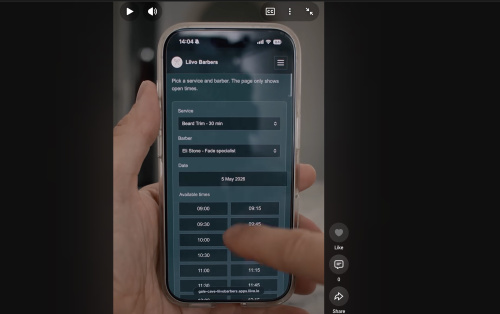
1. The core brief
This section stands on its own. If you paste nothing but section 1 and section 2, you will still get recognisably the right app. Everything after them is detail to draw on, not a specification to satisfy line by line.
What it is. A booking website for one barber shop or hair salon: a public page that introduces the shop and its people, a booking panel that shows real free times and takes an appointment without any customer account, and a private schedule screen where the staff see and cancel what is booked. It is for a small shop that wants to stop taking bookings by phone. One shared password for the whole team, no payments, no customer logins.
You are expected to make this your own shop, not a copy of somebody else's. This is the most rebrandable app in the set. Almost everything you can see on screen belongs to you: the shop name and logo mark, the headline and every line of copy, the people, their photos and bios, the service menu, the prices, the colours, the fonts, the opening hours and the booking rules. The configuration block in section 5 is the mechanism for exactly that, one file that carries all of it. Different wording, a different palette, a different layout and different small interactions are fine and expected. What must survive is the shape of the thing, which is section 2.
The screens.
- Landing page. Shop introduction, then a card for each person on the team with a photo, a rating, a short bio and their specialties.
- Person page. That person's full profile beside a live booking panel: service, day, free time, your details, confirm.
- Confirmation page. One card, addressable by the booking reference, showing when, with whom, for what, and the reference itself.
- Staff sign in. One password field.
- Staff schedule. Filterable list of appointments with counts and a cancel action on each row.
- 404 and error pages. Plain, with a way back home.
/health. A one line JSON answer for uptime checks.
The features that define it.
- A directory of the people who take bookings, each with photo, title, bio and specialty tags, that routes the visitor to a person rather than a calendar.
- A service menu with the duration and the price visible at the point of choosing.
- Slot length follows the chosen service, so switching service reflows the times.
- A rolling strip of upcoming days, with days the person does not work marked as closed rather than hidden.
- Real availability: that person's working hours minus their existing appointments, never a fixed grid.
- Slots that have already passed today are shown but disabled, so today visibly fills up.
- Booking with no account at all: name, email, phone, optional note, confirm.
- A short booking reference, and a confirmation page the customer can revisit.
- A server side re-check at submit time, so the loser of a race gets a clear "that time was just taken" instead of a double booking.
- Staff sign in with one shared password, no user table.
- A schedule filterable by person and by date range, with the filters living in the URL so they can be bookmarked.
- Counts of total, confirmed and cancelled for whatever range is on screen.
- One click cancel that keeps the row in history and puts the freed time back on sale immediately.
- Server rendered throughout, so it works with almost no client JavaScript.
The feel. Warm, calm and plain, closer to a well set printed page than to a SaaS dashboard. Cream paper rather than white, one deep accent colour, a serif for headings over a plain sans for everything else, generous white space and hairline rules instead of heavy borders. It should feel unhurried: a card lifts slightly on hover, buttons and slots settle in a tenth of a second, and nothing else moves. Booking should take under a minute and feel like reading a menu, not filling in a form, and the whole thing should be usable one handed on a phone with nothing ever scrolling sideways except the day strip and the schedule table.
Where to start. Paste section 1 and section 2, build stage 1 of section 17 from them, get it deployed at a URL, and only then come back for the rest of this document.
2. Fidelity: what to keep, what to get right, what to change
2.1 Must match, or it is a different app
- A public page that lists the people, one card each, not a bare calendar.
- Pick a person, then pick a service from a menu that shows duration and price.
- See real available times for that person on a chosen day, derived from their working hours minus their existing bookings.
- Book with no account, no login and no payment.
- Get a booking reference and a confirmation page that stays reachable at that reference.
- A staff view, behind one shared password, that can see the day's bookings and cancel any of them, with the cancelled time becoming bookable again.
That is the product. Everything else on the screen is yours.
2.2 Must be right, or it breaks
These are technical facts rather than taste. Getting one wrong gives you a broken app rather than a different one.
- Two people must not be able to book the same slot. The transaction plus
overlap
SELECTcloses the common case, the stale form, but it does not close two requests arriving at the same instant, and neither does addingSELECT ... FOR UPDATE: a select that matches no rows locks nothing, so both transactions see an empty result and both insert. This was true of the app this brief is based on. You need the database to refuse the second row: the PostgreSQL exclusion constraint in section 11.3, or an equivalent such as a unique index on the discrete slot start per person, or serialisable isolation with a retry. Keep the transactional check as well, and catch the constraint violation to render the same "that time was just taken" message. - A booking must not run past closing time. The slot loop condition is
t + durationMin <= close, nott < close, so a 45 minute service against a 16:00 close offers 15:15 as its last start. Overlap comparison is half open,newStart < existingEnd && newEnd > existingStart, so touching appointments do not conflict. And validate the submitted start and end server side against a freshly built slot list, or a hand made post books outside opening hours. - The schema must bootstrap cleanly on a completely empty database. A
stranger deploying this always starts empty.
db/migrate.jsmust run from nothing to a working schema with no manual step, and the seed must insert only into an empty staff table. If any step needs a hand run, the first deploy either crash loops or serves a site with no staff and no services on it, and whoever deployed it has no way to tell which. The destructive reset branch in section 9.1 fires whenever the stored version is belowSCHEMA_VERSION, so treat that number as load bearing, see section 2.4. - Fail closed on the staff password. No hardcoded fallback for
ADMIN_PASSWORDorSESSION_SECRETin the source. The original shipped one, which meant anyone reading the repository could sign into any deployment that forgot to set the variable. Exit non zero in production when either is missing, the same way the app already exits withoutDATABASE_URL. - Never block a booking on an email send. If you wire confirmation email at
all, call it after
COMMIT, do not await it in the request path, swallow its errors, and treat "no SMTP configured" as a supported state that logs and carries on. A mail outage must never stop the shop taking appointments. And only print "we emailed you" when something actually was emailed. - The deployment contract. A
buildscript must exist even though it does nothing, because the platform runs it and a missing script is a failed deploy. Bindprocess.env.PORTon0.0.0.0. A hardcoded port, or a bind tolocalhost, leaves the platform's health check knocking on a door nobody opens, so the deploy is marked unhealthy and never gets traffic even though the log says the app is listening. Keep PostgreSQL as the deployed datastore: container disks are ephemeral, so a SQLite file loses every booking on the first redeploy. - Timezone consistency. Set
TZon the deployment and pass an explicittimeZoneinto everytoLocaleStringcall, and keep both equal tosite.locale.timeZone. Slot strings are naive wall clock, so a mismatch silently writes the wrong instant. - Every query parameterised, including the optional staff filter on the schedule. Never concatenate SQL. The schedule filters come straight off the query string, so one concatenated filter hands anybody with a browser the ability to read the whole appointments table, customer phone numbers included, or to drop it.
2.3 Yours to change
Generously, and without asking anybody: the shop name, the logo initials, the headline, the subline, the footer note and every other word of copy. The people, how many of them there are, their titles, photos, bios and specialties. The service menu, its names, descriptions, durations and prices. The currency, the locale and the date wording. Every colour token, the serif and sans pairing, the corner radii, the shadows, the spacing scale and the container widths. The ordering of the staff grid. The two breakpoints. Which of the optional extras you build, and which of the deliberate omissions in section 7.8 you decide you want after all. And every tuning number in this document except the handful named below.
The look described in section 12, cream and deep green with a serif over a sans at two breakpoints, is one good look among many. It is there so you have something coherent to react against, not because the app needs it.
2.4 The numbers that are load bearing, and why
Everything else is a tuned default. These are not:
SCHEMA_VERSION = 1. Bumping it triggers the reset branch, which drops the appointments table. It wipes every booking on the next start. Leave it at 1 and make schema changes additively, see section 9.1.- The half open overlap comparison in both the slot builder and the booking
transaction. Flip either inequality to
<=and back to back appointments start refusing each other, or overlapping ones start being accepted. t + durationMin <= closeas the slot loop condition. This is what stops a booking running past closing time.- 8 characters from 4 random bytes for the booking reference. It is the customer's only handle on their booking and it is unguessable rather than protected, so do not shorten it and do not make it sequential. Longer is fine.
- The status values
'confirmed'and'cancelled', spelled exactly. Availability filters onstatus <> 'cancelled', so a third value or a typo quietly makes a slot unbookable forever. working_hourskeys are day numbers as strings with'0'for Sunday, matching JavaScriptgetDay(). Change the convention and every day is off by one, which is the kind of bug that only shows up on a Sunday.- Session cookie flags,
httpOnlyandsameSite: 'lax'. The 8 hour expiry is a taste choice, those two are not. - Node 18 or newer, for native
fetchandcrypto. - Express 4 versus 5.
res.redirect('back')works in 4 and was removed in 5. Readreq.get('Referrer') || '/admin'instead and the code is correct on both.
Numbers that are explicitly not load bearing, to be clear: the 30 minute slot increment, the 14 day booking window, the 0 minute buffer, the 0 minute minimum notice, the 7 day default schedule range, the 130 character bio truncation, the three specialty tags, the 880px and 720px breakpoints, every duration and price in the service menu, and every rating and review count.
2.5 The build is staged, and stage 1 is small
Even if these two sections are all you have, do not build the whole thing in one pass. Section 17 splits it into three stages, and the split matters more than the detail inside it:
- Stage 1 is the public path only: the config file, the database, the availability library, the landing page, the person page with its booking panel, the booking post and the confirmation page. Then deploy it and make one real booking on your phone. Plain styling is fine and there is no staff screen yet.
- Stage 2 adds sessions, the staff login, the filterable schedule with its counts, cancel, flash messages and the real error states.
- Stage 3 is the look, the motion, the accessibility pass and the hardening, which is where the exclusion constraint and the production credential guards land.
Build stage 1, get it running at a URL you can open, and only then go looking for the rest of this document.
3. What you are building
Build me a booking website for a single barber shop or hair salon, called SHOP_NAME. Visitors land on a page that introduces the shop and shows a card for every barber on the team, with a photo, a rating, a short bio and their specialties. Clicking a barber opens their page: full bio, specialties, and a live booking panel on the right where the visitor picks a service, picks a day from the next two weeks, picks a free time slot, types their name, email and phone, and confirms. The slot list is real: it comes from that barber's working hours minus the appointments already booked, and it never offers a time in the past. Confirming produces a booking reference and a confirmation page. Staff sign in with a shared password to see a filterable schedule of upcoming appointments and cancel any of them, which puts the freed time back on sale immediately.
It is for a small shop that wants to stop taking bookings by phone. The tone is calm and plain, not salesy. No customer accounts, no payments, no reviews to write. One password for the whole team.
4. How to use this prompt
Path A, Liivo connector, no terminal. Connect your AI to Liivo by adding a
custom connector with the address https://my.liivo.ai/mcp (in Claude:
Settings > Customize > Connectors > Add custom connector; in ChatGPT: Settings >
Plugins > MCPs > Add MCP server). Sign in, which creates your Liivo account.
First message:
Use setup-project for a barber shop booking website
Then paste this whole prompt as your next message. Let the AI scaffold, ask the platform for a managed PostgreSQL database, and deploy before you request any changes, so you have a working URL to compare against.
Path B, any AI in a local folder, deploy after. Make an empty folder, open your AI there, paste this prompt. Run it locally against a PostgreSQL database you already have. When it works, push it to a git repository and point Liivo (or any Node host) at that repository.
Path C, terminal with Claude Code or Codex. mkdir barber-site && cd barber-site, start claude or codex, paste this prompt. Same as path B, with
the AI running the commands.
5. Your shop, in one block
Create the file config/site.js exactly as below and fill in the placeholder
values. Nothing else in the codebase should contain a shop-specific value.
Every page, the seed data, the currency formatting, the date formatting and the
footer read from here. This is the only file a new owner has to edit.
Every value in the block below is a filled in example, not a requirement. The placeholder strings are there to be replaced, and the numbers are the ones the original settled on after real use, so they are a sensible starting point rather than a target. Change the slot increment, the booking window, the buffer, the minimum notice, the prices, the durations, the ratings and the working hours to whatever your shop actually does. Add fields you want and delete fields you do not. What matters is that shop specific values live here and nowhere else.
// config/site.js
// EDIT THIS FILE AND NOTHING ELSE TO MAKE THE SITE YOURS.
module.exports = {
  brand: {
    name: 'YOUR_SHOP_NAME_HERE',              // e.g. 'Linden Street Barbers'
    initials: 'YS',                           // 2 letters for the square logo mark
    heroHeadline: 'Book a barber who fits you, on a day that fits your schedule.',
    heroSubline: 'Browse the team, see real availability, and confirm in under a minute. No phone tag, no guessing.',
    footerNote: 'A calmer way to book your next appointment.'
  },

  labels: {
    // The words used across the site for your staff. Change these and the
    // headings, buttons and microcopy follow.
    staffSingular: 'barber',
    staffPlural: 'barbers',
    staffSectionTitle: 'Our barbers',
    staffSectionSub: 'Each barber sets their own hours. Pick someone whose specialty matches what you have in mind.',
    loginTitle: 'Staff sign in'
  },

  contact: {
    phone: '+00 000 000 0000',                 // shown in the footer and on the confirmation page
    email: 'YOUR_SHOP_EMAIL_HERE',
    addressLine: 'YOUR_STREET_ADDRESS_HERE',
    city: 'YOUR_CITY_HERE',
    mapsUrl: ''                                // optional, links the address if set
  },

  // Free text shown in the footer. The real booking rules come from each
  // person's workingHours below, not from this line.
  hoursLine: 'Open Mon to Sat, closed Sundays',

  social: {
    // Leave any of these empty and the icon or link is not rendered at all.
    instagram: '',
    facebook: '',
    tiktok: ''
  },

  images: {
    // Optional. Empty string means the hero uses the plain colour gradient,
    // which is what the original does.
    heroImageUrl: ''
  },

  locale: {
    locale: 'en-US',                            // date and time wording
    timeZone: 'Europe/Stockholm',               // MUST match your shop's real timezone, see section 11
    currencySymbol: '$',
    currencyPosition: 'before',                 // 'before' or 'after'
    currencyDecimals: 0                          // 0 shows $85, 2 shows $85.00
  },

  booking: {
    slotIncrementMinutes: 30,   // slots start every 30 minutes
    bookingWindowDays: 14,      // how many days ahead the day strip offers
    bufferMinutes: 0,           // gap forced after each appointment, 0 = back to back
    minNoticeMinutes: 0         // 0 = anything later than right now is bookable
  },

  admin: {
    // Password comes from the ADMIN_PASSWORD environment variable, never from
    // this file. This is only the default date range of the schedule screen.
    defaultRangeDays: 7
  },

  // One entry per person who takes bookings.
  // workingHours: day => { start, end } in 24 hour local time. Omit a day to
  // mean closed. Omit a person's day and the day pill shows as closed.
  staff: [
    {
      name: 'STAFF_NAME_1',
      title: 'Master Barber',
      photoUrl: 'https://YOUR_IMAGE_HOST/staff1.jpg',
      bio: 'Two or three sentences in the shop voice. What they are known for, and what it is like to sit in their chair.',
      specialties: ['Fades', 'Beard grooming', 'Classic cuts', 'Hot towel shave'],
      rating: 4.9,              // display only, see section 8
      reviewCount: 287,         // display only
      yearsExperience: 15,
      workingHours: {
        mon: { start: '09:00', end: '18:00' },
        tue: { start: '09:00', end: '18:00' },
        wed: { start: '09:00', end: '18:00' },
        thu: { start: '10:00', end: '20:00' },
        fri: { start: '10:00', end: '20:00' },
        sat: { start: '10:00', end: '16:00' }
      }
    },
    {
      name: 'STAFF_NAME_2',
      title: 'Senior Barber',
      photoUrl: 'https://YOUR_IMAGE_HOST/staff2.jpg',
      bio: '...',
      specialties: ['Skin fades', 'Texturizing', 'Kids cuts'],
      rating: 4.8,
      reviewCount: 192,
      yearsExperience: 11,
      workingHours: {
        tue: { start: '10:00', end: '19:00' },
        wed: { start: '10:00', end: '19:00' },
        thu: { start: '10:00', end: '19:00' },
        fri: { start: '10:00', end: '19:00' },
        sat: { start: '09:00', end: '15:00' }
      }
    }
    // Add as many as you like. Two is enough to see the site work.
  ],

  // The menu. durationMinutes drives the slot length, so a 45 minute service
  // gets 45 minute slots. priceCents is an integer in minor units.
  services: [
    { name: 'Haircut',              durationMinutes: 30,  priceCents: 4500,  description: 'Tailored cut with shampoo and a quick style.' },
    { name: 'Skin fade',            durationMinutes: 45,  priceCents: 5500,  description: 'Clipper work blended to the skin, finished by hand.' },
    { name: 'Cut and beard trim',   durationMinutes: 60,  priceCents: 7000,  description: 'Full cut plus beard shaped and lined up.' },
    { name: 'Beard trim',           durationMinutes: 30,  priceCents: 3000,  description: 'Shape, line up and condition.' },
    { name: 'Hot towel shave',      durationMinutes: 45,  priceCents: 5000,  description: 'Traditional wet shave with hot towels.' },
    { name: 'Kids cut',             durationMinutes: 30,  priceCents: 3000,  description: 'Calm, friendly cut for ages 12 and under.' },
    { name: 'Head shave',           durationMinutes: 30,  priceCents: 4000,  description: 'Clean shave to the skin, scalp conditioned after.' }
  ]
};
Rules for consuming this file:
server.jsdoesapp.locals.site = require('./config/site')once, so every template can readsite.brand.nameand friends.- The seed script reads
site.staffandsite.services. It writes them into the database on first start only, see section 9. - Currency and date helpers take their symbol, position, decimals, locale and
timezone from
site.locale. No$and no'en-US'anywhere else in the code. - Day names map to the JavaScript day numbers the database stores with
const DAY_INDEX = { sun: 0, mon: 1, tue: 2, wed: 3, thu: 4, fri: 5, sat: 6 }.
For context on why this block matters: in the app this brief is based on, the
shop name sat in three separate templates and one console log, the address and
opening hours were hardcoded placeholder text in the footer partial, the currency
symbol was a literal $ inside a helper, the date locale was a literal
'en-US' in three places, and the staff and the whole price list lived in the
seed script. Rebranding it meant editing eight files and knowing which. That is
the thing this configuration block removes, and it is the reason this app is
worth handing to someone else. There was no phone number and no social links
anywhere, so those two are additions.
6. Tech stack
Pin these majors. This is a deliberately boring server-rendered stack, which is why it deploys in one step and has no build tooling to break.
The exact minor versions are what the original resolved to and are a fine
starting point, not a requirement. The two things worth holding onto are Node 18
or newer and the absence of a build step. Swapping EJS for another server
template language, or pg for another PostgreSQL driver, is your call. Adding a
client framework and a bundler is a different app.
| Piece | Choice | Why |
|---|---|---|
| Runtime | Node.js 18 or newer ("engines": { "node": ">=18" }) | Native fetch and crypto available, matches the platform default |
| Server | Express 4.19 (express@^4.19.2) | Plain routing, no framework build step |
| Templates | EJS 3.1 (ejs@^3.1.10) | Server-rendered HTML, no client framework, no bundler |
| Database | PostgreSQL, driven by pg@^8.11.5 | Real overlap checks and transactions, and it survives restarts |
| Sessions | express-session@^1.18.0 plus cookie-parser@^1.4.6 | One shared staff password, no user table |
| CSS | One handwritten public/styles.css with CSS custom properties | No Tailwind, no build, easy to retheme |
| Client JS | About 8 lines inline on one page | Nothing to bundle |
Do not add React, Next.js, Tailwind, Prisma or a bundler. There is no build step, and that is the point.
package.json:
{
  "name": "barber-booking",
  "version": "1.0.0",
  "description": "Booking site for a barber shop",
  "main": "server.js",
  "scripts": {
    "build": "node -e \"process.exit(0)\"",
    "start": "node server.js",
    "dev": "node server.js",
    "migrate": "node db/migrate.js",
    "seed": "node db/seed.js"
  },
  "engines": { "node": ">=18" },
  "dependencies": {
    "cookie-parser": "^1.4.6",
    "ejs": "^3.1.10",
    "express": "^4.19.2",
    "express-session": "^1.18.0",
    "pg": "^8.11.5"
  }
}
The build script is a deliberate no-op. There is nothing to compile, but the
platform runs npm run build before npm start, and a missing script is a
failed deploy. Keep it.
File layout:
config/site.js          your shop details, the only file to edit
db/pool.js              one shared pg Pool
db/migrate.js           schema plus version bookkeeping
db/seed.js              first run insert of staff and services from config
lib/availability.js     slot maths, no database access, unit testable
public/styles.css       the whole design
server.js               routes, helpers, startup
views/home.ejs
views/stylist.ejs
views/confirmation.ejs
views/admin.ejs
views/admin-login.ejs
views/error.ejs
views/not-found.ejs
views/partials/header.ejs
views/partials/footer.ejs
.env.example
.gitignore              node_modules/ .env .env.local npm-debug.log* .DS_Store .vscode/
7. Every page and screen
There are seven rendered views and one JSON endpoint. Five pages are public, two are staff only.
Read this section as a description of a version that works, not as a layout to reproduce pixel for pixel. Every padding, column width, truncation length and piece of microcopy here is a default the original settled on. Keep the purpose of each screen and the order the visitor moves through them, and change the rest freely.
7.1 Public: landing page, GET /
Purpose: introduce the shop and route the visitor to a person.
Layout, top to bottom:
- Sticky header (shared partial). Left: a 36 by 36 rounded square in the
accent colour holding
brand.initialsin the serif face, thenbrand.namein the serif face at 1.3rem. Right nav: a link to/labelled withlabels.staffSectionTitle, and a pill-outlined "Staff login" link to/admin/login. When a staff session is active the nav instead shows "Schedule" plus a "Sign out" button that posts to/admin/logout. - Flash strip, only when a flash message is set in the session. Full-bleed tinted bar, one line of text, cleared after being read once.
- Hero, 72px top and 56px bottom padding, on a vertical gradient from
#f3ede1to the page background. Inside a 760px column: a small uppercase letter-spaced eyebrow showingbrand.name, thenbrand.heroHeadlineas an h1 at 2.8rem serif, thenbrand.heroSublineas a 1.1rem lede, then a filled pill button "See our <staffPlural>" that jumps to the#stylistsanchor. - Staff grid, section with 64px vertical padding. Heading
labels.staffSectionTitle, sublabels.staffSectionSub, then a responsive grid,repeat(auto-fill, minmax(300px, 1fr)), 24px gap. Each card is a white rounded 14px surface with a soft shadow, and the whole card is one link to/stylists/:id. Card contents: a 4:3 photo filling the width as a background image withrole="img"and the person's name as the aria-label, then a body with 22px padding holding a gold star glyph plus the rating to one decimal plus "(N reviews)" in muted text, the name as an h3, the title in muted text, the bio truncated to 130 characters with an ellipsis, up to three specialty tags as accent-tinted pills, and a "View availability arrow" call to action in the accent colour. Hover lifts the card 2px and deepens the shadow. - Footer (shared partial). Left: shop name in bold plus
brand.footerNote. Right:hoursLine, then the address (linked tomapsUrlwhen set), then the phone number, then any non-empty social links.
Ordering: staff are listed by rating descending, then review count descending.
States: no loading state, the page is server rendered. If the staff table is empty the grid renders nothing, so keep the seed working. A database failure falls through to the 500 error page.
7.2 Public: person page and booking panel, GET /stylists/:id
Query parameters, both optional: ?service=<serviceId>&date=YYYY-MM-DD.
Defaults are the first service by id and today.
Two column grid, 360px aside plus flexible main, 48px gap, collapsing to one column under 880px.
Left aside, a white card that sticks 96px from the top on desktop: a square 1:1 photo, then rating line at 1.05rem, the name as h1, the title, "N years of experience" in muted small text, the full bio, a "Specialties" subheading, and every specialty as a tag pill.
Right panel, a white card with 32px by 36px padding, titled "Book an appointment" with the line "Choose a service, then pick a day and time. We will hold your slot the moment you confirm."
- Service select. A single
<select>in its own GET form that auto-submits on change and carries the currentdatein a hidden field, so changing the service keeps the chosen day. Each option readsName · duration · price, for exampleSkin fade · 45 min · $55. Durations render as30 min,1 hr,1 hr 30 min. - Service description, a cream panel with a 3px accent left border showing the selected service's description.
- "Choose a day", a horizontally scrolling strip of pills, one per day for
the next
bookingWindowDaysdays starting today. Each pill shows a short label likeThu, Aug 21. The selected day is filled with the accent colour. A day the person does not work renders at 50% opacity with the word "closed" underneath, and it is still clickable, landing on the closed state below. - "Available times", a grid of slot buttons,
repeat(auto-fill, minmax(90px, 1fr)), 8px gap. Each slot is a label wrapping a hidden radio input, showing the start time asHH:MM. A free slot is white with a hairline border and turns solid accent with white text when selected. A taken or past slot is 40% opacity, struck through, and disabled.- Closed state: if the person does not work that day, no slot grid is rendered at all. Instead a dashed-border panel says "This <staffSingular> is not working on this day. Try another day above."
- Fully booked state: the grid renders with every slot struck through. Optional small addition, not in the original: also print "No free times left on this day." above the grid when the slot list is non-empty and nothing in it is available.
- "Your details" fieldset: full name (required,
autocomplete="name"), email (required, type email,autocomplete="email"), phone (required, type tel,autocomplete="tel"), and an optional 3 row notes textarea with the placeholder "e.g. skin fade, keeping the top long". - "Confirm appointment", a full width filled pill button.
Selecting a slot writes the chosen start and end into two hidden inputs. Also
send the radio's own value, which is startISO|endISO, and have the server
prefer that value, so the form still works with JavaScript disabled.
Invalid id: a non-numeric :id returns 400 with a plain text message. An id
that does not exist renders the 404 page.
7.3 Public: confirmation, GET /booking/:reference
A centred 680px card, 48px by 40px padding, text centred. A 56px accent circle
with a white check glyph, marked aria-hidden. An eyebrow "You are booked". An
h1 "See you on Thursday, August 21 at 2:30 PM", formatted in the shop locale and
timezone. A lede confirming which email address the details went to, plus the
shop phone number for changes.
Then a definition list, left aligned, each row a 110px label column plus value,
separated by hairline rules: Staff member (name plus title), Service
(name plus duration), Reference (the code in an accent-tinted monospace
chip), For (customer name plus phone), and Notes only when notes were
given. Below: a "Back to <staffPlural>" outline button to /.
This URL is the customer's only handle on their booking, so it must keep working if they revisit it. It is unguessable rather than protected, so do not put anything on it beyond what the customer already typed.
Unknown reference: the 404 page.
7.4 Staff: login, GET /admin/login and POST /admin/login
A centred narrow card: labels.loginTitle as h1, the line "Enter the staff
password to view your schedule.", one autofocused password field, and a full
width "Sign in" button. Wrong password sets an error flash and redirects back to
the same page, so the password is never echoed. Correct password sets the
session flag and redirects to /admin.
7.5 Staff: schedule, GET /admin (session required)
Purpose: the owner's daily driver.
- Heading "Schedule" with the line "Filter by <staffSingular> or date range. New bookings appear immediately."
- Three stat cards in a
minmax(180px, 1fr)grid, each a white surface with the number in the 2rem serif accent face over a muted label: Total bookings, Confirmed, Cancelled. These count only the rows currently in range, not all time. - Filter bar, a white card laid out
2fr 1fr 1fr autoand collapsing to one column under 720px: a staff select defaulting to "All staff", a From date input, a To date input, and an "Apply" outline button. It is a GET form, so filters live in the URL and can be bookmarked. Defaults: from today, to today plusadmin.defaultRangeDays. - Schedule table inside a horizontally scrolling white card. Columns:
When (full date and time in bold, duration in minutes underneath),
Staff, Customer (name in bold, email and phone underneath in muted
text), Service (a hyphen when the service was deleted), Status (a
pill badge, accent tint for confirmed, red tint for cancelled), and an action
column holding a "Cancel" link-button that posts to the cancel route behind a
native
confirm()dialog. Cancelled rows render at 50% opacity with a strikethrough and no Cancel action. Sorted by start time ascending.- Empty state: a dashed panel, "No appointments in this range."
Reaching /admin without a session redirects to /admin/login.
7.6 Error pages
views/not-found.ejs, rendered with status 404: "We could not find that page",
the line "The link may have changed, or the page is no longer available.", and a
"Back to home" outline button. Used by unknown routes, unknown ids and unknown
references.
views/error.ejs, rendered with status 500 by the global error handler and with
400 or 409 by the booking route: heading "Something went wrong" plus the
specific message and a "Back to home" button. The three messages the app can
produce are "Please fill in all required fields.", "That time was just taken.
Please choose another slot.", and the generic "Something went wrong on our end.
Please try again."
7.7 GET /health
Runs SELECT 1 and returns {"ok": true} with 200, or
{"ok": false, "error": "..."} with 500. Used by the platform and by you.
7.8 Pages this app deliberately does not have
Do not build these. The original has none of them, and adding them changes the shape of the site:
- No separate services or pricing page. The menu lives in the booking select, with its price and duration in the option text.
- No gallery page and no image uploads.
- No about page. The shop story is the hero plus each person's bio.
- No contact page. Address, hours and phone live in the footer.
- No opening hours page. Hours are the day strip and the footer line.
- No customer accounts, no login, no "my bookings" list, no reschedule.
- No customer-side cancellation. Only signed-in staff can cancel. If you want customers to cancel themselves, that is an addition, see section 17.
- No payments, no deposits, no reviews the public can write.
If you want any of these later, ask for them as a change after the site is up.
8. Complete feature list
Public booking
- Staff directory ordered by rating then review count.
- Per person profile with photo, title, years of experience, bio and specialty tags.
- Service menu with duration and price shown inline in the select.
- Slot length follows the selected service, so changing service reflows the grid.
- Rolling day strip covering
bookingWindowDaysdays from today, with closed days visually marked. - Real availability: working hours minus non-cancelled appointments.
- Past slots on today are disabled automatically.
- Booking captures name, email, phone and optional notes.
- Server side re-check for overlap inside a transaction, so a slot that was taken while the form sat open is refused with a clear message rather than double booked.
- 8 character uppercase hex booking reference from 4 random bytes.
- Confirmation page addressable by reference.
Staff side
- Shared password login, session cookie, httpOnly, sameSite lax, 8 hour expiry.
- Schedule list with staff filter and date range filter, both in the URL.
- Total, confirmed and cancelled counts for the current range.
- One click cancel with a confirm dialog, and a success flash afterwards.
- Cancelling frees the slot for the public immediately, because availability ignores cancelled rows.
Behaviour and polish
- Server rendered, so it works with JavaScript off apart from slot selection, which you will make degrade gracefully.
- Roughly 8 lines of client JavaScript in total, on the person page only.
- Flash messages are one shot, cleared as they render.
- Responsive: two breakpoints, 880px and 720px, plus auto-filling grids that reflow continuously.
- Sticky header, and a sticky profile aside on desktop.
- Hover lift on cards, 0.1s to 0.2s transitions, no other motion. No sound.
- Accessibility: photo divs carry
role="img"and an aria-label, the check icon isaria-hidden, every input is inside its own label, focus draws a 3px accent ring, and inputs carry autocomplete hints. - No dark mode. One light theme.
/healthfor uptime checks.
Ratings are display only. rating and reviewCount are numbers you type
into the config. Nothing computes them, and the public cannot submit a review. If
you would rather not show made-up numbers, set both to 0 and hide the line when
reviewCount is 0.
9. Data model
Three tables plus a one row bookkeeping table. Written as plain SQL, applied by
db/migrate.js. Keep the table and column names, they are what the queries in
section 10 expect. Renaming is fine as long as you rename everywhere, with two
exceptions that are not cosmetic: the two status values and the day number keys
in working_hours, both listed in section 2.4.
CREATE TABLE IF NOT EXISTS schema_meta (
  key   TEXT PRIMARY KEY,
  value TEXT NOT NULL
);

CREATE TABLE IF NOT EXISTS stylists (
  id               SERIAL PRIMARY KEY,
  name             TEXT NOT NULL,
  title            TEXT NOT NULL,
  photo_url        TEXT NOT NULL,
  bio              TEXT NOT NULL,
  specialties      TEXT[] NOT NULL DEFAULT '{}',
  rating           NUMERIC(3,2) NOT NULL DEFAULT 5.0,
  review_count     INTEGER NOT NULL DEFAULT 0,
  years_experience INTEGER NOT NULL DEFAULT 0,
  working_hours    JSONB NOT NULL DEFAULT '{}',
  created_at       TIMESTAMPTZ NOT NULL DEFAULT NOW()
);

CREATE TABLE IF NOT EXISTS services (
  id               SERIAL PRIMARY KEY,
  name             TEXT NOT NULL,
  duration_minutes INTEGER NOT NULL,
  price_cents      INTEGER NOT NULL,
  description      TEXT
);

CREATE TABLE IF NOT EXISTS appointments (
  id             SERIAL PRIMARY KEY,
  stylist_id     INTEGER NOT NULL REFERENCES stylists(id) ON DELETE CASCADE,
  service_id     INTEGER REFERENCES services(id) ON DELETE SET NULL,
  customer_name  TEXT NOT NULL,
  customer_email TEXT NOT NULL,
  customer_phone TEXT NOT NULL,
  notes          TEXT,
  start_time     TIMESTAMPTZ NOT NULL,
  end_time       TIMESTAMPTZ NOT NULL,
  status         TEXT NOT NULL DEFAULT 'confirmed',
  reference      TEXT NOT NULL UNIQUE,
  created_at     TIMESTAMPTZ NOT NULL DEFAULT NOW()
);

CREATE INDEX IF NOT EXISTS idx_appointments_stylist_start
  ON appointments(stylist_id, start_time);
Notes on the shape:
- The staff table is called
stylistsfor historical reasons. The word the public sees comes fromlabels.staffSingular, so a barber shop never displays the word "stylist" anywhere. Rename the table if you prefer, but rename it everywhere. statusis a free text column used as an enum with exactly two values,'confirmed'and'cancelled'. Nothing else is ever written. Add aCHECK (status IN ('confirmed','cancelled'))if you want the database to enforce it.working_hoursis JSONB keyed by JavaScript day number as a string, where'0'is Sunday:{"1":{"start":"09:00","end":"18:00"},"6":{"start":"10:00","end":"16:00"}}. A missing key means closed that day. The config file uses day names and the seed converts them.specialtiesis a real PostgreSQL text array.pghands it back as a JavaScript array, so templates can call.slice(0, 3)on it directly.service_idis nullable withON DELETE SET NULL, so deleting a service from the menu leaves historic appointments intact with an empty service cell.referenceis unique and is the public handle for a booking.- Deleting a staff row cascades and removes their appointments. That is
destructive. Prefer adding an
active BOOLEAN DEFAULT TRUEcolumn and filtering on it if you need to retire someone.
9.1 Migration and versioning, and how to bootstrap on an empty database
db/migrate.js runs on every start, before the server listens. It must be safe
on a completely empty database, which is the case for anyone deploying this
fresh. Implement it exactly like this:
const SCHEMA_VERSION = 1;

const RESET_SQL = `
DROP TABLE IF EXISTS appointments CASCADE;
DROP TABLE IF EXISTS services CASCADE;
DROP TABLE IF EXISTS stylists CASCADE;
`;

async function getStoredVersion(client) {
  const exists = await client.query(`SELECT to_regclass('public.schema_meta') AS t`);
  if (!exists.rows[0].t) return 0;
  const r = await client.query(`SELECT value FROM schema_meta WHERE key='version'`);
  return r.rows.length === 0 ? 0 : parseInt(r.rows[0].value, 10);
}

async function legacyTablesPresent(client) {
  const r = await client.query(`SELECT to_regclass('public.stylists') AS t`);
  return !!r.rows[0].t;
}

async function migrate() {
  const client = await pool.connect();
  try {
    const stored = await getStoredVersion(client);
    if (stored < SCHEMA_VERSION && (await legacyTablesPresent(client))) {
      console.log(`[migrate] resetting legacy schema (stored=${stored}, target=${SCHEMA_VERSION})`);
      await client.query(RESET_SQL);
    }
    await client.query(SCHEMA);            // the CREATE TABLE IF NOT EXISTS block above
    await client.query(
      `INSERT INTO schema_meta (key, value) VALUES ('version', $1)
       ON CONFLICT (key) DO UPDATE SET value = EXCLUDED.value`,
      [String(SCHEMA_VERSION)]
    );
    console.log(`[migrate] schema at version ${SCHEMA_VERSION}`);
  } finally {
    client.release();
  }
}
What this does, case by case, and why it matters to you:
- Empty database, the normal first deploy.
schema_metadoes not exist, so the stored version is 0.stylistsdoes not exist either, so the reset is skipped. EveryCREATE TABLE IF NOT EXISTSruns, the version row is written as 1, and the seed then fills the tables. Clean bootstrap, no manual step. - Database that already has this app's tables at version 1. Stored version equals the target, so no reset. The creates are all no-ops. The seed sees a non-empty staff table and skips. Your bookings survive every redeploy.
- Database carrying tables from an older, incompatible version of the app,
written before
schema_metaexisted. Stored version is 0 andstylistsexists, so the three tables are dropped and rebuilt from scratch. This is the case the versioning was added for: a half-built earlier schema made the app crash on start, and detecting it is the only way to recover automatically.
The important warning. That third branch destroys data. It drops
appointments. It fires whenever the stored version is lower than
SCHEMA_VERSION, so bumping SCHEMA_VERSION to 2 wipes every booking on the
next start. Do not bump it as a routine way to change the schema. For a real
change once you have live bookings, either:
- Keep
SCHEMA_VERSIONat 1 and add additive statements to the schema block, which is whatCREATE TABLE IF NOT EXISTS,ALTER TABLE ... ADD COLUMN IF NOT EXISTSandCREATE INDEX IF NOT EXISTSare for. Additive changes need no version bump at all, and this covers almost everything a small shop wants. - Or introduce numbered, additive steps: a
migrationsarray where entrynholds the SQL to go from versionn-1ton, applied in order and recorded inschema_meta, with the destructiveRESET_SQLpath kept only forstored === 0 && legacyTablesPresent.
Back the database up before any schema work. On a managed platform, ask for a backup through the connector first.
9.2 Seeding
db/seed.js reads config/site.js and inserts staff and services on first
run only:
const existing = await client.query('SELECT COUNT(*)::int AS n FROM stylists');
if (existing.rows[0].n > 0) {
  console.log('[seed] stylists table not empty, skipping');
  return;
}
So it is safe to call on every start, and it never fights with live data. The
practical consequence: editing config/site.js after the first deploy does not
change staff or services, because the seed skips a non-empty table. Prices,
hours and people live in the database from then on. To apply config edits to an
existing deployment, either update the rows directly with SQL, or clear the three
tables and let the seed run again, which also deletes bookings. Say this out loud
to whoever owns the shop, because it surprises people.
The seed converts day names to the numeric keys the column expects:
const DAY_INDEX = { sun: 0, mon: 1, tue: 2, wed: 3, thu: 4, fri: 5, sat: 6 };
function toWorkingHours(byName) {
  const out = {};
  for (const [day, window] of Object.entries(byName)) {
    const idx = DAY_INDEX[day.toLowerCase()];
    if (idx === undefined) throw new Error(`config/site.js: unknown day "${day}"`);
    out[String(idx)] = window;
  }
  return out;
}
Insert staff with JSON.stringify(toWorkingHours(person.workingHours)) for the
JSONB column and the plain JavaScript array for specialties.
10. API contract
Everything is HTML over form posts. There is no JSON API except /health. No
CSRF token is used, which is acceptable only because there is nothing to protect
beyond one shared staff password. Add a token if you extend the staff side.
| Method | Path | Auth | Request | Response |
|---|---|---|---|---|
| GET | / | none | none | 200 HTML landing page |
| GET | /stylists/:id | none | query service (int, optional), date (YYYY-MM-DD, optional) | 200 HTML person page. 400 plain text on a non-numeric id. 404 HTML when no such person |
| POST | /stylists/:id/book | none | form encoded: service_id int, slot string startISO\|endISO, start_time, end_time, customer_name, customer_email, customer_phone, notes optional | 302 to /booking/:reference. 400 HTML error page when a required field is missing. 409 HTML error page when the slot was taken meanwhile. 500 HTML on failure |
| GET | /booking/:reference | none | none | 200 HTML confirmation. 404 HTML on unknown reference |
| GET | /admin/login | none | none | 200 HTML login card |
| POST | /admin/login | none | form: password | 302 to /admin on success. 302 back to /admin/login with an error flash on failure |
| POST | /admin/logout | session | none | 302 to / after destroying the session |
| GET | /admin | session | query stylist int optional, from and to dates optional | 200 HTML schedule. 302 to /admin/login without a session |
| POST | /admin/appointments/:id/cancel | session | none | 302 back to the referring URL with a success flash. 302 to /admin/login without a session |
| GET | /health | none | none | 200 {"ok":true} or 500 {"ok":false,"error":"..."} |
| any | anything else | none | none | 404 HTML |
The queries that matter:
-- landing page
SELECT id, name, title, photo_url, bio, specialties, rating, review_count, years_experience
FROM stylists ORDER BY rating DESC, review_count DESC;

-- that person's bookings for the chosen day, to grey out slots
SELECT start_time, end_time FROM appointments
WHERE stylist_id = $1 AND start_time >= $2 AND start_time <= $3
  AND status <> 'cancelled';
-- $2 = 'YYYY-MM-DDT00:00:00', $3 = 'YYYY-MM-DDT23:59:59'

-- overlap re-check inside the booking transaction
SELECT id FROM appointments
WHERE stylist_id = $1 AND status <> 'cancelled'
  AND start_time < $3 AND end_time > $2;
-- $2 = new start, $3 = new end. Half open comparison, so an appointment that
-- ends exactly when the new one starts is not an overlap.

-- confirmation page
SELECT a.*, s.name AS stylist_name, s.title AS stylist_title, s.photo_url,
       sv.name AS service_name, sv.duration_minutes, sv.price_cents
FROM appointments a
JOIN stylists s ON s.id = a.stylist_id
LEFT JOIN services sv ON sv.id = a.service_id
WHERE a.reference = $1;

-- schedule
SELECT a.*, s.name AS stylist_name, sv.name AS service_name, sv.duration_minutes
FROM appointments a
JOIN stylists s ON s.id = a.stylist_id
LEFT JOIN services sv ON sv.id = a.service_id
WHERE a.start_time >= $1 AND a.start_time <= $2   -- plus AND a.stylist_id = $3 when filtered
ORDER BY a.start_time ASC;

-- cancel
UPDATE appointments SET status = 'cancelled' WHERE id = $1;
Every query is parameterised. Never build SQL by string concatenation, including
the optional staff filter, which appends AND a.stylist_id = $N with N derived
from the parameter array length.
11. The booking engine, and the numbers behind it
Two different kinds of thing live in this section. The rules have to be right or the app breaks: the loop condition that keeps a booking inside opening hours, the half open overlap comparison, the server side revalidation of a submitted slot, and making the database itself refuse a duplicate. The numbers are defaults the original arrived at after real use, and they are a good place to start rather than a target: 30 minute slot starts, a 14 day window, no buffer and no minimum notice. A shop that runs 20 minute appointments, needs 10 minutes to sweep up between clients, or wants two hours of notice should change them and nothing else needs to move. Section 2.4 lists exactly which numbers here are load bearing.
11.1 Slot generation
lib/availability.js, no database access, so it is easy to test:
function buildSlots(workingHours, date, durationMin, busyIntervals, opts = {}) {
  const increment  = opts.slotIncrementMinutes ?? 30;
  const buffer     = opts.bufferMinutes ?? 0;
  const minNotice  = opts.minNoticeMinutes ?? 0;

  const dow = String(new Date(date + 'T00:00:00').getDay());  // 0 = Sunday
  const window = workingHours[dow];
  if (!window) return [];                                     // closed that day

  const open  = parseHM(window.start);   // '09:00' => 540 minutes past midnight
  const close = parseHM(window.end);
  const slots = [];

  for (let t = open; t + durationMin <= close; t += increment) {
    const startISO = `${date}T${formatHM(t)}:00`;
    const endISO   = `${date}T${formatHM(t + durationMin)}:00`;
    const startMs  = new Date(startISO).getTime();
    const endMs    = new Date(endISO).getTime();

    const conflict = busyIntervals.some(
      (b) => startMs < b.endMs + buffer * 60000 && endMs + buffer * 60000 > b.startMs
    );
    const tooSoon = startMs < Date.now() + minNotice * 60000;

    slots.push({ label: formatHM(t), startISO, endISO, available: !conflict && !tooSoon });
  }
  return slots;
}
The exact rules, all of them:
- Slots start every
slotIncrementMinutesminutes, default 30. They are not aligned to the service length, so a 45 minute service on a 09:00 open produces 09:00, 09:30, 10:00 and so on. - A slot must finish by closing time. The loop condition is
t + durationMin <= close, so a 45 minute service against a 16:00 close offers 15:15 as its last start, not 15:30. - Slot length equals the selected service's duration. Change the service and the whole grid changes.
- Overlap is half open.
newStart < existingEnd && newEnd > existingStart. Touching appointments do not conflict, so 10:00 to 10:30 and 10:30 to 11:00 can both exist. - Buffer time. The original has none:
bufferMinutesis 0 and appointments sit back to back. Set it above 0 and the buffer is applied on both sides of every existing appointment when testing for conflict. - Past slots. Anything starting before
Date.now()plusminNoticeMinutesis rendered but disabled, so a customer looking at today sees the day fill up as it passes.minNoticeMinutesis 0 in the original, which means a slot stays bookable until its start time passes. Set it to 60 to require an hour's notice. - Closed days produce an empty slot array, which is what the empty state
keys off. There is no separate holiday or one-off closure list. To close a
single date, either clear the person's day in
working_hoursor book a blocking appointment over it. - Day strip length is
bookingWindowDays, 14 in the original, always starting today. - Cancelled appointments are ignored, so cancelling really does put the time back on sale.
- Slot state is not held. Two people can have the same slot on screen. The loser gets the 409 message at submit time. There is no soft hold or timer.
11.2 Timezone, which is the one thing that will bite you
Slot strings are naive local wall clock, 2026-08-21T14:30:00, with no offset.
new Date() interprets them in the server process timezone, and the column
is TIMESTAMPTZ, so what actually lands in the database depends on the
container's clock setting. Display uses toLocaleString, which also follows the
process timezone. It is self consistent, but only if that timezone is the shop's.
Containers usually run UTC. A shop in Stockholm that leaves it alone will see 14:30 written and read back as 14:30, while the underlying instant is two hours off from the barber's actual afternoon, which matters the moment you add a calendar feed, an email, or anything that renders the time somewhere else.
Fix it in two places:
- Set the
TZenvironment variable on the deployment to the shop's zone, for exampleTZ=Europe/Stockholm, so the process clock is the shop clock. - Pass
{ timeZone: site.locale.timeZone }explicitly into everytoLocaleStringandtoLocaleDateStringcall, so rendering does not silently depend on the host.
Both, not one. Keep site.locale.timeZone and TZ the same value.
11.3 Preventing double bookings properly
The booking route opens a transaction, re-checks for overlap, and inserts. That
closes the common case, the stale form. It does not close two requests arriving
at the same instant, because a SELECT that matches no rows locks nothing, so
both transactions can see an empty result and both can insert. Adding
FOR UPDATE to that select does not help either, and this is the trap worth
naming: SELECT ... FOR UPDATE locks the rows it returns, and on an empty result
set there are no rows to lock, so both transactions sail through and both insert.
Row locks cannot protect a row that does not exist yet. On a small shop's traffic
you may never hit it. Make the database enforce it anyway:
CREATE EXTENSION IF NOT EXISTS btree_gist;

DO $$
BEGIN
  IF NOT EXISTS (SELECT 1 FROM pg_constraint WHERE conname = 'appointments_no_overlap') THEN
    ALTER TABLE appointments
      ADD CONSTRAINT appointments_no_overlap
      EXCLUDE USING gist (
        stylist_id WITH =,
        tstzrange(start_time, end_time) WITH &&
      ) WHERE (status <> 'cancelled');
  END IF;
END $$;
Then catch the unique violation class in the booking route and render the same
409 message. CREATE EXTENSION may be refused on a managed database where you
are not superuser, so wrap this whole step in a try and catch, log a warning, and
carry on with the transactional check alone. Do not let it stop the app booting.
11.4 Booking route, step by step
- Read
:idand the form body. - Prefer
req.body.slotand split it on|for start and end. Fall back tostart_timeandend_time. If neither yields both values, render the 400 error page with "Please fill in all required fields." - Require
service_id, name, email and phone. Same 400 page when any is missing. HTMLrequiredattributes already cover the normal path, so this is the guard against a hand-made post. - Validate server side that the requested time is really on offer: load the
person and the service, rebuild the slot list for that date with
buildSlots, and confirm the submitted start and end match an entry whoseavailableis true. This is the check the original skips, and without it a crafted post can book outside opening hours, at a length that does not match the service, or in the past. Fail with the same 400 page. BEGIN.- Run the overlap query. If it returns a row,
ROLLBACKand render the 409 page with "That time was just taken. Please choose another slot." - Generate the reference:
crypto.randomBytes(4).toString('hex').toUpperCase(), 8 characters. On the very unlikely unique violation, retry once with a new reference. INSERTthe appointment.statusdefaults to'confirmed'.COMMIT, release the client in afinally, and redirect to/booking/<reference>.- Any thrown error rolls back and falls through to the 500 page.
11.5 Cancellation
Staff only, from the schedule row, behind a browser confirm(). It sets
status = 'cancelled' and never deletes the row, so the history stays and the
counts stay honest. Then it sets a success flash and redirects back to the
referring URL, which preserves the filters the user had applied. Do not use
res.redirect('back'): it works in Express 4 but was removed in Express 5. Read
req.get('Referrer') || '/admin' instead.
There is no reinstate action. A cancelled appointment stays cancelled and its time is immediately bookable by anyone.
12. Look and feel
Warm, calm, editorial. Cream paper rather than white, deep green rather than blue, a serif for headings and a plain sans for everything else. No gradients beyond one soft hero wash, no glassmorphism, no neon.
This whole section is one good look among many, and none of it is load bearing.
The palette, the Cormorant Garamond over Inter pairing, the 14px radius, the
spacing scale and the two breakpoints are the values the original settled on, and
they hang together, which is why they are written down as a complete set. Take
them as a starting point and repaint the lot if your shop is chrome and neon
rather than cream and green. Two things are worth keeping whatever you do: define
your colours as CSS custom properties in one :root block so a retheme stays a
one file edit, and keep the accessibility rules at the end of this section, which
are not decoration.
:root {
  --bg: #faf7f2;            /* warm paper, the page */
  --surface: #ffffff;       /* cards */
  --ink: #1f1b16;           /* headings and body */
  --ink-soft: #5b554d;      /* secondary text */
  --muted: #8a8278;         /* labels, meta */
  --line: #e8e2d8;          /* hairlines and input borders */
  --accent: #2f5d50;        /* deep green, buttons and links */
  --accent-soft: #d8e3df;   /* tag and badge fill, focus ring */
  --accent-ink: #1c3b32;    /* text on accent-soft, button hover */
  --warn: #c45c3e;
  --ok: #2f5d50;
  --bad: #b1452c;           /* errors, cancel */
  --shadow: 0 4px 20px rgba(31, 27, 22, 0.06);
  --radius: 14px;
}
Other fixed values: the hero gradient runs linear-gradient(180deg, #f3ede1 0%, var(--bg) 100%). The error flash background is #fbe4dc with --bad text, the
success flash is --accent-soft with --accent-ink. The service description
panel is #f5f0e6. Table headers are #f7f3eb. Stars are #d4a747. Card hover
shadow is 0 12px 30px rgba(31, 27, 22, 0.1).
Type. Headings 'Cormorant Garamond', Georgia, 'Times New Roman', serif at
weight 600 with letter-spacing: -0.01em. Body 'Inter', system-ui, -apple-system, 'Segoe UI', Roboto, Helvetica, Arial, sans-serif at 16px with
line-height: 1.55. Sizes: h1 2.4rem (2.8rem in the hero) at line-height 1.15,
h2 1.75rem, h3 1.2rem but switched back to the sans at weight 600. The eyebrow is
0.75rem uppercase at letter-spacing: 0.14em in the accent colour. The lede is
1.1rem in --ink-soft.
Load the two faces or you will not get this look. Add to the head of the shared header partial:
<link rel="preconnect" href="https://fonts.googleapis.com">
<link rel="preconnect" href="https://fonts.gstatic.com" crossorigin>
<link href="https://fonts.googleapis.com/css2?family=Cormorant+Garamond:wght@600;700&family=Inter:wght@400;500;600&display=swap" rel="stylesheet">
If you would rather make no external requests, delete the link and accept Georgia plus the system sans. The fallback stacks are chosen to survive that, and the layout does not shift.
Shape and space. Cards and panels use --radius, 14px. Buttons and pills use
border-radius: 999px. Inputs use 8px. Content container is 1120px with 24px
side padding, and the narrow container is 680px. Sections are 64px vertical, the
hero is 72px over 56px. Grid gaps: 24px for cards, 16px for stats and filters,
8px for slots and day pills.
Buttons. Primary is accent fill with white text, hovering to --accent-ink.
Secondary is a white surface with a --line border, hovering to an accent border
and accent text. Large is 14px by 28px and full width. All are 999px pills with a
0.15s transition.
Motion. Card hover lifts translateY(-2px) over 0.2s and deepens the shadow.
Slots transition in 0.1s. Buttons 0.15s. Nothing else animates, nothing
autoplays, and there is no page transition.
Responsive. Two hard breakpoints: at 880px the profile grid collapses from
360px 1fr to one column, at 720px the admin filter bar collapses from
2fr 1fr 1fr auto to one column. Everything else reflows through auto-filling
grids: staff cards minmax(300px, 1fr), slots minmax(90px, 1fr), stats
minmax(180px, 1fr). The day strip scrolls horizontally, and the schedule table
scrolls horizontally inside its card, so the page body never scrolls sideways.
Dark mode. None. Single light theme by design.
Accessibility rules the site keeps. Every input sits inside its own <label>
with a visible text span. Focus shows border-color: var(--accent) plus a 3px
--accent-soft ring, never outline: none alone. Photo divs that carry a
background image also carry role="img" and an aria-label with the person's
name. The confirmation check glyph is aria-hidden="true". Status is conveyed by
a badge with a word in it, not by colour alone.
One gap to fix while you build: slot radios are hidden with opacity: 0 and
pointer-events: none, which makes keyboard focus invisible. Add
.slot:has(input:focus-visible) { outline: 2px solid var(--accent); outline-offset: 2px; }
so the slot grid is usable by keyboard.
13. External services
The app depends on very little, which is deliberate.
| Service | What it is for | If you are not on Liivo or OSC |
|---|---|---|
| PostgreSQL 14 or newer | The only datastore. Staff, services, appointments, schema version | Any PostgreSQL: local, Docker, Neon, Supabase, RDS. Only DATABASE_URL changes |
| Staff photo hosting | The photoUrl values | Any HTTPS image URL. Put the files in object storage, a CDN, or public/ in the repo if they are small and never change |
| Web fonts | Cormorant Garamond and Inter | Self host the woff2 files under public/fonts/ and use @font-face, or drop them for the fallback stacks |
| SMTP, optional | Confirmation emails, see 13.1 | Any SMTP provider, or leave it off |
There is no Redis, no queue, no object storage, no analytics, no payment provider and no third party booking widget. Do not add any.
13.1 Confirmation email or SMS, optional
The original sends nothing. Be careful here: its confirmation page claims "We sent a copy of these details to <email>", which is not true. Pick one:
Option 1, honest copy, no provider. Change the line to "Save this page or note your reference. Call us on <phone> if anything changes." Nothing else to build. This is the smaller, more truthful site.
Option 2, real email with a graceful fallback. Add nodemailer and a single
lib/notify.js:
const nodemailer = require('nodemailer');

const enabled = Boolean(process.env.SMTP_HOST && process.env.SMTP_USER);
const transport = enabled
  ? nodemailer.createTransport({
      host: process.env.SMTP_HOST,
      port: Number(process.env.SMTP_PORT || 587),
      secure: String(process.env.SMTP_SECURE || 'false') === 'true',
      auth: { user: process.env.SMTP_USER, pass: process.env.SMTP_PASS }
    })
  : null;

async function sendBookingConfirmation(booking, site) {
  if (!transport) {
    console.log('[notify] SMTP not configured, would have emailed', booking.customer_email, booking.reference);
    return { sent: false, reason: 'not-configured' };
  }
  try {
    await transport.sendMail({
      from: process.env.MAIL_FROM || `bookings@${process.env.MAIL_DOMAIN || 'example.com'}`,
      to: booking.customer_email,
      subject: `Your appointment at ${site.brand.name}, ref ${booking.reference}`,
      text: `...plain text with date, service, person, reference and the shop phone...`
    });
    return { sent: true };
  } catch (err) {
    console.error('[notify] send failed', err.message);
    return { sent: false, reason: 'send-failed' };
  }
}
Rules for this addition:
- Never let it block or fail a booking. Call it after
COMMIT, do not await it in the critical path, and swallow its errors. A mail outage must not stop the shop taking appointments. - No provider configured is a supported state, not an error. The app boots and books normally and logs what it would have sent.
- Make the confirmation page tell the truth: pass the result through and
render the "we emailed you" line only when
sentis true. - On Liivo or OSC, ask the connector for a workspace mailbox and to wire SMTP into the app rather than pasting your personal email password. There are platform tools for creating a mailbox and configuring an app's SMTP from it. Verify the exact tool names in your own session, and save the generated credentials the moment they are shown, because they are not readable again.
SMS. Not built and not recommended for a first version. If you want it, the
same lib/notify.js shape works with any SMS API: one enabled flag from the
presence of credentials, a no-op that logs when unset, and errors swallowed.
14. Environment variables
Placeholders only. Commit this file as .env.example and never commit .env.
# Required. PostgreSQL connection string. The app refuses to start without it.
# Add ?sslmode=require when your provider needs TLS.
DATABASE_URL=postgresql://USER:PASSWORD@HOST:5432/DATABASE?sslmode=require

# Required. The shared staff password for /admin. Pick something long.
ADMIN_PASSWORD=YOUR_LONG_STAFF_PASSWORD_HERE

# Required. Signs the session cookie. Any long random string.
SESSION_SECRET=YOUR_LONG_RANDOM_SESSION_SECRET_HERE

# Set by the platform. Default 8080 locally. Never hardcode it.
PORT=8080

# The shop's timezone. Must match locale.timeZone in config/site.js.
TZ=Europe/Stockholm

# Optional. Injected by the platform. Careful: on some hosts this is the
# internal hostname the platform routes to rather than the address a customer
# types, so it suits service to service calls and is wrong in a link a human
# has to click. See section 15.
APP_URL=https://YOUR_GENERATED_PREFIX.apps.liivo.io

# Optional. Leave every SMTP_ variable unset to run with email disabled.
SMTP_HOST=
SMTP_PORT=587
SMTP_SECURE=false
SMTP_USER=
SMTP_PASS=
MAIL_FROM=
Startup rules, which the original gets half right:
- Exit non-zero with a clear message when
DATABASE_URLis missing. The original does this, keep it. - Do the same for
ADMIN_PASSWORDandSESSION_SECRETwhenNODE_ENV === 'production'. Do not ship a hardcoded fallback password or session secret in the source. The original does, and it means anyone who reads the repository can sign into any deployment that forgot to set the variable. A development-only fallback is acceptable only when it is clearly guarded by a non-production check and logged loudly.
15. Deploying on Liivo
The shape of this app fits the platform contract with one small addition, the
no-op build script.
Repository layout. One app at the root. package.json with build and
start. No Dockerfile: this is plain Node with pg, which is pure JavaScript
and needs no system packages. Adding one only gives you something else to
maintain.
Build and start. The platform runs npm run build, which exits 0 doing
nothing, then npm start, which is node server.js. server.js runs the
migration and the seed before it listens:
async function start() {
  if (!process.env.DATABASE_URL) {
    console.error('DATABASE_URL not set, refusing to start');
    process.exit(1);
  }
  try {
    await migrate();
    await seed();
  } catch (err) {
    console.error('[startup] migration/seed failed', err);
    process.exit(1);
  }
  app.listen(PORT, '0.0.0.0', () => console.log(`listening on ${PORT}`));
}
start();
Failing loudly beats booting into a broken schema. A crash loop with one clear line in the log is far easier to diagnose than a site that renders empty pages.
Port. const PORT = parseInt(process.env.PORT || '8080', 10); and bind
0.0.0.0. The platform injects PORT.
Health. / answers with one indexed query and renders immediately, so the
platform sees a healthy app. /health is there for uptime monitoring.
The database, which you must ask for. This app stores everything in PostgreSQL, so it needs a managed database. Ask the connector, in plain words:
Create a managed PostgreSQL database for this app and set DATABASE_URL
in the app's environment from its connection details.
What the app needs from it: one DATABASE_URL connection string with create
table rights on its own schema. Nothing else. When the platform prints the
generated credentials, copy them somewhere safe immediately, because they are
stored write-only and cannot be read back.
Persistence, plainly. This app does not use SQLite and does not write to the local filesystem at all, which is why it survives restarts. Container storage on Liivo and OSC is ephemeral: anything on disk is gone on the next redeploy. If you are tempted to swap PostgreSQL for a SQLite file to skip provisioning a database, understand what you are choosing. It works locally and it will silently lose every booking the shop has taken on the first restart. Use SQLite only on your own machine while developing, and keep PostgreSQL as the deployed path.
Sessions. express-session with no store option keeps sessions in process
memory, so staff are signed out on every restart and sessions do not work across
more than one instance. Acceptable for one small shop on one instance. If the app
is scaled or restarts often, ask the platform for a key-value cache and add
connect-redis. That is the only reason this app would ever need a second
backing service.
Environment variables. Set DATABASE_URL, ADMIN_PASSWORD,
SESSION_SECRET and TZ through the platform parameter store, never in the
repository.
Public URL. Generated, shaped like
https://<generated-prefix>.apps.liivo.io. It is assigned, not chosen, so it
will read like fresh-brim-teeth rather than your shop name. Do not hardcode it
anywhere.
Do not build customer-facing links out of APP_URL. An injected app address
can be the internal hostname the platform's own web runner uses rather than the
public one a customer would type. That makes it fine for a call from one service
to another and useless in anything a person has to click. For a link a human
follows, a booking confirmation link in an email above all, either send a
relative path and let the browser resolve it, or build the absolute URL in the
browser from window.location.origin, or set your own variable to the address
you actually see in the address bar and use that. If you do send an absolute link
from the server, open it once from a phone on mobile data before you trust it.
When a deploy fails, in order: did npm run build exist and exit 0; is
DATABASE_URL set and reachable from the app; did the migration log
[migrate] schema at version 1; did the seed log an insert count or "skipping";
is the app binding process.env.PORT and 0.0.0.0; does /health return
ok: true. The single most common failure is a missing or unreachable
DATABASE_URL, and the app tells you so in one line and exits.
There is a longer platform guide in DEPLOY-TO-LIIVO.md alongside this prompt if
you have it.
16. Acceptance checklist
Walk this after the build. Every item is something you can see. Several items name a default, for example 14 day pills and 30 minute slot starts. If you tuned those numbers in your config, check against your own values instead.
npm startwith noDATABASE_URLprints "DATABASE_URL not set, refusing to start" and exits non-zero.- First start against an empty database logs
[migrate] schema at version 1and then an insert count from the seed. A second start logs[seed] stylists table not empty, skipping, and any booking made in between is still there. /healthreturns{"ok":true}./shows one card per entry inconfig/site.staff, highest rated first, each with a photo, a star rating to one decimal, "(N reviews)", the title, a bio cut at 130 characters with an ellipsis, and at most three specialty tags.- Every visible piece of shop identity on
/traces back toconfig/site.js: the logo initials, the shop name in the header, the hero headline, the section heading wording, and the footer address, phone and hours line. Changebrand.nameand it changes in the header, the tab title, the hero eyebrow and the footer at once. - Clicking a card opens
/stylists/<id>with the booking panel on the right on a wide screen, and stacked below the profile under 880px. - The service select shows
name · duration · pricefor every service, prices formatted with your configured symbol and decimals. Changing it reloads the page, keeps the chosen day, and updates the description panel. - The day strip shows exactly 14 pills starting with today. Days the person does not work are dimmed and labelled "closed". Clicking one shows the message "This <staffSingular> is not working on this day."
- On a working day, the first slot equals that day's opening time and the last slot start plus the service duration is not later than the closing time. Slot starts are 30 minutes apart.
- Pick a 30 minute service and book 10:00. Reload the page: 10:00 is struck through and disabled, and 09:30 and 10:30 are still available, because touching appointments do not conflict.
- Now pick a 60 minute service on the same day. 09:30 and 10:00 are both disabled, because both would run over the 10:00 booking.
- On today, every slot earlier than the current time is struck through.
- Submitting the form without picking a slot is blocked by the browser. Posting
to
/stylists/:id/bookby hand without a slot returns the error page with "Please fill in all required fields." - Posting a time outside the person's working hours by hand is rejected, not booked.
- A successful booking redirects to
/booking/<REF>whereREFis 8 uppercase hex characters. The page shows the appointment date in the shop timezone, the person, the service with duration, the reference in a chip, and the customer name and phone. Revisiting the URL later shows the same thing. - Open the same slot in two tabs, book it in the first, then submit the second. The second shows "That time was just taken. Please choose another slot." and no second appointment exists.
/adminwithout a session redirects to/admin/login. A wrong password shows an error flash and does not echo the password. The right password lands on the schedule.- The schedule defaults to today through today plus 7 days, lists appointments oldest first, and the three stat cards match the rows on screen.
- Filtering by one person and by a date range puts both in the query string and narrows the table. An empty range shows "No appointments in this range."
- Cancelling asks for confirmation, shows a success flash, keeps the row in the table struck through with a "cancelled" badge, keeps the filters you had, and frees the slot on the public page immediately.
- Signing out returns you to
/and/adminsends you back to the login page. - An unknown URL and an unknown booking reference both render the 404 page with a "Back to home" button.
- At 375px wide nothing scrolls sideways: the day strip and the schedule table scroll inside themselves.
- Tabbing through the slot grid shows a visible focus indicator on each slot.
- No secret appears anywhere in the repository.
git grep -i passwordfinds only variable names,.env.exampleplaceholders and the login form.
17. Build order, in three stages
Build this in passes, not in one sitting. The point of stage 1 is a real URL you can open on your phone, so you are reacting to something running instead of imagining it. You can paste sections 1 and 2 on their own, build stage 1 from them, and only then paste or refer back to the rest of this document.
Stage 1: the smallest thing that is recognisably the app, then deploy it
Target: a stranger can open the URL, pick a person, pick a service, pick a free time, book it, and get a reference back. Plain styling is fine. No staff screen yet.
- Scaffold.
package.jsonwith the five dependencies and the four scripts, including the no-opbuildscript, plus.gitignoreand.env.example. - Config first.
config/site.jswith your real shop details, your people and your service menu. Everything downstream reads it, so filling it in now saves you a rewrite later. - Data layer.
db/pool.jsexporting one sharedPoolbuilt fromDATABASE_URL, withssl: { rejectUnauthorized: false }only when the URL containssslmode=require. Thendb/migrate.jswith the schema and the version check, thendb/seed.jsreading the config with the day name conversion. Runnpm run migrate && npm run seedagainst an empty database and look at the rows before writing a single route. One pool for the whole app. - Availability library.
lib/availability.jswithbuildSlots,parseHM,formatHM,todayISO,addDaysISO,dayLabel. It touches no database, so exercise it directly: a closed day gives an empty array, a 45 minute service against a 16:00 close ends at 15:15, an existing 10:00 to 10:30 appointment disables exactly the slots that overlap it. - Server skeleton.
server.jswith the EJS view engine, static files, body parsers, the config drivenformatPrice,formatDurationandformatDateTimehelpers onapp.locals,/health, a 404 handler and an error handler. Confirm/healthbefore adding pages. - Public read path. Header and footer partials,
home.ejs, thenstylist.ejswith the service select, the day strip and the slot grid. Stop and look at it. The whole product is judged on this screen. - Booking write path.
POST /stylists/:id/bookwith field validation, the server side slot revalidation, the transaction with the overlap re-check, the reference, thenconfirmation.ejs. - Deploy now, before anything else. Ask the platform for a managed
PostgreSQL database, set
DATABASE_URL,SESSION_SECRET,ADMIN_PASSWORDandTZ, push, and watch the start log for the migrate and seed lines. Open the generated URL and make one real booking on your phone. Items 1 to 3 and 6 to 16 of section 16 should already pass.
Stage 2: the rest of the core brief
Everything in section 1 that stage 1 left out.
- Sessions and the staff side.
express-sessionwithcookie-parser, theisAdminand flash locals middleware,requireAdmin, login, logout, the schedule with its staff and date range filters and the three stat cards, and cancel behind aconfirm()dialog, redirecting viareq.get('Referrer'). - Flash messages, one shot, cleared as they render.
- The error and 404 views with the three real messages from section 7.6, so a taken slot and a missing field say something a customer understands.
- Closed day and fully booked states on the booking panel, and the empty state on the schedule table.
- Redeploy and verify that a cancelled appointment frees its slot on the public page immediately. That round trip is the heart of the staff side.
Stage 3: the feel, the polish and the hardening
- Styling.
public/styles.cssin one pass using the tokens in section 12, or your own palette, then the font link, then check 375px, 880px and 1280px. - Motion and hover. Card lift, slot and button transitions, and nothing else.
- Accessibility pass. Labels around every input, the visible focus ring
including the keyboard focus style for slot radios,
role="img"plus an aria-label on the photo divs, andaria-hiddenon the check glyph. - Hardening. The exclusion constraint from section 11.3 wrapped in a try and
catch, the production guard on
ADMIN_PASSWORDandSESSION_SECRET, andTZconfirmed equal tosite.locale.timeZone. - Copy pass. Read every line on the site out loud in your own shop's voice. This is the cheapest improvement in the whole build.
- Walk section 16 end to end against the public URL.
Defer, or skip entirely: confirmation email, SMS, a Redis session store, customer-side cancellation, per-person service lists, holiday and one-off closures, deposits, and any second language. None of them are needed for the shop to take its first booking, and each one is a change request once the site is live.
18. Hard won facts and gotchas
Reference material for when something goes wrong, not part of the build sequence. You do not need any of it to build the app, and everything in it that would break the app if ignored is already stated in section 2. Come back here when a symptom does not match what you expected, or when you are about to change something in the migration, the timezone handling or the overlap logic.
18.1 Why the version check in 9.1 exists, and the cheap existence probe
The pattern was not designed up front. It was added after a redeploy landed on a
database that already held tables from an earlier, incompatible version of the
schema. CREATE TABLE IF NOT EXISTS saw the tables, did nothing, said nothing,
and the app then queried columns that were not there, so it failed on the first
page load rather than at start, which is the confusing way round.
Two details of the implementation are worth understanding before you touch it:
SELECT to_regclass('public.thing')returns NULL when the relation is absent instead of raising, which makes it the cheapest existence check in PostgreSQL and it works for any relation, not just tables.- The second probe, for the app's own first table, is what separates a brand new database from a pre-versioning one. Both report stored version 0. Without that probe the reset branch would fire on every fresh, empty database, which is harmless there but would make the branch impossible to reason about.
What raising SCHEMA_VERSION costs is in 2.4 and 9.1. It is the single most
expensive mistake available in this codebase, so do not rediscover it on a
database that holds real bookings.
18.2 The double booking you cannot reproduce by hand
Two browser tabs, item 16 of the acceptance checklist, exercise the stale form,
and the transactional re-check catches that one. It is not the same bug as two
requests arriving in the same instant, which no row lock can catch, for the reason
given in 2.2.1 and 11.3. Clicking will not show it to you. To actually test it,
fire two concurrent posts for the same slot from a terminal, two backgrounded
curl calls with the same slot value, and then count the rows. Without the
exclusion constraint you can get two. With it, one insert wins and the other
raises a constraint violation that your handler should turn into the same "that
time was just taken" page.
Two things that cost time when adding the constraint:
ALTER TABLE ... ADD CONSTRAINT IF NOT EXISTSdoes not exist in PostgreSQL. That is the only reason 11.3 wraps it in aDOblock that checkspg_constraint. Without the guard the second start fails on a duplicate constraint name.CREATE EXTENSION btree_gistcan be refused on a managed database where your role is not superuser. I could not confirm one way or the other for any particular provider, which is why 11.3 treats the whole step as best effort inside a try and catch and keeps the transactional check as the guaranteed path. If the extension is refused, the alternatives in 2.2.1, a unique index on the discrete slot start per person or serialisable isolation with a retry, need no extension at all.
18.3 Times that look right everywhere and are still wrong
The timezone trap in 11.2 has a symptom worth recognising because it hides from
testing. Slot strings are naive wall clock and the column is TIMESTAMPTZ, so
writing and reading both go through the same process clock. You type 14:30 and you
read back 14:30, on every page, forever. Nothing looks wrong. The stored instant
is only revealed as wrong when something outside the app reads that column: an
email, a calendar feed, a second app, or you running SQL by hand.
So do not test it by booking and looking at the screen. Book one appointment and
run SELECT reference, start_time AT TIME ZONE 'UTC' FROM appointments against
the database. If the shop meant 14:30 local and you are in a summer zone two hours
ahead of UTC, that query should read 12:30. If it reads 14:30, the container clock
is UTC and the fix is the pair in 11.2, TZ on the deployment and an explicit
timeZone in every toLocale* call, both set to site.locale.timeZone. Setting
one and not the other trades a wrong stored instant for a wrongly rendered one.
18.4 Scaffolds over-provision, so ask for less than they suggest
A generated project skeleton on a managed platform will often prescribe a
key-value cache and a configuration service alongside the database, and its
generated README will list them as requirements. This app imports one library,
pg, and reads its settings from process.env and nothing else. On a platform
where the parameter store is part of the product, that cache and that config
service are the plumbing which injects the variables, not runtime dependencies of
your app. PostgreSQL is the only backing service to ask for. A cache becomes a
real dependency only if you add a shared session store, which section 15 covers.
The same applies to variable names. Scaffolds tend to suggest a generic auth secret and a base URL variable, and neither has to match what your code reads. The list in section 14 is the list. Delete anything else from the environment so nobody later spends an afternoon wiring a variable nothing reads.
18.5 A font that is declared and never loaded
Naming a family in CSS does not fetch it. If styles.css asks for a serif and a
sans and no partial links a webfont stylesheet and there is no @font-face, every
visitor gets the fallback stacks, typically a system serif and a system sans. The
page still looks deliberate, which is exactly why this survives review, and the
editorial serif the whole look depends on is simply absent. This happened in the
app this brief is based on.
Check it, do not assume it: inspect a heading and read the computed font family,
or temporarily set the family to a name that does not exist anywhere and see
whether the page changes. If it does not change, it was never loading. Either link
the webfont stylesheet in the header partial or self host the woff2 files under
public/fonts/.
18.6 One pool, and what a second one costs
If db/migrate.js and db/seed.js each build their own Pool, the process ends
up holding two pools against the same database and one of them sits idle for the
lifetime of the app. Small managed databases have small connection limits, so
this is not free. Export a single pool from db/pool.js and import it in the
server, the migration and the seed, as stage 1 step 3 says.
18.7 What the pg driver hands back
Two conversions that are easy to get backwards, and both fail quietly rather than loudly:
- A
TEXT[]column comes back as a real JavaScript array, and aJSONBcolumn comes back as an already parsed object. CallingJSON.parseon either throws or mangles it. - Writes are not symmetric. A
JSONBparameter wantsJSON.stringify, which is why the seed stringifies the working hours object. Pass the raw object and you can end up with the string[object Object]sitting in the column, which then makes every day look closed.
18.8 Defects in the original this brief already corrects
The app this brief is based on works, and it also carries a handful of things you should not inherit. Each is handled in its own section, listed here only so you can check that your build did not quietly reintroduce one:
- The confirmation page tells the customer "we sent a copy of these details to your email" while no mail code exists anywhere in the app. Nothing is ever sent. Either send something or change the sentence, see 13.1, and make the line conditional on an actual send.
- Credential fallbacks in the source, so a deployment that forgot to set the variables was signable into by anyone who had read the code. Fail closed instead, see 2.2.4 and section 14.
- The booking post trusts the start and end times that came off the form and never rebuilds them, so a hand made request can book outside opening hours or for a length the service does not have. See step 4 of 11.4.
- No
buildscript, which the platform runs before start, so the deploy fails on a missing npm script rather than on anything to do with the app. See 2.2.6. - Fonts declared and never loaded, see 18.5.
- A second connection pool, see 18.6.
- Sessions in process memory, which signs the staff out on every restart and breaks entirely across more than one instance. Fine for one shop on one container, and section 15 says when it stops being fine.
res.redirect('back'), which works in Express 4 and was removed in Express 5. See 11.5.
Everything else in this brief is a faithful description of what that app does.