digital-workspace
A private work database you host yourself. One page behind one password, with tabs that load as you open them and everything editable in place, autosaving rather than waiting for a save button. Build the three that form the spine, to do lists as reorderable columns, a rich block editor with tables and images, and one tracking surface for whatever you actually track, then add from ten more as you want them: a wiki with full text search, contacts, email drafts, a links vault, a video kanban with a teleprompter, document uploads, reports. It also takes writes over an API key, so scripts and scheduled agents can push rows in without you touching the screen. Needs a managed database.
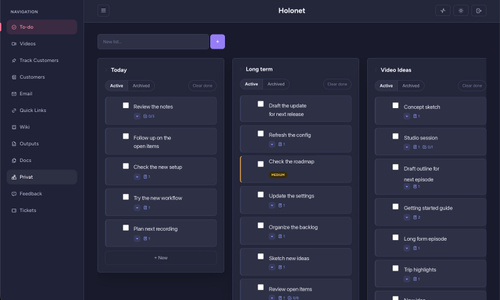
- The core brief This section stands on its own. If you read nothing else in this document, you can still build recognisably the right app from what is here. You are expected to make your own version of it, not a copy. Different wording, layout, colours, copy, field names and small interactions are fine and expected.
What it is Workbase is a single user, password protected work database: one small Node service, one private web page, everything you do for work in one place. It is for one person who wants a private replacement for several separate SaaS tools, and who also runs scripts or AI agents that push rows into it over an HTTP API with an API key. Every tab reads and writes through that same API, so anything you can do by clicking, an automation can do too.
The screens Login page. One password field on a centred card. No accounts, no sign up. The app page. One HTML page, a sidebar of tabs with live count badges, one tab visible at a time. Every tab loads its data the first time you open it. A shared detail editor, opening over the app as a modal, used by any tab whose rows have a body worth writing into. Which tabs to build, and which to skip The original grew to twelve tabs. Almost nobody wants all twelve, and handing an assistant twelve tab specifications at once is the fastest way to get twelve half finished tabs. So decide up front.
Build these three. They are the spine of the app.
To do. Multiple named lists shown as columns, cards you drag within and between lists, priority tinting, due dates with overdue detection, done and archived filters. The rich block editor that opens from a to do card. Text blocks with real HTML, checklist blocks, and table blocks, in any order, autosaving as you type. This is the piece that makes the app worth having rather than another to do list. It is not a tab, it is the thing the tabs open. One tracking surface, whatever you actually track. The original tracks customer accounts: cards in four category zones you drag between, each with health, plan, stage, a follow up date, free form notes, arbitrary custom fields and a dated touchpoint log. If you do not manage accounts, put your own thing here: your GitHub tickets, your job applications, your reading pile. Keep the shape (cards in zones, drag to recategorise, a detail modal with a property rail and a dated log) and change the fields. That is stage 1, and it is a genuinely small build. It is also a complete tool.
Then pick from this menu, only what you will use. Each one is a tab in the same shell, using the same API conventions, and each is independent of the others. Section 7 has the full detail on every one.
Tab What it is Worth it if Wiki A grid of page tiles, each opening the same block editor. Search covers block text, checklist items and table cells You want notes that are not attached to a task. Cheapest addition on the list, it reuses the editor Quick Links Tiles with a name, URL, username and masked password with a reveal and copy You keep a scratch list of internal tools and logins. Read the plain text warning in 7.9 first Email drafts Reusable templates grouped by topic, with copy subject and copy body buttons You send the same five emails over and over Contacts A searchable, sortable table of people with a profile modal and a dated contact history You have more people than you can hold in your head Docs Drop zone for HTML and PDF files, stored in the database, viewable in an iframe Reports and PDFs arrive from elsewhere and you keep losing them Reports A table of HTML documents pushed in by automation, with unread dots and done ticks You have jobs that produce a report per run Inbox A triage list grouped into action needed, for review and info, pushed in by automation Something else already decides what needs your attention Feedback Two tables of synced feedback items, open and resolved, with local acknowledged and skipped flags and a draft email modal You are the person who answers user feedback Tickets A read only table of your own GitHub issues and pull requests, with pin, hide and a private note Your work is spread across many repositories Videos A five column production kanban with a long per video brief and a full screen teleprompter You actually make videos. Otherwise skip it, and skip the teleprompter with it There is also a daily brief API with no UI in the original. Build the endpoints if an agent will file a prioritised list of things to do today, and add a tab only if you want one.
The features that define it One private page behind one password, no user accounts, no sharing. One HTML page with vanilla JavaScript, no build step, no framework. It starts in under a second and switching tabs is instant. Tabs load their own data lazily, the first time you open them, and remember that they loaded. The block editor: text, checklist and table blocks, added in any order, all editable in place. Text blocks take real formatting: typing - or 1. at the start of a line makes a real list, Tab nests it, images can be pasted or dropped straight in. Table blocks are keyboard driven: Tab walks cells and wraps, Enter drops down a row, and the table grows when you walk off the edge. Autosave with a visible status line, not save buttons. Nothing you type needs confirming. Everything editable in place: rename a list by double clicking it, edit a touchpoint inline, change a field in a detail modal without a form submit. Drag and drop wherever it means something, cards within a list, cards between lists, list columns, cards between category zones, with a working touch fallback. A write API with an API key on every route an automation needs, so scripts and agents can push rows in without a browser session. Sync endpoints that are idempotent: running the same sync twice updates rows rather than duplicating them, and never clobbers the flags you set by hand. Job health surfaced honestly: when a sync last ran, whether it failed, and a banner when it has gone quiet. All state in the database, never in the container filesystem, including uploaded images and documents. A restart loses nothing. Drafts only. The app never sends an email, it writes one for you to copy. Dark mode, remembered, defaulting to the system preference. The feel Fast and quiet. It should feel like a local application that happens to be in a browser: no spinners you notice, no page transitions, no toast notifications stacking up in a corner. Density is high but not cramped, closer to a well kept spreadsheet than a dashboard, with soft cards on a near white or near black surface and one purple accent doing most of the work. Nothing animates except a drawer sliding and a wrong password shaking. It is a private workspace, so it can be blunt: real counts, real errors, red banners when a job failed, no encouragement and no celebration.
Everything after section 1 is detail to draw on, not a specification to satisfy line by line.
- Fidelity: what to match, what to get right, what to change Must match, or it is a different app One private page behind one password. A single shared password, no user accounts, and nothing readable without it. Tabs that load lazily inside one page. No full page navigation between sections, and no waiting on data for tabs you have not opened. The block editor is the heart of it. Text, checklist and table blocks in one ordered list, reusable by more than one tab. Everything editable in place. No separate edit screens, no form submit to change a field. Autosave, not save buttons. Debounced writes with a visible status, and a forced save when a modal closes. A write API so automation can push rows in. API key auth, the same endpoints the UI uses, and idempotent sync routes. Nothing lives on disk. Every byte, including uploads, is in the database. Drafts only. No send button anywhere. Must be right, or it breaks These are not taste. Getting one of them wrong gives you a broken or unsafe app rather than a different one.
Sanitize every bit of HTML on its way into and out of a text block. Paste is a real injection vector: people paste from email, from other web apps, from documents. Strip script, style, iframe and object elements and every comment node, strip every on* attribute, strip javascript: from src and href, and drop any <img> whose src does not match /^(/api/uploads/|https?://)/i. That allow list is load bearing: without it a data: or javascript: image src walks straight through. The sandbox CSP on uploaded documents. Same problem with a bigger blast radius, because an uploaded HTML file is a whole document you did not write. Serve /api/docs/:id/file for text/html with Content-Security-Policy: sandbox allow-scripts allow-popups, X-Content-Type-Options: nosniff and Cross-Origin-Resource-Policy: cross-origin. Restrict uploads to text/html and application/pdf; every other type changes the security story. The Cross-Origin-Resource-Policy: cross-origin is not decoration: a sandbox CSP gives the document an opaque origin, which makes the response cross origin to your own page, so the app wide same-origin policy blocks the frame from loading at all. And do not put a sandbox attribute on the viewer iframe as well: two sandboxes stop the frame rendering entirely. Send the sandbox header for text/html only. A sandboxed PDF is a grey box, because the browser's built in PDF viewer refuses to run inside a sandboxed frame, and a PDF cannot reach your DOM anyway. API key auth on every sync route. /api/videos*, /api/inbox*, /api/feedback*, /api/tickets*, POST /api/outputs, POST /api/docs and POST /api/briefs accept a cookie or an X-Api-Key. Everything else is cookie only. Miss the key path and your automation silently cannot write; miss the cookie requirement elsewhere and your data is public. Idempotent upserts, keyed on the upstream id. Feedback keys on the source's own id, tickets on owner/repo#type-number, reports on their runAt, inbox items on their thread id, briefs on their date. Re running a sync must update rows, never duplicate them. Load every existing row once, merge, and write in one bulk request. A fetch then put loop per item loses writes to revision conflicts: the original dropped about a quarter of them that way, 72 created out of 95 sent. Local tracking flags survive a sync that overwrites the synced fields. The merge is { ...existing, ...upstreamFieldsOnly }. acknowledged, skipped, archived, pinned, hidden, note and any override flag are yours and the upstream never touches them. If a sync can clear the flag that says "I already emailed this person", the tab is worse than useless. The contacts view has no deny list. The original tagged every other entity with a type field and left contacts untagged, so its contacts view excluded every known type by name. That is a leak waiting to happen: add a thirteenth entity type, forget to add it to the list, and its rows appear in your contact table. Give contacts their own type tag and select on it. If you inherit untagged data, migrate it at boot rather than maintaining the deny list. The auth gate is registered before the static file middleware, and exempts exactly /login.html, /js/login.js, /api/login and /api/health. Wrong order and every HTML page is readable without logging in. Miss the /js/login.js exemption and the login form silently does nothing, because the script itself gets redirected to the login page. The origin and referer check skips API key callers. They do not send an Origin header, so a blanket "require Origin on writes" rule 403s every scheduled script while the browser keeps working. Apply the check only to requests carrying a session cookie. Cookie flags: HttpOnly; Secure; Path=/; SameSite=Strict. All four. Drop HttpOnly and any injected script can read the session token, drop Secure and it travels in clear text, drop SameSite=Strict and you are relying on the origin check alone for CSRF. The JSON body limit must exceed the document limit by a third, because base64 inflates. 15 MB of document arrives as roughly 20 MB of JSON, which is why the body limit is 30 MB. Change one of those two numbers and you must change the other. Mango _find queries carry no sort. Without a matching index CouchDB rejects the query outright. Sort in JavaScript after the read. Register collection routes such as /api/brief-items/reorder before the /:id routes, or Express matches reorder as an id and you get a confusing 404 on a route you can see in the file. app.set('trust proxy', 1). Behind a platform ingress every request otherwise looks like it came from the proxy address, so the login rate limiter counts all attempts against one IP and locks you out of your own app. Deployment contract. The platform clones the repository and runs npm install, npm run build, npm start from the repository root. A build script must exist and succeed even with nothing to build, so make it a no op. Bind 0.0.0.0 on Number(process.env.PORT), coerced, because the platform injects it as a string. Keep one deployable app per repository: deploying out of a monorepo subdirectory silently loads zero environment variables and the app exits complaining about a variable you know you set. Fail closed at startup. Missing database URL, password, session secret or API key logs which one and exits. Never fall back to an unauthenticated mode: a deploy that silently loses its environment then serves your data to the internet, and the log will not tell you it happened. ALLOWED_ORIGIN points at your real public URL. Left on localhost, browser writes fail with 403 while reads keep working, which is a miserable thing to debug. GitHub's GraphQL search protocol, if you build the ticket sync. type: ISSUE returns issues and pull requests both, so you need inline fragments on Issue and PullRequest, and closedByPullRequestsReferences(first: 10, includeClosedPrs: true) to find the pull request that closed an issue. Treat "built 0 records" as a failure: it almost always means a token scope problem, not an empty account. Yours to change Generously. Everything below is a starting point, not a requirement.
The tab set. Which of the ten optional tabs exist, in what order, under what names. Whether the video kanban and the teleprompter exist at all: they are the most personal thing in the app and the first thing to cut if you do not film. The storage engine. See 4.6. CouchDB was one workable option and its only real advantage is that the server needs no driver, so the whole app is four dependencies and no build step. A relational database is an entirely reasonable choice and arguably the better one. What changes: you gain a schema, real constraints, transactions for the multi row writes (deleting a list and reparenting its children, replacing a day's brief items) and indexed queries instead of full view scans; you take on an ORM or a query builder, a migration tool, and a separate bucket for the image and document bytes because they should not sit in a table. The API contract in section 6 is identical either way, so nothing above the data layer changes. The styling. Palette, fonts, radii, shadows, spacing, icon set, the whole look. The tokens in section 11 are one coherent answer, not the answer. The field set on every entity. Every one of them is somebody else's job described in fields. Health, plan and stage on a tracked account, brand and camera type on a video, industry and LinkedIn on a contact: rename them, drop them, add your own. The custom fields feature exists precisely because the fixed set is never right. Names, branding and copy. The app name, the tab labels, every empty state, every button, every error message. Layout and ordering. Sidebar or top tabs, table or cards, two panes or one, which tab is the default. Every tuning number in this document, except the load bearing ones named above. Section 10 collects them in one table with that caveat repeated. The scripts. Three companion scripts are described in section 9. Build the ones matching the tabs you kept, and none of the others. Build it in stages, and stage 1 is small Do not try to build every tab in one sitting. Twelve tabs held in your head at once is how you get twelve half finished ones.
Stage 1 is the smallest thing that is recognisably the app, deployed at a real URL. That means: the scaffold and a health endpoint, the data layer for your spine entities only, the auth gate and middleware in the exact order above, CRUD for three tabs at most, the one page shell with lazy tabs, the login page, the block editor in full, and then a deploy. Use it for a day before writing another line.
Stage 2 adds the remaining tabs and the automation endpoints, one tab at a time, each deployed before the next. Stage 3 is the polish: touch drag, empty states, responsive breakpoints, accessibility and motion. Section 15 lists all three in order if you have the rest of this document. Nothing in the "must be right" group above is ever a stage 3 item.
- How to use this prompt Paste section 0 on its own first. Build stage 1 from it, get it deployed, and only then paste or point at the rest of this document. That is the practical answer to the length of what follows: the core brief is about a page, the rest is reference material you draw on once something is running.
Then pick one of these three paths.
(a) Liivo MCP connector, no terminal. Go to https://liivo.ai/connect and add a custom MCP connector with the address https://my.liivo.ai/mcp. In Claude that is Settings > Customize > Connectors > Add custom connector. In ChatGPT it is Settings > Plugins > MCPs > Add MCP server. Sign in when prompted, which creates your Liivo account. Then send this as your first message:
Use setup-project for a self hosted work database called Workbase Paste the rest of this prompt as your second message. Let the assistant scaffold and deploy before you ask for any changes, so you have a working URL to compare against.
(b) Any AI in a local folder, then deploy. Create an empty folder, open it in your assistant, paste this prompt, and let it write the files. Run it locally with a local CouchDB (section 12), then connect the Liivo MCP connector and ask the assistant to deploy the folder.
(c) Claude Code or Codex in a terminal. mkdir workbase && cd workbase, start the CLI, paste this prompt. Ask for the data layer first, then the API, then the UI, in the order given in section 15.
- Tech stack These are the versions the original runs, settled on after real use rather than chosen from a list. They are a good starting point, not a target. Newer patch and minor versions are fine, and the two choices actually worth arguing with are the database, discussed in 4.6, and Express 4 over Express 5.
Layer Choice Version Why Runtime Node.js 20 or newer (engines: >=18) Uses the built in global fetch, so no HTTP client dependency HTTP Express 4.22.x (^4.18.2) Small, boring, no router surprises. Do not jump to Express 5 Security headers helmet 8.1.x One line for a sane header baseline, then two deliberate carve outs CORS cors 2.8.x Locked to a single configured origin Rate limit express-rate-limit 8.4.x Login brute force protection only Database Apache CouchDB 3.3 or newer Talked to over plain HTTP with fetch. No driver, no ORM, no build step Frontend Vanilla HTML, CSS, JavaScript none One page, one tab visible at a time, script tags in load order. No bundler, no framework Icons Tabler Icons webfont latest, via CDN <i class="ti ti-xxx"></i> throughout Fonts Inter and Figtree via Google Fonts Inter for body, Figtree available for headings Charts none required Do not add a chart library. There are no charts Total production dependency count: four. Keep it that way. If you are tempted to add a framework, do not; the whole point is that this app has no build step and starts in under a second.
- Data layer 4.1 Shape One CouchDB database holds every entity. Documents are discriminated by a type field, and one design document defines the map views that each list endpoint reads. There are no joins and no schema, so the server is responsible for every invariant.
Database name comes from DB_NAME and defaults to workbase. Create the database at boot if a HEAD on it returns 404.
4.2 Design document Create or update _design/records at boot. Fetch the existing document first, keep its _rev, and only write if any required view is missing, so a restart is not a write. The map functions are stored as strings via Function.prototype.toString().
const REQUIRED_VIEWS = [ 'all_contacts', 'by_email', 'by_account', 'all_drafts', 'all_todos', 'all_todolists', 'all_tracked', 'all_briefs', 'all_brief_items', 'all_videos', 'all_links', 'all_inbox_items', 'inbox_by_thread', 'all_wiki_pages', 'all_feedback', 'feedback_by_source_id', 'all_tickets', 'tickets_by_key' ];
const views = { // Contacts are the only type with no type tag, for historical reasons. // Exclude every tagged type and the singleton documents. // Do not copy this shape. See the note below the block. all_contacts: { map: function (doc) { if (doc._id !== 'metadata' && doc._id !== 'email_topics' && !doc.type) emit(doc._id, doc); }}, by_email: { map: function (doc) { if (doc.email) emit(doc.email, doc); }}, by_account: { map: function (doc) { if (doc.accountName) emit(doc.accountName, doc); }},
all_drafts: { map: function (doc) { if (doc.type === 'email_draft') emit(doc.createdAt, doc); }}, all_todos: { map: function (doc) { if (doc.type === 'todo') emit(doc.sortOrder != null ? doc.sortOrder : doc.createdAt, doc); }}, all_todolists: { map: function (doc) { if (doc.type === 'todo_list') emit(doc.sortOrder != null ? doc.sortOrder : doc.createdAt, doc); }}, all_tracked: { map: function (doc) { if (doc.type === 'tracked_account') emit(doc.addedAt, doc); }}, all_briefs: { map: function (doc) { if (doc.type === 'daily_brief') emit(doc.date, doc); }}, all_brief_items: { map: function (doc) { if (doc.type === 'brief_item') emit([doc.briefId, doc.sortOrder != null ? doc.sortOrder : 9999], doc); }}, all_videos: { map: function (doc) { if (doc.type === 'video') emit(doc.createdAt, doc); }}, all_links: { map: function (doc) { if (doc.type === 'link') emit(doc.sortOrder != null ? doc.sortOrder : doc.createdAt, doc); }}, all_wiki_pages: { map: function (doc) { if (doc.type === 'wiki_page') emit(doc.sortOrder != null ? doc.sortOrder : doc.createdAt, doc); }},
all_inbox_items: { map: function (doc) { if (doc.type === 'inbox_item') emit(doc.receivedAt || doc.createdAt, doc); }}, inbox_by_thread: { map: function (doc) { if (doc.type === 'inbox_item' && doc.threadId) emit(doc.threadId, doc); }},
all_feedback: { map: function (doc) { if (doc.type === 'feedback_item') emit(doc.sourceUpdatedAt || doc.sourceSubmittedAt || doc.createdAt, doc); }}, feedback_by_source_id: { map: function (doc) { if (doc.type === 'feedback_item' && doc.sourceId) emit(doc.sourceId, doc); }},
all_tickets: { map: function (doc) { if (doc.type === 'ticket_item') emit(doc.ghUpdatedAt || doc.ghCreatedAt || doc.createdAt, doc); }}, tickets_by_key: { map: function (doc) { if (doc.type === 'ticket_item' && doc.key) emit(doc.key, doc); }} }; Fix all_contacts rather than copying it. The original left contacts untagged and its view therefore selects on the absence of a type field, excluding the two singletons by id. That is a deny list, and it leaks: add a thirteenth entity type, forget it, and its rows show up in your contact table. Give contacts type: "contact" like everything else and select on it:
all_contacts: { map: function (doc) { if (doc.type === 'contact') emit(doc._id, doc); }}, Section 1 lists this among the things that must be right. If you are importing existing untagged rows, tag them in a boot migration alongside the three in 4.5.
4.3 Documents Every timestamp is a full ISO 8601 string unless the field name says date, in which case it is YYYY-MM-DD. Every list endpoint strips _id, _rev and type and returns the document with id set from _id.
// _id: "metadata" (singleton, no type field) { "_id": "metadata", "lastFeedbackSyncAt": "2026-08-19T06:00:00.000Z", "lastFeedbackJobAt": "2026-08-19T06:00:00.000Z", "lastFeedbackJobStatus": "ok", // "ok" | "failed" "lastFeedbackJobError": null, "feedbackTotalSynced": 95, "lastTicketSyncAt": "2026-08-19T06:05:00.000Z", "lastTicketJobAt": "2026-08-19T06:05:00.000Z", "lastTicketJobStatus": "ok", "lastTicketJobError": null, "ticketTotalSynced": 370, "lastInboxCheckAt": "2026-08-19T05:30:00.000Z", "lastJobStatus": "ok", // inbox job "lastJobError": null, "lastJobAt": "2026-08-19T05:30:00.000Z" }
// _id: "email_topics" (singleton, no type field) { "_id": "email_topics", "topics": ["Onboarding", "Re-engagement", "Feature Announcement", "Follow-up", "General"] }
// contact (id "contact-<ms>" for manual, or the source's own id for synced). // The original had no type field here; add "type": "contact" as 4.2 explains. { "_id": "contact-1770000000000", "type": "contact", "name": "string", "email": "string", "accountName": "string", // the org or workspace slug this person belongs to "company": "string", "role": "string", "industry": "string", "linkedIn": "string", // full URL "tags": ["string"], "priority": "focus | high | medium | low | null", "status": null, // null (active) | "contacted" | "later" | "skip" "contactedAt": "iso | null", "activitySummary": "string", "notes": "string", "firstSeen": "YYYY-MM-DD", "source": "string", // where the row came from, free text "contactHistory": [ { "id": "history-<ms>", "date": "YYYY-MM-DD", "method": "email|call|meeting|slack|other", "summary": "string", "source": "manual | <automation name>", "createdAt": "iso" } ], "sortOrder": null, "createdAt": "iso", "updatedAt": "iso", "syncedAt": "iso" }
// type: "todo_list" _id: "todolist-<ms>", plus the fixed "todolist-default" { "_id": "todolist-default", "type": "todo_list", "name": "Default", "sortOrder": 0, "createdAt": "iso", "updatedAt": "iso" }
// type: "todo" _id: "todo-<ms>" { "_id": "todo-1770000000000", "type": "todo", "text": "string", // the card title "done": false, "doneAt": null, "priority": null, // null | "high" | "medium" | "low" "dueDate": null, // "YYYY-MM-DD" | null "listId": "todolist-default", "sortOrder": null, // number | null "content": [], // rich blocks, see 4.4 "createdAt": "iso", "updatedAt": "iso" }
// type: "wiki_page" _id: "wiki-<ms>" { "_id": "wiki-1770000000000", "type": "wiki_page", "title": "Untitled", "content": [], "sortOrder": null, "createdAt": "iso", "updatedAt": "iso" }
// type: "email_draft" _id: "draft-<ms>" { "_id": "draft-1770000000000", "type": "email_draft", "subject": "string", "body": "string", "topic": "General", "sortOrder": null, "createdAt": "iso", "updatedAt": "iso" }
// type: "link" _id: "link-<ms>-<rand6>" { "_id": "link-1770000000000-a1b2c3", "type": "link", "name": "string", "url": "string", "username": "string", "password": "string", "sortOrder": null, "createdAt": "iso", "updatedAt": "iso" }
// type: "tracked_account" _id: "tracked-<ms>" { "_id": "tracked-1770000000000", "type": "tracked_account", "contactId": null, // optional link to a contact document "accountName": "string", // REQUIRED, the primary label on the card "name": null, // person name, shown as secondary line "organization": null, "email": null, "health": "unknown", // "good" | "needs-attention" | "at-risk" | "unknown" "stage": "Onboarding", // free text "plan": null, // "" | "Free" | "Creator" | "Developer" | "Enterprise" | "Custom" "signedUpAt": null, // "YYYY-MM-DD" "notes": "", "nextFollowUp": null, // "YYYY-MM-DD" "category": null, // null | "focus" | "paying" | "trial" "cardOrder": null, // number, order inside its category zone "customFields": [ { "id": "cf-<ms>", "label": "string", "value": "string" } ], "todos": [ { "id": "todo-<ms>", "text": "string", "done": false, "dueDate": null, "globalTodoId": "todo-<ms> | null" } ], "touchpoints": [ { "id": "tp-<ms>", "date": "YYYY-MM-DD", "type": "email|call|slack|meeting|other", "note": "string", "description": "string | null" } ], "addedAt": "iso", "updatedAt": "iso" }
// type: "video" _id: "video-<ms>" { "_id": "video-1770000000000", "type": "video", "title": "string", "description": "", "notes": "", "week": "", // free text, e.g. "2026-W14" "brand": "", // one of BRANDS (config constant), or "" "platforms": [], // subset of ["youtube","instagram","tiktok","facebook"] "status": "idea", // idea|scripted|filmed|edited|posted|archived "postedOn": [], // subset of the platform list "hook": "", "duration": "", "cameraType": "", "context": "", "directorNotes": "", "manuscript": "", "recordingInstructions": "", "codexPrompts": [ { "label": "string", "prompt": "string" } ], "editingTimeline": [ { "time": "0:03", "action": "string", "overlay": "string" } ], "editingNotes": "", "captions": { "tiktok": "", "instagram": "", "youtube": "", "facebook": "" }, "postingNotes": { "tiktok": "", "instagram": "", "youtube": "", "facebook": "" }, "createdAt": "iso", "updatedAt": "iso" }
// type: "output" _id: "output-<runAt with : and . replaced by ->" { "_id": "output-2026-08-19T06-00-00-000Z", "type": "output", "title": "string", "runAt": "iso", "content": "<full HTML document>", "agentTask": "string", // job name, drives the filter pills "actionItems": 0, // integer badge "read": false, "done": false, "createdAt": "iso", "updatedAt": "iso" }
// type: "document" _id: "document-<uuid>" bytes live in attachment "file" { "_id": "document-3f2b...", "type": "document", "title": "string", // max 200 chars "filename": "string", // max 120 chars, basename only "contentType": "text/html | application/pdf", "size": 12345, // bytes "note": "string", // max 2000 chars "source": "upload | agent", "createdAt": "iso", "updatedAt": "iso" }
// _id: "workbase:uploads" single document that holds every inline image as an attachment { "_id": "workbase:uploads", "type": "uploads_index" }
// type: "inbox_item" _id: "inbox-<threadId>" when a threadId is given, else "inbox-<ms>" { "_id": "inbox-abc123", "type": "inbox_item", "threadId": "abc123 | null", // external id, makes the write idempotent "sender": "", "senderName": "", "subject": "", "snippet": "", "receivedAt": "iso", "priority": "review", // "action_needed" | "review" | "info" "tags": [], "resolved": false, "resolvedAt": null, "createdAt": "iso", "updatedAt": "iso" }
// type: "feedback_item" _id: "feedback-<sourceId>" { "_id": "feedback-9f1", "type": "feedback_item", "sourceId": "9f1", // id in the upstream system, the idempotency key "userId": "", "account": "", "status": "submitted", // submitted|under_review|planned|in_progress|completed|declined "category": "other", // free text from upstream, styled per value "rating": null, // 1..5 or null "feedback": "", // the text "linkedIssue": null, // URL or null "sourceSubmittedAt": "iso", "sourceUpdatedAt": "iso", // local tracking, never overwritten by a sync "internal": false, // computed from INTERNAL_ACCOUNTS unless overridden "internalOverride": null, // boolean once set by hand, then it sticks "acknowledged": false, "acknowledgedAt": null, "completedNotified": false, "completedNotifiedAt": null, "skipped": false, "skippedAt": null, "archived": false, "archivedAt": null, "createdAt": "iso", "updatedAt": "iso", "lastSyncedAt": "iso" }
// type: "ticket_item" _id: "ticket-" + key with every non alphanumeric run replaced by "-" { "_id": "ticket-owner-repo-issue-4525", "type": "ticket_item", "key": "owner/repo#issue-4525", // the idempotency key "ghType": "issue", // "issue" | "pr" "repo": "owner/repo", "number": 4525, "title": "", "url": "", "state": "open", // "open" | "closed" | "merged" "linkedPRs": [ { "number": 4530, "url": "", "state": "merged", "title": "" } ], "ghCreatedAt": "iso", "ghUpdatedAt": "iso", "ghClosedAt": null, // local tracking, never overwritten by a sync "pinned": false, "pinnedAt": null, "hidden": false, "hiddenAt": null, "note": "", // max 2000 chars "createdAt": "iso", "updatedAt": "iso", "lastSyncedAt": "iso" }
// type: "daily_brief" _id: "brief-YYYY-MM-DD" { "_id": "brief-2026-08-19", "type": "daily_brief", "date": "2026-08-19", "generatedAt": "iso", "metricsSnapshot": null, "archived": false, "createdAt": "iso", "updatedAt": "iso" }
// type: "brief_item" _id: "brief-item-<ms>[-<index>]" { "_id": "brief-item-1770000000000-0", "type": "brief_item", "briefId": "brief-2026-08-19", "priority": "MEDIUM", // "URGENT" | "HIGH" | "MEDIUM" | "LOW" "title": "string", "description": "", "source": "", "completed": false, "completedAt": null, "archived": false, "sortOrder": 0, // assigned as index * 10 on bulk create "createdAt": "iso", "updatedAt": "iso" } 4.4 The rich content block format todo.content and wiki_page.content share one format: an ordered array of blocks. This is the heart of the app, so get it exactly right.
[ { "type": "text", "id": "block-<ms>", "value": "<sanitized HTML string>" }, { "type": "checklist", "id": "block-<ms>", "items": [ { "id": "item-<ms>", "text": "string", "done": false } ] }, { "type": "table", "id": "block-<ms>", "rows": [ ["Header A","Header B"], ["a1","b1"] ] } ] Rules:
A text block stores sanitized HTML, not markdown. Legacy values may be plain text or contain markdown image syntax !alt; convert those to <img> on load so old rows keep working. A table's first row is the header row. Cells are plain strings. Normalise defensively on render: if rows is missing or empty use [["",""]], compute the column count as the maximum row length, and pad every short row so the grid is always rectangular. A new text block starts empty, a new checklist starts with one empty item, and a new table starts as 2 columns by 3 rows (one header row plus two body rows). 4.5 Migrations at boot Run these after creating the design document, each guarded so it is a no op on a normal restart:
Any todo with listId === undefined gets listId: "todolist-default". Collect them from the view, then write them in one _bulk_docs. Ensure todolist-default exists with name: "Default", sortOrder: 0. Any tracked_account with category === undefined gets category: inFocus === true ? "focus" : null, and the old inFocus field is deleted. One _bulk_docs again. If CouchDB is unreachable at boot, log the error and process.exit(1). The app is useless without it and a half working process is worse than a restart loop.
4.6 The storage engine is yours to change A document database was one workable option, not the right answer. If you would rather use a relational database, do. It is arguably the better choice for this app, and the API contract in section 6 is identical either way, so nothing above the data layer changes.
What changes if you go relational: you gain a schema, real foreign keys, and transactions for the multi row writes that can currently half fail, which are deleting a to do list and reparenting its children, and replacing a day's brief items. Queries become indexed instead of full view scans, so the report and document list caps stop being load bearing. You take on an ORM or a query builder, a real migration tool instead of ad hoc boot functions, and a separate object store for the image and document bytes, because those should not sit in a table. Your dependency count roughly triples and you get a build or generate step back. Concretely: one table per entity type, jsonb for content, customFields, todos, touchpoints, linkedPRs, tags, platforms, captions, postingNotes, codexPrompts and editingTimeline, the two singleton documents as one row tables, and the object key stored on the row.
The honest accounting for the document database, so you can make the call:
CouchDB here buys one real thing: the server has no database driver and no ORM, so the app is four dependencies and starts instantly. The costs are real too, and you should know them before you copy it:
Every list endpoint reads an entire view and then filters and sorts in Node. That is fine at a few thousand documents per type and it is not fine at a million. There is no schema, no foreign key and no transaction. Deleting a to do list has to rewrite its child to dos by hand, and creating a brief plus its items can half fail. _find (Mango) queries with no matching index do a full scan. The report and document lists do exactly that, capped at 100 and 500 documents. Every write needs the current _rev, so conflicts have to be retried by hand. Attachments live inside the database, so uploads inflate it and it needs compaction. Migrations are ad hoc functions that run at boot, with no history and no way to roll back. If you would rather have SQL, the whole model maps cleanly onto PostgreSQL: one table per type, content and the array fields as jsonb, the two singleton documents as one row tables, and attachments as objects in a storage bucket with the key stored in the row. Section 13 tells you how to get either one on the platform. Everything else in this prompt is unchanged either way, because the API contract is the same.
- Auth model One shared password, no user accounts. This is a single user tool.
POST /api/login with { password }. On match, set a cookie: auth_token=<token>; HttpOnly; Secure; Path=/; SameSite=Strict; Max-Age=2592000 (30 days). On mismatch return 401 { error: "Wrong password" }. The token is HMAC_SHA256(SESSION_SECRET, LOGIN_PASSWORD) hex. Session check is a constant comparison against that value. GET /api/logout clears the cookie and redirects to /login.html. Rate limit POST /api/login to 5 attempts per 15 minutes per IP, with standardHeaders: true, and the message { error: "Too many login attempts. Please try again in 15 minutes." }. Set app.set('trust proxy', 1) so the limiter sees the real client IP behind the platform ingress. Automation auth is a static API key, accepted as either the X-Api-Key header or an apiKey query parameter. Fail closed at startup: if COUCHDB_URL, API_KEY, LOGIN_PASSWORD or SESSION_SECRET is missing, log which one and process.exit(1). Never fall back to an unauthenticated mode. Honest limitation: because the token is a pure function of the password, it is the same on every device and it can only be invalidated by changing the password. That is an acceptable trade for a one person tool and it is not acceptable for a shared one. If you want per session tokens, store a random token list in the database instead. Say so in your README rather than pretending it is a full auth system.
Middleware order Order matters more than anything else in this file. Get it wrong and either the login page is unreachable or the whole app is public.
helmet with the CSP described in section 11, applied per request so that two routes can opt out (/api/outputs/:id/content and /api/docs/:id/file). cors({ origin: ALLOWED_ORIGIN, credentials: true }). express.json({ limit: '30mb' }). It has to be 30 MB because a 15 MB document arrives base64 encoded, which inflates it by a third. Origin and Referer check on every POST, PATCH, PUT and DELETE: skip it when a valid API key is present, skip it when the request carries no auth_token cookie, otherwise require an Origin or Referer whose host equals the request Host. Reject with 403 and one of Missing Origin/Referer, Invalid Origin/Referer, Cross-origin request blocked. This is the CSRF defence and it must not apply to API key callers, which do not send an Origin. The auth gate, before express.static. Otherwise every HTML page is readable without logging in. Exempt exactly these paths: /login.html, /js/login.js, /api/login, /api/health. Also skip the gate for the route families that do their own dual auth: /api/videos*, /api/inbox*, /api/feedback*, /api/tickets*, POST /api/outputs, POST /api/docs, POST /api/briefs. Anything else: valid cookie, or 401 JSON for /api/* paths and a redirect to /login.html for everything else. express.static('public'). The /js/login.js exemption is not optional. Without it the gate redirects the login script itself to the login page, the submit handler never attaches, and the form silently does nothing.
- API contract Common conventions: JSON in, JSON out. Every list route returns { <plural>: [...] }. Every mutation returns { success: true } plus the affected object where useful. Errors are { error: "message" } with status 400 for validation, 401 unauthorised, 404 not found, 409 conflict, 413 too large, 500 for anything else. Auth column: C cookie only, C+K cookie or API key.
Health and session
Method Path Auth Body Response
GET /api/health none `{ status:"ok", database:"connected"
POST /api/login none { password } { success:true } and Set-Cookie, or 401
GET /api/logout none 302 to /login.html, cookie cleared
Contacts
Method Path Auth Notes
GET /api/contacts C { metadata:{ totalContacts, pendingOutreach, focus, contacted, later, skip, lastCheckDate }, contacts:[...] }. Sort by sortOrder when set, else firstSeen descending
POST /api/contacts C { name, email?, accountName?, priority?, activitySummary? }, name required. Creates contact-<ms> with status:null, firstSeen today
PATCH /api/contacts/:id C Any of name, email, accountName, company, role, industry, linkedIn, tags, status, priority, activitySummary, notes. Setting status to "contacted" stamps contactedAt
DELETE /api/contacts/:id C
POST /api/contacts/:id/history C { date?, method?, summary, source? }, summary required. Appends to contactHistory, returns the whole updated contact
DELETE /api/contacts/:id/history/:historyId C Returns the whole updated contact
POST /api/contacts/sync C+K { metadata?, contacts:[...] }. Bulk upsert by id. Preserves notes, status, contactedAt, company, role, industry, linkedIn, tags, contactHistory, source on existing rows. An incoming reactivate: true clears a contacted or later status back to null but never clears skip. Stamps syncedAt. Returns { success:true, contactsCount, timestamp }
POST /api/contacts/bulk-status C { ids:[...], status }
POST /api/contacts/reorder C { order:[{ id, sortOrder }] }
To dos and lists
Method Path Auth Notes
GET /api/todos C Sorted by sortOrder then createdAt ascending
POST /api/todos C { text, priority?, dueDate?, listId? }, text required, trimmed. Defaults listId to todolist-default
PATCH /api/todos/:id C Any of text, done, priority, dueDate, listId, sortOrder, content. done:true stamps doneAt only if unset; done:false clears it
DELETE /api/todos/:id C
POST /api/todos/reorder C { order:[{ id, sortOrder }] }
GET /api/todolists C Sorted by sortOrder then createdAt
POST /api/todolists C { name } required
PATCH /api/todolists/:id C { name?, sortOrder? }
DELETE /api/todolists/:id C 400 for todolist-default. Moves every child to do to todolist-default in one _bulk_docs first, then deletes the list
POST /api/todolists/reorder C { order:[{ id, sortOrder }] }
Wiki
GET /api/wiki, POST /api/wiki ({ title? }, default Untitled), PATCH /api/wiki/:id ({ title?, content?, sortOrder? }, empty title falls back to Untitled), DELETE /api/wiki/:id, POST /api/wiki/reorder. All cookie auth.
Email drafts and topics GET /api/drafts, POST /api/drafts ({ subject, body?, topic? }, subject required, topic defaults to General), PATCH /api/drafts/:id, DELETE /api/drafts/:id, POST /api/drafts/reorder. GET /api/topics returns { topics } and falls back to the five defaults when the singleton document is absent. POST /api/topics with { topic } appends, case insensitively deduplicated, and returns the full list. DELETE /api/topics/:topic (URL encoded, case insensitive) removes it and returns the list; 404 if it was not there. Deleting a topic never touches drafts.
Tracked accounts Method Path Auth Notes GET /api/tracked C Sorted by category rank (focus 0, paying 1, trial 2, unassigned 3) then cardOrder then addedAt POST /api/tracked C accountName required. Everything else optional, defaults per section 4.3 PATCH /api/tracked/:id C name, organization, accountName, email, health, stage, plan, signedUpAt, notes, nextFollowUp, customFields, todos PATCH /api/tracked/:id/category C { category } must be focus, paying, trial or null, else 400 POST /api/tracked/reorder C { order:[{ id, cardOrder }] } DELETE /api/tracked/:id C POST /api/tracked/:id/touchpoints C { date?, type?, note, description? }, note required. Prepends (newest first), id tp-<ms>, date defaults to today, type defaults to other PATCH /api/tracked/:id/touchpoints/:tpId C Partial update, returns { touchpoint } DELETE /api/tracked/:id/touchpoints/:tpId C 404 when the touchpoint id is unknown Videos GET /api/videos supports ?week=, ?brand=, ?status= filters and sorts by status order then createdAt. GET /api/videos/:id returns one video, 404 when the document is not type: "video". POST /api/videos needs title. PATCH /api/videos/:id accepts exactly this allow list and ignores anything else: title, description, notes, week, brand, platforms, status, postedOn, hook, duration, cameraType, context, directorNotes, manuscript, recordingInstructions, codexPrompts, editingTimeline, captions, postingNotes. DELETE /api/videos/:id. All five are C+K, because the point of this tab is that a script can file a fully written production brief into it.
Reports (the Outputs tab) Method Path Auth Notes GET /api/outputs C Mango _find on { type: "output" }, limit: 100, sorted by runAt descending in JavaScript. Do not put a sort in the Mango query; without a matching index CouchDB rejects it POST /api/outputs C+K { title, content, runAt?, agentTask?, actionItems? }, title and content required. Id derives from runAt so re running a job overwrites its own row: fetch the existing _rev and include it GET /api/outputs/:id/content C Sends the stored HTML with Content-Type: text/html and no CSP, because the report is a whole document with its own inline styles PATCH /api/outputs/:id C Allow list only: done, read, title, agentTask, actionItems DELETE /api/outputs/:id C Documents (the Docs tab) Method Path Auth Notes GET /api/docs C Metadata only, _find on { type: "document" } limit 500, newest first POST /api/docs C+K { filename, contentType, data, title?, note?, source? }. data is base64 with no data: prefix. contentType must be text/html or application/pdf, else 400. Max 15 MB decoded, else 413. Writes the metadata document, then PUTs the bytes as attachment file using the returned rev; if the attachment write fails, delete the metadata document so no empty row is left behind. source is agent when the caller used an API key and did not have a cookie GET /api/docs/:id/file C Id must match /^document-[a-zA-Z0-9-]+$/. Streams the attachment. ?download=1 switches Content-Disposition from inline to attachment. Always X-Content-Type-Options: nosniff and Cache-Control: private, max-age=300. For text/html also send Content-Security-Policy: sandbox allow-scripts allow-popups and Cross-Origin-Resource-Policy: cross-origin PATCH /api/docs/:id C { title?, note? }, truncated to 200 and 2000 characters DELETE /api/docs/:id C Deleting the document removes its attachment with it Inline image uploads Method Path Auth Notes POST /api/uploads C { filename, contentType, data } base64. Allowed types: image/png, image/jpeg, image/gif, image/webp, image/svg+xml. Max 8 MB, else 413. Stored name is <slug of filename, max 40 chars>-<uuid>.<ext>. Attach to the single workbase:uploads document, retrying up to 3 times on a 409 by refetching the _rev. Returns { url, filename, markdown } where url is /api/uploads/<name> and markdown is !alt GET /api/uploads/:filename C Rejects any name containing / or .. with 400. Proxies the attachment with its stored content type and Cache-Control: private, max-age=3600 Inbox GET /api/inbox returns { items, lastInboxCheckAt, lastJobStatus, lastJobError, lastJobAt }, newest receivedAt first. POST /api/inbox is idempotent on threadId: if a document with that thread already exists and is resolved, return { success:true, id, skipped:"already_resolved" } without touching it; if it exists and is unresolved, update the given fields and return updated: true; otherwise create inbox-<threadId>. Requires subject or threadId. PATCH /api/inbox/:id patches sender, senderName, subject, snippet, priority, tags, receivedAt and handles resolved with a resolvedAt stamp on the transition. DELETE /api/inbox/:id. GET and PATCH /api/inbox-metadata read and write lastInboxCheckAt, lastJobStatus, lastJobError, lastJobAt on the metadata document. All C+K.
Feedback Method Path Auth Notes GET /api/feedback C+K { items, lastSyncAt, lastJobStatus, lastJobError, lastJobAt }, newest sourceUpdatedAt first POST /api/feedback/sync C+K { items:[...], jobStatus?, jobError? }. See the algorithm below PATCH /api/feedback/:id C+K { acknowledged?, completedNotified?, skipped?, archived?, internal? }. Each boolean stamps its *At field on the false to true transition and clears it on the way back. Setting internal also sets internalOverride, which makes the choice survive future syncs. 404 unless the document is type: "feedback_item" Sync algorithm, and it matters:
Load every existing feedback document once through the all_feedback view and index it by sourceId. One request, not one per item. For each incoming item, take sourceId from item.sourceId or item.id; count it as skipped and move on if there is neither. Build the upstream field set: sourceId, userId, account, status, category, rating, feedback, linkedIssue, sourceSubmittedAt, sourceUpdatedAt, each falling back to the existing value and then to a default. Existing row: merge { ...existing, ...upstream, lastSyncedAt: now }, which keeps _id and _rev so CouchDB treats it as an update, and keeps every local tracking flag. Recompute internal from INTERNAL_ACCOUNTS only when internalOverride is null. New row: create feedback-<sourceId> with all tracking flags false. Write everything in one _bulk_docs request. Count per document errors from the response array and report { success:true, created, updated, failed, skipped, total }. Record lastFeedbackSyncAt, lastFeedbackJobAt, lastFeedbackJobStatus (jobStatus or ok), lastFeedbackJobError and feedbackTotalSynced on the metadata document. Do not implement this as a per item fetch then put loop. The original did, and under load it silently dropped about a quarter of the writes (72 created out of 95 sent) because of _rev conflicts on sequential calls.
Tickets GET /api/tickets returns { items, lastSyncAt, lastJobStatus, lastJobError, lastJobAt } newest ghUpdatedAt first. POST /api/tickets/sync takes { items:[...], jobStatus?, jobError? } and follows exactly the same preload, merge, single _bulk_docs algorithm as feedback, keyed on key, preserving pinned, hidden and note. PATCH /api/tickets/:id accepts { pinned?, hidden?, note? } with the same timestamp stamping, note truncated to 2000 characters, 404 unless the document is type: "ticket_item". All C+K.
Daily brief (API only) These endpoints exist so an external agent can file a prioritised list of things to do today. The original has no UI for them, so treat the tab as optional: build the API, and only build a Briefs tab if you want one.
Method Path Auth Notes GET /api/briefs C Each brief plus totalItems and completedItems, computed from one all_brief_items view read grouped by row.key[0]. Newest date first POST /api/briefs C+K { date, generatedAt?, metricsSnapshot?, items:[{ priority, title, description, source }] }. date required. Upserts brief-<date>, deletes every existing item for that brief first, then creates the new items in one _bulk_docs with sortOrder: index * 10. Returns { success:true, briefId, itemCount } PATCH /api/briefs/:id C { archived } DELETE /api/briefs/:id C Deletes the brief and every item under it GET /api/brief-items?briefId= C 400 without briefId. Range query with startkey=[briefId] and endkey=[briefId,{}], sorted by sortOrder POST /api/brief-items C { briefId, title, priority?, description?, source? }. Auto creates the parent brief when briefId does not exist yet, taking the date from the id suffix PATCH /api/brief-items/:id C completed, title, description, source, priority, archived, sortOrder. completed stamps completedAt DELETE /api/brief-items/:id C POST /api/brief-items/reorder C Must be registered before the /:id routes or Express will match reorder as an id Shared server helpers // Bulk write a new order onto many documents. Fetch each _rev, set the field, // write once. orderField is 'sortOrder' everywhere except tracked accounts, // which use 'cardOrder'. async function bulkReorderDocs(order, orderField = 'sortOrder')
// Bulk delete by id, fetching each _rev and posting {_deleted:true} documents. async function bulkDeleteDocs(ids) 7. Page and screen inventory Two HTML pages only: /login.html and /index.html. The root route sends index.html. Everything else is a tab inside that one page.
What follows describes all twelve tabs the original ended up with. Read only the ones you chose in section 0 and ignore the rest; nothing here is a checklist. The numbers, labels, empty state wording and layout choices in these subsections are what the original settled on after using it, so treat them as a sensible default you are free to overrule.
7.1 /login.html Centred card on the page background. Title, the subtitle Enter your password to continue, one password field with autocomplete="current-password" and autofocus, an eye icon button inside the field that toggles the input between password and text and swaps between an eye and a struck through eye icon (aria-pressed and aria-label update with it), an error line, and a full width Sign in button.
States: idle; submitting (button disabled, label Signing in...); wrong password (the field gets a red shake for 600 ms, is cleared and refocused, error reads Wrong password. Try again.); network failure (error reads Connection error. Please try again.). Success navigates to /. The script lives at /js/login.js, never inline, and that path is exempt from the auth gate.
7.2 /index.html shell Header: a hamburger button, the app name centred, and on the right a dark mode toggle (moon or sun icon) and a sign out link to /api/logout. Sidebar: a titled Navigation panel with one button per tab, each with a Tabler icon, a label, and for most of them a live count badge. Order: To do, Videos, Tracking, Contacts, Email, Quick Links, Wiki, Reports, Docs, Inbox, Feedback, Tickets. The active button is highlighted. Main content: one div per tab, only the active one visible. Below 900 px wide the sidebar becomes an overlay drawer with a backdrop, closes on selection, on backdrop click and on Escape. Above 900 px the hamburger collapses and expands it in place. The active tab persists two ways: location.hash (#todos, #videos, ...) wins, then localStorage, then the default todos. Restore it synchronously on DOMContentLoaded, before any data loads, so you never see the wrong tab flash. Dark mode: data-theme on <html>, remembered in localStorage, defaulting to prefers-color-scheme. On first paint, fire one parallel preload of /api/drafts, /api/todos, /api/tracked, /api/feedback and /api/tickets purely to fill the sidebar badges. Swallow every error: badges fill in when the tab is visited. Each tab loads its own data the first time it is shown and keeps a <tab>Loaded flag so switching back is instant. 7.3 To do tab (default) Layout: a slim bar at the top with a New list... text input and a + button, then a responsive grid of list columns (two per row on desktop, one on mobile).
Each column has: a header with a drag handle, the list name (double click to rename inline, Enter commits, Escape cancels), and an x delete button that is absent on the default list. Below the header, three controls: Active, Archived and Clear done (disabled when nothing is done). Then the items. Then a + New button at the bottom.
Each item row: a drag handle, a checkbox, the title, a meta line, and a delete button. The meta line shows a priority pill (high, medium or low, tinting the whole card), a due date chip formatted as Aug 19 with a calendar glyph that reads overdue and turns red when the date is in the past and the item is not done, and content indicators. Indicators are a note count, a checklist progress count like 3/7 that turns green at full, and a table shape like 4x3 for one table or a plain count for several. A caret next to the indicators expands an inline preview of up to 4 lines drawn from the content blocks, each truncated at 90 characters.
Empty states, per filter: Active shows All done! with No active tasks.; Archived shows Nothing completed yet with Finish a task and it will show up here.
Actions: + New creates a to do titled Untitled, marks it a draft in memory, opens the detail modal and selects the title so you can type straight over it. Checkbox toggles done. Delete asks for confirmation. Clear done deletes every done item in the list after confirming. Drag an item within a list to reorder it, or onto another list to move it: dropping on empty space appends, dropping on an item inserts before it, and listId plus sortOrder persist. Drag a column header to reorder the lists. Touch devices get the same behaviour through a pointer based fallback with a 7 px movement threshold and a floating ghost.
7.4 The rich detail modal (shared by To do and Wiki) One modal, two modes, switched by an editorMode variable. The to do version adds a priority select and a due date field under the title; the wiki version has title and content only.
Auto growing title textarea at the top, then the property row, then a save status label that reads Unsaved changes, then Saved, then Save failed. Body: the content blocks. Empty state reads Click a button below to add content. Footer: Text, Checklist and Table buttons that append a block and focus it. Autosave: every edit debounces 800 ms, then writes the whole content array plus the title. Closing the modal cancels the timer and forces one final save. Closing a to do that was created by + New and left completely empty (no custom title, no priority, no due date, no meaningful content) deletes it again, so an accidental click never leaves litter. Text block: a contenteditable div with a placeholder, an attach image button in its header, and a delete button.
Typing - , * , + or 1. at the start of a line converts it into a real <ul> or <ol> list item, Word style. The trigger is /(^|\n)([-+]|\d+[.)])[ ]$/. Tab and Shift+Tab nest and un nest the list item under the caret, Apple Notes style. Tab is swallowed either way so focus never escapes the editor. Enter on an empty list item exits the list. Images: paste, drop, or pick a file. Upload through POST /api/uploads with a placeholder shown at the caret while it flies, then insert an <img> wrapped in a non editable span carrying a delete control. Click an image for a full screen lightbox. Backspace or Delete next to an image removes the whole image, not a stray character. Sanitize on the way in and on the way out. Remove script, style, iframe and object elements and every comment node, strip every on attribute, strip javascript: from src and href, and drop any <img> whose src does not match /^(/api/uploads/|https?://)/i. Checklist block: rows of checkbox plus text input plus remove button, and an + Add item button. Enter adds the next item, Backspace on an empty item deletes it.
Table block: a scrollable grid of contenteditable cells. Header row is th, body rows td. A control row above deletes columns, a control column to the right deletes rows, and + Row and + Column buttons sit under the table with the hint Tab moves on, Enter drops down. Tab and Shift+Tab walk cells and wrap across rows; tabbing off the last cell appends a row. Enter moves down a row and appends one at the bottom. Arrow Up and Down move between rows. Paste is forced to single line plain text.
7.5 Videos tab Header Content Planner with an + Add Video button. A sub navigation of Kanban (with a count) and Archive (with a parenthesised count).
Kanban: five fixed columns, Idea, Scripted, Filmed, Edited, Posted, each with a coloured dot, a title and a count. Cards show a drag handle, the title, and a meta row with a brand badge and a week badge. A card whose notes start with Campaign: gets a distinct border. Empty column reads Drop here. Drag a card to another column to change its status, with mouse drag and a pointer based touch fallback.
Archive view: a grid of the same cards for videos with status: "archived", or No archived videos.
The video modal is a long form that opens read only with an Edit toggle. Fields in order: title; description shown on the card; a four field row of week, brand select, duration and camera type; target platform checkboxes (YouTube, Instagram, TikTok, Facebook); a status select; a Posted On checkbox group that only appears when the status is posted. Then six collapsible sections, each showing a hint of its contents when collapsed:
Section Hint when collapsed Contents Hook first 40 characters Opening hook line Context has content What the video teaches, and director notes on pacing and delivery Manuscript line count The script, plus a Teleprompter button Recording N prompt(s) Recording instructions, and a repeatable list of labelled prompts each with a copy button Editing N row(s) An editable timeline table of time, action, overlay, plus editing notes Captions N platform(s) Per platform caption and posting note pairs All sections start collapsed for a new video. A legacy Notes field appears only when it is non empty. Footer has two variants: read mode offers Edit, Archive and Delete; edit mode offers Save and Cancel. Leaving edit mode or closing with unsaved changes asks for confirmation first.
Teleprompter: a full screen overlay driven from the manuscript. Split the text on blank lines into blocks, and detect a leading timestamp with /^(\d+:\d+(?:-\d+:\d+)?)\s*[-\u2013\u2014:]\s(.*)/ so 0:03 Cut to screen renders as a timestamp label plus its line. One block is active at a time, shown large, past blocks dimmed. Header shows the title and an n / total counter with up and down buttons. Arrow keys or clicking a block move the active one and smooth scroll it to the centre. Escape closes. Footer hint: navigate, Esc close.
7.6 Tracking tab Header Tracked Accounts with + Add Account. Then four labelled drop zones, each with a coloured dot: In Focus, Paying, Trial and All Tracked. The first three show Drag cards here when empty. All Tracked shows an illustrated empty state reading No tracked accounts yet with Add accounts you are actively managing.
Card: a health badge with a coloured dot (Good, Needs Attention, At Risk, Unknown), an optional plan badge, a drag handle, a remove button, the account name as the primary label with an optional external link arrow, the person name as a secondary line, and a follow up pill that appears only when nextFollowUp is today or earlier.
Drag a card between zones to change its category, and within a zone to reorder; both persist. Touch gets the pointer fallback.
The detail modal is a two pane document layout:
Left: a large free text Notes area, and a to do list with an inline add row. These to dos mirror into the main To do tab: a list named Customers is created on demand, each item is written there as [<account name>] <text>, its id is remembered in globalTodoId, edits patch the mirrored item and removals delete it. Right, a property rail: Section (the category select), Account (required, with the external link), Health, Plan, Signed Up, Follow up, Stage, then a divider, then Name, Organization, Email, then a divider, then any custom fields and an + Add field button. Custom fields can be renamed and removed. Below both panes, Touchpoints: a newest first list where each entry shows a type icon, the date, the title, and an expandable description, and can be edited inline or deleted. The add row is a type select, a date defaulting to today, a title input that commits on Enter, a + desc toggle revealing a description textarea, and an Add button. Footer: a save status label, Close and Save Changes (Create Account for a new one). Clicking the backdrop saves rather than discarding. 7.7 Contacts tab A toolbar with a search box (Search by name, email, company, industry, role, account...), a status select (All statuses, Active, Contacted, Later, Skip), an industry select populated from the data, a Clear filters button, and a live N contacts count.
The table columns are Name, Company, Role, Industry, Account, Email, Status, Last Contacted, Tags, and an action column. Every header except Tags sorts, toggling ascending and descending, with an arrow on the active column. Default sort is name ascending. Name shows an outbound arrow to the LinkedIn URL when present. Account renders in a monospace chip. Status is a coloured badge, with a missing status shown as Active. Missing values render as -.
Two filters are implicit and both matter: rows with no identifying field at all (no name, email, account, company, role or industry) are hidden entirely, and free text search covers name, email, account, company, role, industry, tags, activity summary and notes. Empty result reads No customers match your search.
Clicking a row or its View button opens the profile modal: a left column of editable identity fields (name, email, account, company, role, industry, LinkedIn, comma separated tags), a right column with status and priority selects, read only First seen, Last contacted and Source lines, and activity summary and notes textareas. Below that, Contact History: a newest first list where each entry shows the date, a method badge, an optional source tag, the summary and a delete button, plus an add form with a date defaulting to today, a method select, a summary and a source defaulting to manual. Save writes the profile and reloads the table.
7.8 Email tab Two panes. Left, a Topics rail: All Drafts (n) plus one row per topic with its count and a delete button, then a divider, then an Add Topic input with a +. Deleting a topic warns that drafts keep their topic and are not deleted.
Right, a grid of draft tiles under a heading that reads All Email Drafts or <Topic> Drafts, with an Expand toggle that switches every tile between clamped and full body text, and a + New Draft button.
Each tile: a coloured topic badge, a drag handle, the subject, the body preview, and four actions: Subject and Body copy buttons that write to the clipboard and flash Copied! for 1.5 seconds, an edit pencil and a delete trash. Tiles reorder by drag.
Topic colours come from a fixed palette of 8, chosen by a stable string hash of the topic name so a topic keeps its colour, with a separate dark variant. The tile's top border takes the badge's text colour.
The draft modal has a topic select, a subject input, and a body textarea whose placeholder mentions that you can use placeholders such as {{name}}, {{company}} and {{service}}. Subject is required and the error appears inline. This modal deliberately does not close on backdrop click or Escape, so a long draft is never lost by a stray click. Empty state: No email drafts yet with Click "+ New Draft" to save your first email template.
7.9 Quick Links tab Header Quick Links with a search box and + Add Link. A grid of tiles, each showing the name, a delete button, and up to three labelled rows: URL (truncated with the full value in a tooltip), Username (monospace chip plus a copy button) and Password (masked as bullets, with a reveal toggle that swaps the eye icon and a copy button). Footer actions are Open in a new tab and an edit pencil. Search matches name, URL and username. Empty states: No quick links yet with Click "+ Add Link" to save your first one., and No results with No links match "query". The add and edit modal has name (required, its border flashes red for 1.5 seconds when empty), URL, username and password. Delete goes through a confirmation modal naming the link.
Say this out loud in your README: passwords here are stored and returned in plain text. That is a deliberate convenience for a private single user tool, and it means the database and its backups are as sensitive as the credentials in it. If that is not acceptable for you, either drop the password field or encrypt the value with a key from the environment before storing it.
7.10 Wiki tab Header Wiki with a search box (Search pages...) and + New Page. A grid of tiles, each showing only the page title plus the same content indicators and click preview as a to do card, and a delete button. Search matches the title and the text of every block, including checklist item text and table cell text. Clicking a tile opens the shared rich editor in wiki mode. + New Page creates Untitled and opens it with the title selected. Empty state: No wiki pages yet with Click "+ New Page" to save your first one. Delete confirms first.
7.11 Reports tab (Outputs) Header Reports. A toolbar with a Hide completed checkbox, a set of job filter pills built from the distinct agentTask values in the data (All jobs first, each label title cased from its slug), and a count reading N shown, M/T done. Below 700 px the pills collapse into a select with the same options.
The table columns are a done checkbox, Job (with an unread dot in front of it), an Actions badge showing actionItems when non zero, Run At as date plus a lighter time, and a delete button. Clicking the job or date cell opens the stored HTML in a new tab and marks it read, clearing the dot immediately and patching the server after. Toggling done strikes the row through and updates the counter without a full re render. Delete opens a small confirm dialog naming the report, closable by Escape or backdrop.
Empty states: No outputs yet. Agent reports will appear here after each run.; All outputs are marked done. when hiding completed; No outputs for "job". when a filter matches nothing.
7.12 Docs tab Header Docs with the subtitle HTML reports and PDFs, uploaded here or pushed by your automation, a search box, and All / HTML / PDF filter buttons. Below that a dashed dropzone reading Drop HTML or PDF files here, or click to choose with Max 15 MB per file, then a status line, then the list.
Each card: a type icon, the title, a meta row with a type badge, a human readable size, the created date and time, and either Uploaded or From automation as the source, plus the note when present. Actions are open, download, rename (a prompt) and delete (a confirm).
Upload accepts multiple files at once and reports per file: Uploading name..., then Added N documents. which clears after 4 seconds, or an error in red for an unsupported type or an oversized file. Detect the type from the MIME when the browser gives one and fall back to the .pdf, .html and .htm extensions, because files dragged from some tools arrive with an empty type.
The viewer is a large modal with the title, a meta line, open in new tab and download buttons, and an iframe pointing at /api/docs/:id/file. Do not put a sandbox attribute on the iframe: the response already carries a sandbox CSP, and combining the two stops the frame rendering. For a PDF, add a visible line reading PDF not displaying? Open in a new tab or download it., because inline PDF rendering depends on the browser having a viewer. Closing the modal removes the iframe from the DOM so anything the document started stops. Escape closes.
Empty states: No documents yet with Drop an HTML or PDF file above, or push one from your automation., and Nothing matches that filter.
7.13 Inbox tab Header Inbox with a subtitle showing Last checked: <local datetime> or Last checked: never. Items are grouped under Action needed, For review and Info, each with a count, newest first inside the group, and empty groups are omitted. Each row: a resolve checkbox, a priority badge, the sender (name plus a dimmed address), the subject with any tags, an optional snippet, and a relative time on the right (just now, 5m ago, 3h ago, yesterday, 4d ago, 2w ago, then an absolute date). Resolving is optimistic and rolls back on failure. Resolved items hide behind a Show resolved (n) toggle.
A status banner sits above the list. It is red when the last job reported failed, quoting the error and when it happened. It is amber when the last run is more than 26 hours old, or when no run has ever been recorded. Otherwise there is no banner. Empty state: No inbox items yet. Your automation will push items here when something needs your attention.
7.14 Feedback tab Header Feedback with Last synced: <datetime> or never, and a Hide internal checkbox that is checked by default. A status banner with the same three states as the Inbox, at a 30 hour staleness threshold.
Two sections. New feedback holds every open item (submitted, under_review, planned, in_progress) that is not skipped or archived, newest submission first. Completed / resolved holds completed and declined, newest update first. Each section header shows a count chip and either N need an email or all acknowledged / all notified.
Table columns: Account (bold, plus an Internal tag and a NEW tag when it still needs an email), Category (a coloured chip), Status (a badge, plus n/5 when a rating is present), Submitted, Updated (resolved table only), Feedback (truncated at 140 characters with the full text in a tooltip, plus a GitHub icon linking the issue when set), Contact (a pill reading Not contacted / Not notified, or Emailed <date>), and the actions.
Actions on an open row: Draft opens the email modal, Email sent (or Undo) toggles acknowledged, Skip marks it as not needing contact. On a resolved row the same three plus Archive. Every mutation is optimistic with a rollback and an alert on failure. Archived and skipped rows collapse behind a Show archived & skipped (n) toggle into a muted table with a Restore action.
The sidebar badge counts items that still need an email: not internal, not skipped, not archived, and either open and unacknowledged, or completed and not yet notified. Declined items never demand an email.
The email modal has an English and a Swedish tab, a context line showing the account, category, status and a 220 character quote of the feedback, an editable subject and body prefilled from a template chosen by state (acknowledgement for open, thank you for completed, a polite decline for declined), a Copy button that copies Subject: ... plus a blank line plus the body, and a Mark email sent button. Under it: Drafts only. Copy into your mail client and send it yourself, then mark it sent here to keep track. Keep that behaviour. The app never sends mail.
INTERNAL_ACCOUNTS is a configuration array of your own account names whose feedback never needs a reply. Ship it empty and read it from INTERNAL_ACCOUNTS in the environment as a comma separated list.
7.15 Tickets tab Header My Tickets with Last synced: <datetime>, Open / Closed / All filter pills (default Open), and a search box (Search repo / title...). The same three state staleness banner at 30 hours.
Above the table, a summary reading N shown plus O open, T total. Columns: a pin button, Repo, Ticket (the linked title prefixed with #number, with the private note underneath when set), Type (Issue or PR badge), State (Open, Closed or Merged badge), Linked PR (for an issue, one chip per closing pull request coloured by its state; for a pull request row, a dash), Updated, and two actions: edit note (a prompt) and hide or unhide.
Sorting is pinned first, then most recently updated. Hidden rows are excluded until you press Show hidden tickets (n). Search matches title, repo, number and note. Sidebar badge counts open and not hidden. Empty states: No open tickets. All clear. and No tickets match this view.
GitHub data is read only here. Only pinned, hidden and note are yours.
- Complete feature list This is the full inventory of the original, twelve tabs and all, written down so nothing is lost. It is not a scope statement for your build. Cross out the lines belonging to tabs you skipped.
Shell and navigation
One page, twelve tabs, lazy loading per tab, remembered per tab load flags. Tab persisted to the URL hash and to localStorage, hash wins. Sidebar count badges for To do (active only), Videos (non archived), Tracking (all), Email (all), Wiki (all), Docs (all), Inbox (unresolved), Feedback (needs an email), Tickets (open and not hidden). Dark mode toggle, remembered, defaulting to the system preference. Responsive: drawer sidebar under 900 px, single column grids, compact cards, filter pills collapsing into selects. Editing and interaction
Rich block editor shared by To do and Wiki: text, checklist and table blocks. Markdown style list autoformatting, Tab nesting, Enter to exit a list. Image paste, drop and file pick with an in place upload placeholder, an inline delete control and a full screen lightbox. HTML sanitizing on input and output, with an allow list for image sources. Table keyboard navigation: Tab, Shift+Tab, Enter, Arrow Up and Down, growing the table at the edges. 800 ms debounced autosave with a visible save status, plus a forced save on close. Empty draft cleanup: a to do created and abandoned with nothing in it deletes itself. Drag and drop everywhere it makes sense: to dos within and across lists, list columns, draft tiles, tracked cards between category zones, video cards between kanban columns. Every one has a pointer based touch fallback with a 7 px threshold, a floating ghost and drop indicators. Copy to clipboard with a 1.5 second confirmation flash: draft subject, draft body, link username, link password, prompt text, feedback email. Confirmation before every destructive action, either a modal or a confirm(). Optimistic updates with rollback on the Feedback, Tickets and Inbox tabs. Content and production
Multiple to do lists as columns, renamable, reorderable, deletable with their items reparented to the default list. Priority tinting, due date chips and overdue detection. Five stage content kanban with an archive view. A full production brief per video: hook, context, director notes, manuscript, recording instructions, labelled prompts, an editing timeline table, editing notes, and per platform captions and posting notes. Read only by default with an explicit Edit toggle and unsaved change guards. Full screen teleprompter with timestamp detection and keyboard navigation. People and accounts
Contact directory with search, two dropdown filters, nine sortable columns, and a hidden empty row rule. Contact profile editing plus a dated contact history log. Account tracking board with four category zones, health, plan, stage, follow up date, free form notes, arbitrary custom fields, and a touchpoint log. Account to dos mirrored into a Customers list in the To do tab. Automation surface
API key auth on every route an automation needs. Idempotent bulk sync endpoints for feedback (keyed on the upstream id) and tickets (keyed on owner/repo#type-number), both preserving local tracking fields across syncs and writing in a single _bulk_docs. A brief upsert endpoint that replaces a day's items atomically enough for a daily job. HTML report ingestion, viewable in a new tab, with read and done tracking. Document push for HTML and PDF files. Job health recorded on one metadata document and surfaced as red and amber banners with staleness thresholds of 26 hours (Inbox) and 30 hours (Feedback and Tickets). Three companion scripts, described in section 9. Not in scope, on purpose: no sending of email, no notifications, no multi user support, no charts, no offline mode, no service worker, no keyboard shortcuts beyond the ones listed above, and no sound.
- Companion scripts Put these in scripts/. They are plain Node files with no dependencies, run by hand or from a scheduler. All three read WORKBASE_URL (default http://localhost:8080) and WORKBASE_API_KEY, and all three fail loudly rather than half succeeding.
scripts/ticket-sync.js pulls your GitHub issues and pull requests and posts them to /api/tickets/sync.
Config from the environment: GITHUB_TOKEN (or GH_TOKEN) with repository read scope, GITHUB_AUTHOR (your login), GITHUB_ORGS (comma separated). One GraphQL search per org: author:<login> org:<org>, type: ISSUE, 100 per page, paginated with hasNextPage and endCursor, hard capped at 12 pages as a runaway guard. type: ISSUE returns both issues and pull requests, so use inline fragments: query($q: String!, $cursor: String) { search(query: $q, type: ISSUE, first: 100, after: $cursor) { issueCount pageInfo { hasNextPage endCursor } nodes { __typename ... on Issue { number title url state createdAt updatedAt closedAt repository { nameWithOwner } closedByPullRequestsReferences(first: 10, includeClosedPrs: true) { nodes { number url state title } } } ... on PullRequest { number title url state createdAt updatedAt closedAt mergedAt repository { nameWithOwner } } } } } Build one record per issue with its closing pull requests inlined as linkedPRs, then one record per pull request that is not already inlined on a tracked issue, so nothing appears twice. Keys are <owner/repo>#issue-<n> and <owner/repo>#pr-<n>. States lowercased. A pull request's closedAt prefers mergedAt. A dry run mode (set DRY_RUN=1) prints counts by state and by repo and a sample of three records without posting. On any failure, post { items: [], jobStatus: "failed", jobError: "<reason>" } so the banner in the UI turns red, then exit 1. Treat "built 0 records" as a failure: it almost always means a bad token scope, not an empty account. scripts/feedback-sync.js turns whatever your upstream feedback source gives you into /api/feedback/sync calls. The original parses a line oriented text dump because the upstream tool only offered text; keep that shape since it is a useful pattern for any source that is not JSON.
Reads one or more input files given as arguments and concatenates them. Parses records separated by a line containing only ---, with Key: value lines. Recognised keys: ID (starts a record), User, Account, Status, Category, Rating (takes the first integer), Feedback, Linked issue, Submitted, Updated. Unknown keys, including Note, are ignored. Sanity gate before posting: fail if zero items parsed, and fail if any item is missing an id, an account or a status, because that means the input was truncated. Same dry run and same failure reporting as the ticket sync. scripts/docs-push.js uploads local HTML and PDF files to /api/docs so a report written elsewhere shows up in the Docs tab.
Arguments are file paths. Options are read from the environment: DOC_TITLE names a single document (with several files, only the first takes it and the rest fall back to their filenames), DOC_NOTE annotates all of them, DRY_RUN=1 validates without uploading. Rejects anything that is not .html, .htm or .pdf, rejects empty files, and rejects anything over 15 MB before it wastes a request. Posts { filename, contentType, data: <base64>, title, note, source: "agent" }. Prints a per file result and exits 1 if any file failed. 10. Tuned defaults: the numbers the original settled on Every value in this table is what the original arrived at after real use. They are a good starting point rather than a target, and you should change anything that feels wrong to you. A blank would be less useful than a number you disagree with.
Six entries here are load bearing rather than taste, and section 1 says why:
JSON body limit 30 MB paired with the 15 MB document limit. Base64 inflates by a third, so the body limit must exceed the document limit by at least that much. Change one and change the other. Document types text/html and application/pdf only. Every other type changes the security story of the sandboxed viewer. Image src allow list /^(/api/uploads/|https?://)/i. Drop it and a javascript: or data: image src walks through the sanitizer. Image attachment conflict retries, 3, refetching the _rev each time. Without the retry, two quick pastes lose one of the images to a revision conflict. Login rate limit 5 attempts per 15 minutes. Tune the numbers, do not remove the limiter. The ticket sync page cap of 12. A runaway guard on a paginated remote query. Raise it if you genuinely have more than 1200 issues; do not delete it. Everything else below is yours.
Rule Value Login rate limit 5 attempts per 15 minutes per IP Session cookie lifetime 30 days JSON body limit 30 MB Inline image upload limit 8 MB, types png, jpeg, gif, webp, svg Image attachment conflict retries 3, refetching the _rev each time Image cache header private, max-age=3600 Document upload limit 15 MB, types text/html and application/pdf only Document cache header private, max-age=300 Autosave debounce 800 ms Save status wording Unsaved changes, then Saved, then Save failed Touch drag activation 7 px of pointer movement Mobile navigation breakpoint 900 px Report list cap 100 documents Document list cap 500 documents To do priorities high, medium, low, or none To do sort sortOrder ascending, unset last, then createdAt ascending Overdue rule dueDate < todayISODate && !done Due date format Aug 19 (en-US, short month, numeric day) New table size 2 columns, 3 rows, first row is the header Content preview up to 4 lines, each truncated at 90 characters List autoformat trigger -, , + or 1. followed by a space at line start Image src allow list `/^(/api/uploads/ Video statuses idea, scripted, filmed, edited, posted, plus archived Video platforms youtube, instagram, tiktok, facebook Teleprompter timestamp /^(\d+:\d+(?:-\d+:\d+)?)\s[-\u2013\u2014:]\s(.*)/ Account categories, in order focus, paying, trial, unassigned Health values good, needs-attention, at-risk, unknown Plan options empty, Free, Creator, Developer, Enterprise, Custom Touchpoint types email, call, slack, meeting, other Touchpoint order newest first, prepended Contact statuses null (active), contacted, later, skip Default email topics Onboarding, Re-engagement, Feature Announcement, Follow-up, General Topic palette 8 colours, index from a stable string hash of the topic name Feedback open statuses submitted, under_review, planned, in_progress Feedback resolved statuses completed, declined Feedback text truncation 140 characters in the main tables, 100 in the archive, 220 in the email context Ticket states open, closed, merged Ticket and document note limit 2000 characters Document title limit 200 characters, filename 120 Staleness banner: Inbox amber after 26 hours Staleness banner: Feedback and Tickets amber after 30 hours Brief item priorities URGENT, HIGH, MEDIUM (default), LOW Brief item sort order on bulk create index * 10 Relative time buckets just now under 1 min, Nm ago, Nh ago, yesterday, Nd ago under a week, Nw ago under 5 weeks, then an absolute date Date display ISO style YYYY-MM-DD in tables, locale date plus time on cards Copy confirmation flash 1500 ms Invalid field flash 1500 ms border, 600 ms shake on the login field Upload status auto clear 4000 ms 11. Look and feel Two stylesheets. styles.css carries the tokens, the layout and every component. A second file carries the palette and layout refinements described below as the default look. The original gated that second look behind a hostname check; do not copy that, just make it the default.
Everything in this section is taste, and all of it is yours to replace. The palette, fonts, radii, shadows and breakpoints below are one coherent answer that is known to work in both themes, given so you have somewhere to start rather than a blank stylesheet. The only parts that are not taste are the two under Content Security Policy at the end of the section, and the escaping rule in the accessibility list.
Fonts: Inter for body text (weights 400, 500, 600, 700) with the system stack as a fallback, Figtree available for headings. Body line height 1.6, antialiased. Icons are the Tabler webfont.
Design tokens :root { /* surfaces and text */ --color-bg: #ffffff; --color-surface: #ffffff; --color-surface-elevated: #f7f7fb; --color-border: #ececf3; --color-text: #161625; --color-text-muted: #7b7d8d; --color-text-subtle: #b3b5c2; --color-input-bg: #f7f7fb; --color-shadow: rgba(20, 20, 43, 0.07); --color-shadow-modal: rgba(0, 0, 0, 0.3);
/* accents */ --color-primary: #6f39e6; --color-primary-hover: #5b2fd0; --color-accent: #ec3f75; --color-success: #28a745; --color-success-hover: #218838; --color-warning: #f0b429; --color-danger: #dc3545; --color-neutral: #6c757d;
/* chrome */ --sidebar-bg: #fbfbfd; --panel-bg: #ffffff; --soft-bg: #f7f7fb; --nav-hover: #f3f3f8; --nav-active-bg: #fff5f8; --nav-active-text: #e63f72; --card-shadow: 0 18px 44px rgba(20, 20, 43, 0.07); --control-shadow: 0 8px 22px rgba(20, 20, 43, 0.05);
/* priority tints */ --color-row-high-bg: #fee; --color-row-medium-bg: #ffc; --color-row-low-bg: #efe;
/* status pills */ --color-status-contacted-bg: #d4edda; --color-status-contacted-text: #155724; --color-status-later-bg: #fff3cd; --color-status-later-text: #856404; --color-status-skip-bg: #f8d7da; --color-status-skip-text: #721c24;
/* brief and feedback priorities */ --color-prio-urgent: #c53030; --color-prio-urgent-bg: #fed7d7; --color-prio-high: #c05621; --color-prio-high-bg: #feebc8; --color-prio-medium: #6b46c1; --color-prio-medium-bg: #e9d8fd; --color-prio-low: #276749; --color-prio-low-bg: #c6f6d5; }
html[data-theme="dark"] { --color-bg: #191b2d; --color-surface: #24263b; --color-surface-elevated: #2d3048; --color-border: #3b3f5f; --color-text: #f4f5fb; --color-text-muted: #a9aec8; --color-text-subtle: #72789d; --color-input-bg: #22243a; --color-shadow: rgba(0, 0, 0, 0.32); --color-shadow-modal: rgba(0, 0, 15, 0.72);
--color-primary: #9b7cff; --color-primary-hover: #8766f5; --color-accent: #ff5c8a; --color-success: #2ecc87; --color-success-hover: #25a86e; --color-warning: #f0b429; --color-danger: #e85555;
--sidebar-bg: #202238; --panel-bg: #24263b; --soft-bg: #2d3048; --nav-hover: rgba(255, 255, 255, 0.06); --nav-active-bg: rgba(255, 92, 138, 0.13); --nav-active-text: #ff7aa2; --card-shadow: 0 18px 44px rgba(0, 0, 0, 0.22); --control-shadow: none;
--color-row-high-bg: #1e1428; --color-row-medium-bg: #1a1828; --color-row-low-bg: #0f1e24;
--color-status-contacted-bg: #0d2e1c; --color-status-contacted-text: #4ec98d; --color-status-later-bg: #2a2010; --color-status-later-text: #e8c84a; --color-status-skip-bg: #2a1020; --color-status-skip-text: #e85555;
--color-prio-urgent: #fca5a5; --color-prio-urgent-bg: #3a0d12; --color-prio-high: #fdba74; --color-prio-high-bg: #3a1a00; --color-prio-medium: #c4b5fd; --color-prio-medium-bg: #2e1a5e; --color-prio-low: #6ee7b7; --color-prio-low-bg: #0d3a1a; } Topic badge palette, light then dark, indexed by a stable hash of the topic name:
const TOPIC_PALETTES_LIGHT = [ { bg:'#dbeafe', text:'#1d4ed8', border:'#bfdbfe' }, { bg:'#dcfce7', text:'#166534', border:'#bbf7d0' }, { bg:'#fef3c7', text:'#92400e', border:'#fde68a' }, { bg:'#ede9fe', text:'#5b21b6', border:'#ddd6fe' }, { bg:'#fee2e2', text:'#991b1b', border:'#fecaca' }, { bg:'#d1fae5', text:'#065f46', border:'#a7f3d0' }, { bg:'#ffedd5', text:'#9a3412', border:'#fed7aa' }, { bg:'#e0f2fe', text:'#075985', border:'#bae6fd' } ]; const TOPIC_PALETTES_DARK = [ { bg:'#1e3a5f', text:'#93c5fd', border:'#2a4e7a' }, { bg:'#0d3a1a', text:'#6ee7b7', border:'#1a5c2a' }, { bg:'#3a2a00', text:'#fcd34d', border:'#5a4100' }, { bg:'#2e1a5e', text:'#c4b5fd', border:'#4a2e8a' }, { bg:'#3a0d12', text:'#fca5a5', border:'#5c1520' }, { bg:'#0a3325', text:'#6ee7b7', border:'#155c3a' }, { bg:'#3a1a00', text:'#fdba74', border:'#5c2a00' }, { bg:'#0a2d45', text:'#7dd3fc', border:'#124060' } ]; Layout, motion, accessibility Desktop shell is a CSS grid, 252px minmax(0, 1fr), the page filling the viewport with no outer rounding. The sidebar takes --sidebar-bg, the active nav item gets --nav-active-bg with --nav-active-text and a pill shape rounded on the right only. Cards and modals use 8 to 12 px radii, --card-shadow, and 1 px --color-border hairlines. Pills and chips are fully rounded (999px). Breakpoints: 900 px switches the sidebar to a drawer and grids to one column, 700 px collapses the report filter pills into a select, 600 px removes the page padding. Motion is minimal and fast: 150 to 250 ms opacity and transform transitions on the drawer, the backdrop and hover states, a 600 ms shake on a wrong password, and smooth scrolling for the teleprompter. Nothing else animates. Respect prefers-reduced-motion by disabling the shake and the smooth scroll. Accessibility to keep: aria-pressed and aria-label on the password toggle, role="group" with an aria-label on every filter button group, aria-label on the select that replaces the pills, title attributes on every icon only button, real <label> elements for form fields, focusable native controls throughout, and Escape closing the drawer, the teleprompter, the document viewer and the delete confirmations. The draft modal deliberately ignores Escape; document that as a data safety choice rather than an oversight. Every value rendered into HTML goes through an escape helper. There are two: one for text content and one for values interpolated into attributes and inline handler arguments. Use them without exception, because this UI builds HTML with template strings. Content Security Policy Start from helmet's defaults and change only these:
{ 'script-src': ["'self'", "'unsafe-inline'"], 'script-src-attr': ["'unsafe-inline'"], 'img-src': ["'self'", 'data:', 'https:'], 'connect-src': ["'self'", 'https:'], 'font-src': ["'self'", 'https://fonts.gstatic.com', 'data:'], 'style-src': ["'self'", "'unsafe-inline'", 'https://fonts.googleapis.com', 'https://cdn.jsdelivr.net'] } unsafe-inline for scripts is needed because the UI uses inline onclick and onchange handlers throughout. That is a real weakening of the CSP and the reason it is tolerable here is that every interpolated value is escaped and the app has exactly one user. If you would rather not accept it, the fix is to replace the inline handlers with delegated addEventListener calls, not to leave the policy broken and the buttons dead. Two routes opt out of the app CSP entirely and set their own: the stored report HTML, and the document file route with its sandbox policy. If you ever embed an external dashboard in an iframe, its origin has to be added to frame-src or the frame stays blank with no obvious error.
- Environment variables
Server
PORT=8080 NODE_ENV=production
Database (CouchDB). Credentials live in the URL.
COUCHDB_URL=https://YOUR_DB_USER:YOUR_DB_PASSWORD@YOUR_COUCHDB_HOST DB_NAME=workbase
Auth. Generate the secret with: node -e "console.log(require('crypto').randomBytes(32).toString('hex'))"
LOGIN_PASSWORD=YOUR_LOGIN_PASSWORD_HERE SESSION_SECRET=YOUR_LONG_RANDOM_SESSION_SECRET_HERE API_KEY=YOUR_AUTOMATION_API_KEY_HERE
CORS. Set this to your own public URL once you know it.
ALLOWED_ORIGIN=https://YOUR_GENERATED_PREFIX.apps.liivo.io
Optional. Comma separated account names whose feedback never needs a reply.
INTERNAL_ACCOUNTS=
Optional. Turns the account name on a tracked card into a link to your own
admin tool. {account} is replaced with the account name. Leave empty to hide.
EXTERNAL_RECORD_URL_TEMPLATE=
Used by the companion scripts only, never by the server.
WORKBASE_URL=https://YOUR_GENERATED_PREFIX.apps.liivo.io WORKBASE_API_KEY=YOUR_AUTOMATION_API_KEY_HERE GITHUB_TOKEN=YOUR_GITHUB_TOKEN_HERE GITHUB_AUTHOR=YOUR_GITHUB_LOGIN_HERE GITHUB_ORGS=your-org,your-other-org Commit this as .env.example with exactly these placeholder values. Never commit .env. Never put a real token in a source file, not even as a fallback after process.env.X ||, because that pattern is how credentials end up in git history.
- Deploying on Liivo Repository layout package.json build and start scripts, four dependencies server.js the whole API, roughly 2500 lines. Split it if you prefer public/ index.html the shell and every tab and modal login.html the login card css/styles.css tokens, layout, components css/theme.css the default palette and layout refinements js/state.js shared state and escape helpers, loaded first js/navigation.js tab switching, sidebar, hash and storage restore js/drag-touch.js pointer based drag fallback js/todos.js to do lists and the shared rich editor js/wiki.js wiki tiles, reusing the editor in wiki mode js/email-drafts.js drafts and topics js/tracking.js tracked accounts, zones, touchpoints js/contacts.js the contact table and profile modal js/videos.js kanban, the video modal, the teleprompter js/reports.js the report table js/docs.js upload, list and view documents js/inbox.js the inbox list js/feedback.js the feedback tables and the email modal js/tickets.js the ticket table js/init.js dark mode, badge preload, DOMContentLoaded wiring js/login.js the login form only scripts/ ticket-sync.js, feedback-sync.js, docs-push.js .env.example This is the original's full twelve tab layout. Delete the files for tabs you did not build; each js/<tab>.js is independent of the others.
Script tag order in index.html matters: state.js first, then navigation and the drag helper, then the feature files, then init.js last. wiki.js depends on functions defined in todos.js, so it must come after it.
package.json { "name": "workbase", "version": "1.0.0", "main": "server.js", "scripts": { "build": "echo "no build step"", "start": "node server.js" }, "engines": { "node": ">=18.0.0" }, "dependencies": { "express": "^4.18.2", "cors": "^2.8.5", "helmet": "^8.1.0", "express-rate-limit": "^8.4.1" } } What the platform actually runs Verified against the platform's own deploy guide on 2026-08-19. On deploy it clones the repository and then, from the repository root, runs:
npm install npm run build npm start There is no per workspace build configuration and no manifest file that changes this, and the whole repository is part of the build context. So the build script has to exist and succeed even though this app has nothing to build, which is why it is the no op above. No Dockerfile is needed: there are no native modules and no system packages.
Keep one deployable app per repository. There is a subPath setting for deploying a single workspace out of a monorepo and you should not use it: combined with the parameter store it silently loads zero environment variables, because the start command runs from inside the subdirectory and bypasses the root level config fetch. The app then boots with none of its secrets and fails opaquely, which for this app means it exits at startup complaining about a missing COUCHDB_URL that you know you set. That is a known high priority platform issue, not something you can work around from inside the app. Put Workbase in its own repository with package.json at the top level.
Port, host and health
const PORT = Number(process.env.PORT) || 8080;
app.listen(PORT, '0.0.0.0', () => console.log(listening on ${PORT}));
Never hardcode a port in production. The platform injects PORT as a string, so coerce it. GET / must answer 200 fast: it sends one static HTML file, which qualifies. GET /api/health is exempt from auth on purpose so the platform and you can probe it without a cookie.
Getting the database Ask the assistant, through the MCP connector, for the backing service. Do not assume one exists.
Provision a CouchDB instance for this app and give me the connection URL.
If CouchDB is not available to you, ask for PostgreSQL instead and say you want the Postgres variant of the data layer: one table per entity type, jsonb for content, customFields, todos, touchpoints, linkedPRs, tags, platforms, captions, postingNotes, codexPrompts and editingTimeline, the two singleton documents as one row tables, and attachments in a storage bucket with the object key on the row. Add prisma and run "start": "prisma migrate deploy && node server.js", and add a Dockerfile that installs openssl because Prisma needs it. Do not set DATABASE_URL inside the Dockerfile: that would override the value the platform injects.
Whichever you get, the credentials are shown once and stored write only. Copy them the moment you see them. There is no way to read them back.
Then set the secrets. Give the assistant, one at a time:
COUCHDB_URL (or DATABASE_URL) from the provisioning output. LOGIN_PASSWORD, your own choice. SESSION_SECRET, 32 random bytes in hex. API_KEY, another random string, for your scripts. ALLOWED_ORIGIN, your generated public URL, once you know it. The public URL is generated, shaped like https://<generated-prefix>.apps.liivo.io (or .apps.osaas.io on Open Source Cloud). The prefix is assigned, not chosen, so never hardcode it. One caution about reading it back: the injected APP_URL can hold the platform's internal web runner hostname rather than the public address. That makes it right for service to service calls, such as a sync script running on the platform posting into the app, and wrong for anything a human has to reach. Build any URL you are going to show a person, put in an email or copy to a clipboard from window.location.origin in the browser instead, and set ALLOWED_ORIGIN from the public URL you were shown at deploy time.
File storage Inline images and uploaded documents are stored as database attachments, so no bucket is required and nothing touches the container filesystem. That is deliberate: container storage is wiped on every restart and redeploy. If you move to the Postgres variant, ask for an S3 or MinIO compatible bucket and store the object key on the row instead. Either way, never write an upload to local disk.
Private repository If your repository is private, the platform needs git credentials before it can build. Ask the assistant to set up the git credential for the repository, then trigger a redeploy. A build that succeeded when the repository was public will start failing the moment you flip it private, and the error looks like a clone failure rather than a permission problem.
When a deploy fails Work down this list before asking for a rewrite:
Did npm install and then npm run build succeed? Ask for the build log. A missing build script is a build failure, not a skipped step. Is the app in its own repository with package.json at the root? If it was deployed out of a monorepo subdirectory, no environment variables reach it at all, and the log will name the first required variable as missing. Does start keep running, or does it exit? A missing required environment variable makes this app exit deliberately, and the log names which one. Is it binding process.env.PORT and 0.0.0.0? Can it reach the database? GET /api/health reports database: "disconnected" without failing the request, which is the fastest way to tell a database problem from an app problem. Does an unauthenticated GET / return 302 to /login.html? If it returns the app HTML instead, the auth gate is registered after express.static and your data is public. Fix that before anything else. Is ALLOWED_ORIGIN still pointing at localhost? Browser writes will fail with 403 while reads keep working, which is a confusing failure to debug. 14. Acceptance checklist Walk this list on the deployed URL. Every item is observable.
It is written against the full twelve tab original, so skip any item belonging to a tab you did not build, and adjust the wording where you renamed something. Items 1 to 18, 44 and 45 cover stage 1 and the things section 1 calls load bearing; those are the ones worth being strict about. Item 5 says twelve sidebar items only because that is what the original had, so read it as "the tabs you chose".
GET /api/health returns {"status":"ok","database":"connected", ...} with no cookie. Visiting / without a session redirects to /login.html. Requesting /index.html directly also redirects. A wrong password shakes the field red for about half a second, clears it, and shows Wrong password. Try again. The eye button reveals and hides the password and its aria-pressed flips. Six wrong passwords in a row inside 15 minutes returns the too many attempts message instead of the wrong password message. The correct password lands on the To do tab with the sidebar showing twelve items and badge numbers already filled in. Reloading the page keeps the tab you were on. So does opening <url>/#tickets in a new window. The dark mode button switches the whole app, and the choice survives a reload. Narrow the window under 900 px: the sidebar becomes an overlay drawer, closes when you pick a tab, and closes on Escape. On To do, create a list called Test. It appears as a second column. Double click its title, rename it, and the name sticks after a reload. Press + New in that column. A to do named Untitled appears and its detail modal opens with the title selected. In the modal add a Text block and type - first then Enter then second. You get a real bulleted list of two items. Press Tab on the second: it indents into a nested list. Paste an image into the text block. A placeholder appears, then the image, with a small delete control. Click the image for a full screen lightbox. Reload the page: the image is still there and its URL starts with /api/uploads/. Add a Table block. It starts 2 columns by 3 rows. Tab from the last cell: a new row appears. Enter moves down a row. Add a Checklist block with three items and tick one. Close the modal. The card now shows a 1/3 indicator and a note indicator, and the caret expands a preview. Set a priority of high and a due date in the past. The card tints, and the due chip reads the date plus overdue. Close the modal without typing anything into a brand new to do: it disappears instead of leaving an Untitled card behind. Drag the to do from Test into the default list. It moves, and the move survives a reload. Drag a column header to swap the two columns; that survives too. Tick the to do, switch the column filter to Archived, and it is there. Press Clear done and confirm: it is gone and the button greys out. On Videos, add a video with a title. It lands in Idea. Drag it to Filmed and reload: it is still in Filmed. Open it. The modal is read only until you press Edit. Paste a manuscript of three blocks separated by blank lines, where two start with 0:00 and 0:12. Save, then press Teleprompter: a full screen view with 1 / 3, arrow keys moving the highlight, and Escape closing it. Set the status to posted: a Posted On checkbox group appears that was hidden before. On Tracking, add an account. It appears under All Tracked. Drag it onto In Focus and reload: it stays there and sorts above the others. Open it, add a to do, and save. A list called Customers now exists on the To do tab containing [<account>] <text>. Add a touchpoint with a description. It appears newest first with a type icon and an expandable description, and can be edited inline. Add a custom field, rename it, and give it a value. It persists. On Contacts, add a contact and open the profile. Add a history entry: it shows with today's date, its method badge and a manual source tag. Search for part of the company name: the table filters. Click the Company header twice: the sort arrow flips and the order reverses. On Email, add a topic. It appears in the rail with a count of 0. Create a draft under it: the count becomes 1 and the tile takes the topic's colour, which is the same colour after a reload. Press the draft's Subject copy button: it flashes Copied! for about a second and your clipboard holds the subject. Press Escape with the draft modal open: it deliberately stays open. On Quick Links, add a link with a username and password. The password shows as bullets, the eye reveals it, and the copy button copies it. On Wiki, create a page, add a table block, then search for a word that only appears inside a table cell: the page still matches. On Docs, drop a PDF. It appears with a PDF badge, its size and today's date, marked Uploaded. Open it: the viewer shows it, with an open in new tab fallback line. Rename it, and the new name persists. Drop a .txt file: the status line says only HTML and PDF are supported and nothing is added. Post a report with your API key and no cookie: curl -H "X-Api-Key: $KEY" -H 'Content-Type: application/json' -d '{"title":"Test","content":"<h1>hi</h1>","agentTask":"manual-test","actionItems":2}' <url>/api/outputs returns {"success":true,...}. The Reports tab shows a Manual Test row with an unread dot and a 2 badge. Clicking it opens the HTML in a new tab and the dot clears. Post the same report twice with the same runAt: you get one row, not two. Post two feedback items with your API key, then post the same two again with one field changed: the response reports created: 2 the first time and updated: 2 the second, and the tab shows two rows, not four. Press Email sent on one of them: the pill becomes Emailed <today>, the sidebar badge drops by one, and both survive a reload. Post the sync again: the flag is still set. Press Draft on a feedback row: a modal opens with an English and a Swedish version, a quote of the feedback, and a copy button. There is no send button anywhere. Post a feedback sync with {"items": [], "jobStatus": "failed", "jobError": "test"}: a red banner appears on the tab quoting the error. Run the ticket sync script with a real token. The Tickets tab fills, defaults to the Open filter, and an issue that was closed by a pull request shows that pull request as a chip on its row. Pin a ticket: it jumps to the top and stays pinned across a sync. Hide one: it disappears until you press Show hidden tickets. Post a brief with two items to /api/briefs, then GET /api/briefs: it reports totalItems: 2. Post the same date again with three items: totalItems becomes 3, not 5. Attempt a browser write from a different origin, or with the Origin header stripped: it returns 403 while the same request with an API key succeeds. Restart the app. Everything above is still there, including the uploaded image and the PDF. 15. Build order, in three stages Build this in passes, not in one sitting. Paste section 0 on its own, build stage 1 from it, get it deployed and reachable at a URL, and only then paste or refer back to the rest of this document. Do not try to hold twelve tabs in your head at once; that is how you end up with twelve half finished ones.
Stage 1: the smallest thing that is recognisably the app, then deploy it Three tabs at most, and a URL at the end of it. Nothing here is optional.
Scaffold. package.json, .env.example, server.js reading and validating the environment, app.listen on the injected port, and GET /api/health. Confirm it starts and answers. Database layer. Storage helpers (for CouchDB: parseCouchDBUrl and an authenticated fetch wrapper), database creation, and the views or tables for the entities in your spine only. Add the rest as you add tabs. The bulkReorderDocs and bulkDeleteDocs helpers earn their place immediately. Auth and middleware. In the exact order in section 5. Prove it before moving on: an unauthenticated GET / must redirect, and GET /api/todos must return 401. The CRUD endpoints for your spine tabs only. To dos, to do lists, and your one tracking entity. They all follow the same fetch, mutate, write shape, so do them in one pass. Add the inline image upload endpoints too, because the editor needs them. The shell. index.html with the header, the sidebar, your empty tab containers, styles.css with the tokens, state.js, navigation.js, init.js. Confirm tab switching, hash restore and dark mode work with no data. Login page. login.html plus js/login.js, external, exempt from the gate. The rich editor. todos.js in full: lists, cards, the modal, the three block types, autosave, sanitizing, image upload, the keyboard rules. This is the largest single piece of the app by a wide margin, so give it its own pass and test it before anything reuses it. The tracking tab. Cards in zones, the detail modal, the dated log. Mouse drag and drop on both tabs, with the persistence calls. The touch fallback can wait. Deploy. Provision the database, set the secrets, deploy, set ALLOWED_ORIGIN to the generated URL, and open it on your phone. Stop here and use it for a day before writing another line. Stage 2: the tabs and features from the core brief that are still missing Add them one at a time, each one deployed before you start the next. Every tab is independent, so the order is only about what you want soonest.
Wiki, if you kept it. Reuse the editor in wiki mode. It should be a small file, and it is the cheapest tab on the list. The automation endpoints for whichever synced tabs you kept: reports, documents, the two bulk sync endpoints, the inbox, the brief endpoints. Do the single _bulk_docs design from the start; the naive per item loop is the trap described in section 1. The remaining tabs you chose, in this order because they get progressively less interesting: Contacts, Email, Quick Links, Videos, Reports, Docs, Inbox, Feedback, Tickets. The scripts matching the tabs you built. docs-push.js first because it is the smallest, then feedback-sync.js, then ticket-sync.js. Stage 3: the polish and the feel This is where the back half of the document earns its place. None of it is required for the app to work, and all of it is what makes it pleasant.
The touch drag fallback everywhere drag exists, with the floating ghost and the drop indicators. Empty states with real wording, staleness banners, relative times, copy confirmation flashes, invalid field flashes. Responsive breakpoints: the drawer sidebar, single column grids, pills collapsing into selects. The teleprompter, if you built the Videos tab. Accessibility and motion: aria-pressed on toggles, role="group" on filter groups, labels on icon only buttons, Escape closing overlays, and prefers-reduced-motion disabling the shake and the smooth scroll. Walk the acceptance checklist in section 14 against what you actually built. Defer without guilt: the Briefs UI (the API is enough), any second theme, and any attempt at multi user support. Do not defer anything in the "must be right" group in section 1, and in particular not the auth gate ordering, the single _bulk_docs sync, the HTML sanitizing, or the sandbox CSP on uploaded documents. Those are the ones that hurt later.
When something behaves in a way none of this explains, section 16 collects the gotchas that cost the original real time.
- Hard won facts and gotchas Reference material for when something goes wrong, not part of the build sequence. Skip it until a symptom sends you looking. Everything here cost real debugging time in the original and none of it is guessable from the code you are about to write.
Attaching two files to the same document races itself. Both uploads read the same _rev, so whichever writes second gets a 409. Retry up to three times and refetch the document each time: retrying with the _rev you already hold just fails again identically, which reads like a broken endpoint rather than a conflict.
Two attachment patterns, and the choice is about deletion. Many small files as multiple attachments on one shared document is fewer documents and one place to look, and that is what the inline images do. One file per document, attachment always named file, is what the uploaded HTML and PDF do, because deleting the document takes the payload with it. Pick the second whenever individual deletion matters, since removing one attachment from a shared document is another read, modify, write with another conflict window.
_bulk_docs answers 200 even when individual documents failed. The failures are objects with an error field inside the response array. If you only check the HTTP status you will report a successful sync that wrote nothing.
Boot migrations must be idempotent, and the guard is === undefined, not falsiness. A migration that fills in a missing field and tests the field for truthiness rewrites every document whose value is legitimately 0, "", false or null on every single restart. That is a full database rewrite per deploy, which stays invisible until the database is large enough for the restart to take minutes.
Auto sizing a textarea needs the element to be visible. scrollHeight is 0 while the element is hidden, so render the content blocks after the modal is displayed. Render them first and every auto growing field opens collapsed to one line with the text scrolled out of sight, which looks like a data loss bug and is not one.
An app wide table { width: 100% } with a fixed td height will wreck the first table you later put inside a modal. The trailing control column spreads across the full width and the body rows come out taller than the header. Either scope the app wide table rules to the tables they were written for, or give the editor's table block an explicit width: auto and its own cell heights. This one looks like a bug in the table block and lives entirely in the stylesheet.
Flipping the source repository from public to private stops the builds. The platform needs a registered git credential for it, and the failure surfaces as a clone error rather than a permission error. After registering the credential you may need an empty commit to trigger a fresh build, because nothing about the repository content changed.