tooth-brushing-timer-for-kids
A two minute tooth brushing timer for young children. One screen, a countdown with a draining ring, a Grogu who brushes along, a cheer at every thirty second milestone and a celebration at the end. Plain Node with no database and no services, so it deploys in minutes. Bring your own character art and sounds.
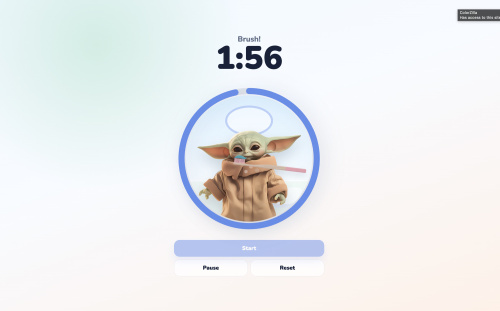
Build me a two minute tooth brushing timer for young children
1. The core brief
What it is. A single screen web app that gets a small child to brush their teeth for a full two minutes. The whole screen is one round bathroom scene: a friendly character stands at a sink, a toothbrush moves back and forth across their mouth, a ring around the scene drains away as the time runs out, and a big countdown reads the time in minutes and seconds. Encouragement fires at fixed points during the run so the child gets a reward before the end, and when the clock hits zero the character celebrates, a fanfare plays and confetti falls. It is for a parent to prop on a bathroom shelf, and for a child who cannot read yet to understand at a glance. There is no login, no data, no settings and nothing to save.
The screens.
/the timer. The whole app. One screen with five states: idle, a short pre roll countdown, running, paused, finished./sound-check.htmla sound check page. Optional developer page that plays each sound layer on its own so you can fix the mix. Not linked from the app, not meant for the child.
The features that define it. If one of these is missing, somebody will say it is not the same app.
- A fixed two minute brushing run. No settings screen, no way to change it in the app.
- A short
3, 2, 1pre roll before the two minutes start, so the brush reaches the mouth before the clock does. - A big
M:SScountdown, large enough to read from across a bathroom. - A progress ring around the scene that visibly drains from full to empty over the run, so the child can see how much is left without reading the clock.
- A character in a bathroom scene who arrives when brushing begins, and a toothbrush that visibly strokes back and forth in time with the timer for the whole two minutes.
- Three encouragement messages at fixed points during the run, each firing exactly once, so the reward comes partway through and not only at the end.
- Start, Pause and Resume on one button, plus Reset. Reset stays available in every state, including mid run. Pause freezes everything in place, sound included, rather than restarting anything.
- A finish celebration that is unmistakably a reward: a happy line of text, the character reacting, confetti across the whole screen, and a fanfare.
- Sound in quiet layers: a tick during the pre roll, music through the run, a brushing texture, an occasional accent, a fanfare at the end. The primary path, and what the original does, is three mp3 files (the tick, the music and the accent) plus two layers generated in code with the Web Audio API (the brushing texture and the fanfare), which is why it needs three licensed files rather than five. Generating all five instead is a perfectly good choice and ships no audio files at all. Loading all five as files is also fine. Section 2 says which of its audio rules belong to which path, so pick a path and read that list once.
- Audio that actually plays on a phone, which means unlocking it inside the first tap. This is the part that silently fails.
- Start available again the instant a run finishes, so a second child goes straight into another round.
- One screen, no scrolling, portrait phone first, clearing the notch and the home bar.
- Understandable without reading: the state is carried by the picture, the ring and the clock, not by the words.
- No accounts, no database, no persistence, no analytics. A static front end with a tiny Node file server in front of it, deployed as one plain Node app.
The feel. Soft, round, bright and slow. Nothing sharp, nothing dark, nothing that flashes or startles, because this thing lives at a child's eye level at seven in the morning. It should feel like a toy that happens to keep time, not like a stopwatch with a mascot glued on, so the motion is continuous and gentle and the character is doing something rather than waiting: a brush stroking, foam bubbling, a ring easing down. The sound is layered but always quiet enough to talk over, and every layer sits under the next rather than fighting it. Nothing demands a tap once the run has started, so a wet hand never has to touch the screen again until the end.
Make your own version. You are expected to. Differing in wording, layout, colour, copy, fonts, the art and the small interactions is fine and expected. In particular the character is yours to invent: what it looks like, how it moves, and what it sounds like are all your choices, and the reader supplies their own art anyway. The only thing that has to survive is that something visibly brushes along in time with the timer.
Section 2 next tells you the short list of things that genuinely have to hold. Everything after that is detail to draw on, not a specification to satisfy line by line.
2. Fidelity: what to keep, what is yours
Must match, or it is a different app
- A real two minutes of brushing, counted down and finished on its own, with a short pre roll before the clock starts.
- A visible countdown and a visible draining progress indicator that agree with each other, both derived from one elapsed value rather than from two independent timers, which drift.
- Something that visibly brushes along in time with the timer, in a scene, for the whole run. It does not have to be a character at a sink, and it certainly does not have to be this character.
- Encouragement partway through the run, at more than one point, each firing once per run.
- A finish celebration that a three year old reads as "you did it", with both a visual and a sound.
- Pause that freezes and resumes exactly where it left off, and Reset that returns to a clean start with the encouragement available again.
- Sound in layers, kept quiet, and audible on a phone.
- One screen for a pre-reader: no scrolling, one-handed on a phone, no login, no settings, nothing saved.
Must be right, or it breaks
These are not taste. Get one wrong and you have a broken app rather than a different one.
Three of them depend on which sound path you picked in feature 9. The bullets
about audio/mpeg, about committed binary audio, and about the accent file's
first 1.2 seconds are mp3 rules, and they apply to whichever layers you ship as
files, which on the primary path is the tick, the music and the accent. The
bullets about the AudioContext, the gain floor and the guards apply on every
path, because the primary path generates two layers in code and because the
autoplay rules bite whether your sound is a file or an oscillator. If you
generated all five layers, skip the mp3 bullets on purpose rather than wondering
whether you missed a requirement.
- The autoplay unlock, in full. Build the
AudioContextlazily inside the first click handler, never at module scope. Include thewindow.webkitAudioContextfallback. Callresume()on it when its state issuspended, from inside a gesture. Put a.catch()on every singleplay()call. Guard every generated sound and every audio interval starter withif (!audioContext || !audioReady) return;, and never guard the pre roll interval or the brushing timer on audio state, because a phone whose audio failed silently must still run the full two minutes and show the clock. Prime the audio from theStarthandler and thePausehandler. Get any of this wrong and the app is silently mute with nothing in the console, and you will not know why. Verify on a real iPhone, because desktop Chrome is forgiving enough to hide a broken implementation. - Web Audio gain envelopes. Ramp exponentially from a floor of
0.0001, never from or to exactly0, and neversetValueAtTime(0)followed by an exponential ramp. Both throw or click audibly. - The port binding. Read
process.env.PORT, fall back to 8080 locally, and listen on0.0.0.0. Bindlocalhostinside a container and the platform health check knocks with nobody answering, while your log cheerfully says the server started. - A
buildscript must exist inpackage.json, even as a no-opecho. The documented platform contract runsnpm run buildand thennpm start, andnpm run buildon a package with nobuildscript exits with an error. - One deployable app at the repo root, with
startstaying in the foreground and never exiting. - A file layout you have actually decided on, with the server's root pointed at it. The original keeps everything flat at the repo root:
package.json,server.js,index.html,styles.css,script.js, the optionalsound-check.htmland anassets/folder, with the server serving from its own directory. Apublic/folder that the server treats as its root is equally good. What breaks is leaving it implicit, because the traversal guard below has to be written against a known root, and because a front end file that sits somewhere the server does not serve returns 404 with nothing in the log. Section 14 has the full tree of the original. - The path traversal guard in the static server. Normalise the request path and refuse anything that resolves outside the app root with a 403. It is four lines and it is the only security surface the app has.
- Correct
Content-Typeper extension, in particularaudio/mpegfor any mp3 you ship. A wrong type is a sound that never plays on some browsers. Cover every extension you actually serve,.html,.css,.js,.pngand.mp3in the original, and fall back toapplication/octet-streamrather than sending nothing. - The split cache policy plus a version query string.
index.htmlmust beno-cachewhile everything else is cached hard, one year plusimmutablein the original. Then every asset the HTML references by URL carries a version string that you change on every deploy that touches it: the stylesheet, every script, and the shared audio file too if you split the audio engine out so the sound check page can use it. Skip this and a fixed bug stays invisibly live on the bathroom phone for a year, with no error anywhere. Images and audio can live without a version string while you never change them, but the moment you replace one, either give it a new filename or version itssrcas well. - Every path in the HTML relative, and never hardcode the app's own public URL. The generated Liivo hostname is assigned, not chosen.
- Lowercase filenames, consistent between code and disk. macOS does not care about case and the deploy container does, so
assets/Character.pngworks on your laptop and 404s in production. - Binary assets actually committed. Images and mp3 files are the single most commonly forgotten thing in this build.
- The art and the animation numbers have to agree with each other. The brush pivot sits near the bristle head, so the head must be at one known end of the image; the foam and stroke positions are aimed at where the character's mouth is. The numbers themselves are yours, but if you change the art you must retune the numbers, and if you keep the numbers you must match the art. One coherent set, from the original, so you have something to move away from instead of a blank: a square character image with the head centred horizontally and the mouth about a third of the way down, three foam bubbles positioned at 33 to 38 percent from the top and 45 to 54 percent from the left of the character element, a long thin toothbrush image with the bristle head at the left end and
transform-origin: 12% 50%, and a stroke of 0.52 seconds. Move any one of those and you are retuning the rest. - Keyframes that set
transformmust restate the whole transform, including any centringtranslate(-50%, 0). Leave it out of the celebration wiggle and the character jumps half its width sideways the moment the timer ends. - Restarting a CSS animation on an element that already has the class needs a forced reflow (
void el.offsetWidthbetween removing and re-adding). Without it the encouragement pop plays once and then never again. - Derive the DOM and the sound from state in one place. One
render()that writes everything, onesyncSounds()called from it. Scattering DOM updates through the click handlers is exactly how this app ends up with a stuck animation or a tick that keeps playing after pause. syncSounds()gets called over and over, so every call has to be harmless.render()runs on every tick of the run, at least once a second and more often if you chose a finer tick. Make it safe one of two ways. Either every starter is idempotent, which is what the original does, soplay()on an already playing element is a no op and each interval starter returns early when its own interval id already exists. OrsyncSounds()remembers the phase it last acted on and returns early when the phase has not changed. Do one of them deliberately. With neither, the music restarts on every tick and the brush noise stacks interval on interval until the app is a roar, and it will sound like a mixing problem rather than a logic one.- Licensing. No copyrighted or recognisable characters, and no audio lifted from a streaming service. This is law, not taste, and it applies the moment the app is on a URL you share. See the assets section.
Yours to change
Everything else, and genuinely everything else. The app's name and branding. The palette, the fonts, the copy and the wording of every message. The character: what it is, what it looks like, how it animates, whether it is a drawing, an inline SVG, a sprite or a photo of a sock puppet. The sounds, all of them. The layout and the order of the elements on screen. Whether you keep the foam bubbles, the mirror, the sink, the frosted countdown overlay, the sound check page or the confetti shimmer at all, and whether you add things that are not here.
And every tuning number in this document. The exact pre roll length, the exact times the encouragement fires, the ring circumference, the confetti count, all the animation durations and easing curves, every volume, every colour, the 190 ms brush noise interval, the media query breakpoints, the asset dimensions. They are recorded because a starting point beats a blank, not because they are targets. Only the handful of numbers called out as load bearing in the list below are not yours to move freely.
The numbers that are load bearing, and why
- The two minutes itself (
DURATION_SECONDS = 120). That is the product. Everything else about the run is negotiable; this is the reason the app exists. - The clock shows whole seconds remaining, so
2:00is visible for the first full second and0:00appears only at the finish. The original decrements and then renders, which is why the clock reads1:59one second after brushing starts. Render a floored elapsed instead and the clock drops to1:59the instant the child presses Start, which reads as a broken app to the parent holding the phone, and forcing the last value to zero at the finish is what stops a negative flashing up. - The
0.0001gain floor in the Web Audio envelopes. Not a taste value. Exponential ramps to or from zero throw or click. process.env.PORTwith an 8080 fallback, and the0.0.0.0bind address. The platform decides the port; guessing it means a deploy that reports unhealthy.- The ring circumference must equal
2 * PI * rfor whatever radius you actually use. 622.035 is correct forr=99. Change the radius and you must recompute it, or the ring will never fully drain or will empty early. - Encouragement keys must land on values the timer actually produces. They are looked up by exact elapsed seconds, so if you change the duration or the tick granularity and forget, a cheer simply never fires and nothing tells you.
- The confetti cleanup delay must exceed the longest fall duration plus the longest start delay. 5200 ms covers a 4.2 s fall with a 0.45 s delay. Cut it short and pieces vanish mid air.
- The pre roll interval fires one more time than there are numerals. Three numerals means the fourth interval callback is the one that clears the overlay and starts the brushing timer, so three numerals give three audible ticks and four callbacks. Off by one here and the child gets two seconds or four.
- The gurgle accent is cut off after 1.2 seconds, so whichever accent file you use must have its useful sound in the first 1.2 seconds. That is a contract between the number and the asset, so change either and check the other.
- The version query string has to change on every deploy that touches an asset that carries one, so the stylesheet, every script, and anything else the HTML references by a versioned URL. What it says does not matter at all. That it differs from last time is the whole mechanism.
Open questions, and the original's answer where it has one
A builder working from section 1 and section 2 alone has to decide all of these. None of them is load bearing, so treat the answers as starting points and not as requirements. They are listed because knowing a question is open is worth as much as knowing the answer.
- Framework. None. Plain HTML, CSS and one script, no bundler and no transpiler. React with a build step would break no rule in this document.
- Node version. 18 or newer, declared as
"engines": { "node": ">=18" }. Node is only there to serve files. - Pre roll length. Three numerals at 1000 ms each, so three seconds.
- Encouragement times. Elapsed 30, 60 and 90 seconds, which is 1:30, 1:00 and 0:30 on the clock. Whether they carry information or pure praise is your call; the original is pure praise.
- Tick granularity. One
setIntervalat 1000 ms for the run, another at 1000 ms for the pre roll. A finer tick is fine and a timestamp based tick is more accurate, and either way the encouragement keys have to stay on values the timer produces. - Ring geometry and direction. An SVG circle at
r=99in aviewBox="0 0 220 220", rotated minus 90 degrees so it starts at twelve o'clock, draining clockwise by growingstroke-dashoffset,stroke-width: 9, round linecap, with a 0.4 second linear transition on the offset so each once per second jump reads as continuous motion. - What the idle screen shows. The scene and the full ring are visible, and the character and the brush are off frame, so the screen is never blank while it waits.
- What the paused screen shows. The original freezes the motion and writes
Pausedin the status line, and nothing else changes. That is honestly weak for a child who cannot read, so if you want a visible paused mark in the picture, add one. It is the one place where the picture carries less than the words. - A second run. Pressing Start after a finish replays the whole pre roll, because the reason for the pre roll still applies on run two.
- Reset during the celebration. It clears the confetti and the text. The original lets an already scheduled fanfare finish rather than tearing down live audio nodes.
- Server responses beyond the happy path. Plain text bodies:
Not foundwith 404,Forbiddenwith 403 for a path that escapes the root,Server errorwith 500 for a file that exists and cannot be read. Methods other than GET are not handled at all in the original, which is a gap rather than a decision. - Cache lifetime for the hard cached files. One year,
public, max-age=31536000, plusimmutableif you like. - Accessibility. The original marks the whole decorative scene
aria-hidden, labels the timer section and the ring, uses real disabled buttons, and putsaria-live="polite"on the app container. That last one means a screen reader announces the clock every second for two minutes, so scope the live region to the status line instead if you care. There is noprefers-reduced-motionhandling in the original at all, and for an app whose whole premise is continuous motion that is a real decision to make rather than a box to tick. Section 6 has the block to add. - Landscape and short screens. Portrait phone is what matters. The original shrinks the clock, the scene and the buttons under
max-height: 660pxand grows them overmin-width: 720px, and never lets the body scroll in either case.
How you know it works
Section 15 is the full checklist. The short version, in order, because each step rules out a whole class of failure:
npm run buildthennpm start, andcurlthe root for a 200. If the build script is missing, this is where you find out rather than in a deploy log.- Fetch the served HTML and confirm it carries your current version string, and that
index.htmlcame backno-cachewhile the stylesheet and the script came back with a long cache. - Ask for a path that escapes the root and confirm a 403, and a path that does not exist and confirm a 404.
- In a browser: every pre roll numeral appears, the ring offset over the circumference equals elapsed over duration at some point mid run, each encouragement fires exactly once, pause leaves the clock and the ring identical two seconds later, resume continues from the same second, the confetti count is non zero at the finish and zero after the cleanup delay, and Start is live again immediately.
- On a real phone, confirm you can hear the first pre roll tick. Desktop Chrome will happily hide a broken autoplay unlock, and this is the one check no amount of code reading replaces.
Build order, and what stage 1 is
Build it in stages, and do not treat sections 1 and 2 as a single sitting. Stage 1 is a running two minute timer end to end: the pre roll, the countdown, the draining ring, the five state machine with pause and reset, the server with its port binding and its traversal guard, and the deploy. Coloured rectangles standing in for the character and the brush are correct at stage 1, and so is silence or generated tones standing in for the sound, because nothing in stage 1 should be blocked on an asset existing. Stage 2 adds the encouragement, the finish celebration, the real art and the brushing motion, and the sound with its unlock. Stage 3 is the polish, the animation detail, the responsive edges and the tuning. Section 16 sets all three out step by step, and section 15 is the checklist to walk at the end. If you only ever read this far, build stage 1 and deploy it before you read on.
3. How to use this prompt
Path A, the Liivo connector, no terminal. Add the custom connector address
https://my.liivo.ai/mcp to Claude or ChatGPT (in Claude: Settings, Customize,
Connectors, Add custom connector; in ChatGPT: Settings, Plugins, MCPs, Add MCP
server). Sign in, which creates your Liivo account. Send this as your first
message:
Use setup-project for a two minute kids tooth brushing timer with an animated character
Then paste the rest of this prompt as your second message. Let the AI scaffold and deploy once before you ask for changes, so you have a live URL to compare against.
Path B, any AI in a local folder, then deploy. Create an empty folder, paste
this prompt, and let the AI write the files. Run it with npm start and open
http://localhost:8080. When you are happy, connect the Liivo connector as in
Path A and ask it to deploy the folder you just built.
Path C, Claude Code or Codex in a terminal. mkdir tooth-timer && cd tooth-timer, start your agent in that folder, paste this prompt. Then
npm start and open http://localhost:8080.
Whichever path you take, you can paste sections 1 and 2 alone as your second message, build stage 1 from those, and only then paste or refer back to the rest. The end of section 2 says what stage 1 is, and section 16 explains why working that way beats handing over the whole document at once.
Also, whichever path you take, read the section "Assets you must supply" before you run it. The app needs one character image, one toothbrush image and three sound files that this prompt deliberately does not give you.
4. Tech stack
This is the stack the original chose, not a requirement. Nothing stops you building the same app in React, or with a framework you already know. What is worth keeping is the property behind the choices: no build step and no dependencies, which is why it deploys in one step and never breaks on a package upgrade. If you swap a row here, swap it knowing what you are giving up.
| Piece | Choice | Why it matters |
| --- | --- | --- |
| Runtime | Node.js 18 or newer | Only used for the file server. Declared as "engines": { "node": ">=18" }. |
| Dependencies | None at all | package.json has no dependencies and no devDependencies. Nothing to install, nothing to audit, no lockfile drift. |
| Server | Node built in node:http, node:fs, node:path | About 50 lines. Serves five static files. No Express, no framework. |
| Front end | Plain HTML, CSS and one JavaScript file | No React, no bundler, no transpiler. The app is 3 files and around 950 lines total. |
| Animation | CSS keyframes and CSS transitions only | Runs on the compositor, costs almost no battery, and needs no animation library. No Lottie, no Rive, no canvas. |
| Timing | setInterval at 1000 ms | Simple and accurate enough for a bathroom shelf. See the note on background tabs under interaction rules. |
| Sound | Three <audio> elements plus the Web Audio API | The mp3 files carry the music, the tick and the gurgle. The brushing texture and the end fanfare are generated in code, so they cost no download and no licence. |
| Fonts | Nunito 700, 800, 900 from Google Fonts | Round and friendly. Falls back to system-ui, sans-serif if the network is unavailable. |
| Build step | None | There is no build script in the original. See the Liivo section for why you should still add a no-op one. |
5. Complete page and screen inventory
The app has one real page. Everything is one screen with five visual states. There is a second, optional developer page.
Page 1: / the timer (index.html)
Full viewport, min-height: 100svh, overflow: hidden on the body so nothing
ever scrolls. Vertical stack, centred, in this order top to bottom:
- Status line (
p.status#statusText). One short line of muted text. Its content is the app's entire copy:Ready?,Get ready,Brush!,Paused,Way to go!,Halfway there!,Super brushing!,All clean!. - Big time (
p.time#timeText).M:SS, starting at2:00. Font weight 900,clamp(3rem, 15vw, 4.6rem)so it fills a phone width. - Celebration line (
div.celebration-text#celebrationText) readingSparkly smile!. Height 0 and opacity 0 until the timer finishes, so it takes no layout space and does not shift the scene while the timer runs. - The character timer (
div.character-timer). A square box,clamp(260px, 76vw, 320px)wide, holding two overlapping layers:- An SVG progress ring, absolutely positioned over the whole box,
viewBox="0 0 220 220", rotated minus 90 degrees so it starts at twelve o'clock. Two circles atcx=110 cy=110 r=99,stroke-width: 9: a faint grey track and a blue progress stroke. - The round scene, 84 percent of the box,
border-radius: 50%,overflow: hidden, containing a mirror ellipse, a sink shape, the character with three foam bubbles, the toothbrush, and a full bleed countdown overlay.
- An SVG progress ring, absolutely positioned over the whole box,
- Controls (
section.controls). A two column grid,clamp(260px, 76vw, 360px)wide.Startis a full width primary blue button spanning both columns.PauseandResetsit side by side underneath as secondary white buttons. Every button is at least 48 px tall withtouch-action: manipulationso a child's tap never triggers a double tap zoom. - Confetti layer (
div.confetti-layer#confettiLayer),position: fixed, covers the viewport,z-index: 20,pointer-events: none, empty until the timer finishes.
The exact structure, so the CSS and the script below line up with it:
<body>
  <main class="app" aria-live="polite">
    <section class="timer-stage" aria-label="Tooth brushing timer">
      <div class="timer-copy">
        <p class="status" id="statusText">Ready?</p>
        <p class="time" id="timeText">2:00</p>
      </div>
      <div class="celebration-text" id="celebrationText" aria-hidden="true">Sparkly smile!</div>

      <div class="character-timer">
        <svg class="timer-ring" viewBox="0 0 220 220" role="img" aria-label="Brushing time remaining">
          <circle class="ring-track" cx="110" cy="110" r="99"></circle>
          <circle class="ring-progress" cx="110" cy="110" r="99"></circle>
        </svg>

        <div class="scene" id="scene">
          <div class="mirror"></div>
          <div class="sink"></div>

          <div class="character" id="character" aria-hidden="true">
            <img src="./assets/character.png" alt="" />
            <div class="foam foam-one"></div>
            <div class="foam foam-two"></div>
            <div class="foam foam-three"></div>
          </div>

          <div class="brush" id="brush" aria-hidden="true">
            <img src="./assets/toothbrush.png" alt="" />
          </div>

          <div class="start-count" id="startCount" aria-hidden="true"></div>
        </div>
      </div>
    </section>

    <section class="controls">
      <button class="primary" id="startButton" type="button">Start</button>
      <button class="secondary" id="pauseButton" type="button" disabled>Pause</button>
      <button class="secondary" id="resetButton" type="button">Reset</button>
    </section>
  </main>
  <div class="confetti-layer" id="confettiLayer" aria-hidden="true"></div>

  <script src="./script.js?v=20260430-1344"></script>
</body>
Two details in that markup that matter. The foam bubbles are children of the
character element, so they travel with it when it slides into frame. And the
confetti layer is a sibling of main, outside the scene, because it has to cover
the whole viewport rather than be clipped by the round scene.
The five states of this screen. The state name is set as a class on the scene
element (is-counting, is-active, is-paused, is-done), which is what drives
every animation.
| State | Status text | Time | Scene | Buttons |
| --- | --- | --- | --- | --- |
| idle | Ready? | 2:00, ring full | Empty bathroom. Character is off frame below the scene. Brush is off frame to the right. No sound. | Start enabled, Pause disabled, Reset enabled |
| counting | Get ready | 2:00, ring full | A frosted white overlay covers the scene showing a huge 3, then 2, then 1, pulsing. The character slides up into frame behind it. Tick tock sound loops. | Start disabled, Pause disabled, Reset enabled |
| running | Brush!, replaced by each milestone message as it fires | counts down every second, ring drains | Character in frame. Brush strokes across the mouth on a loop. Foam bubbles pop in sequence. Music loops, brush swishes play, a gurgle every 30 seconds. | Start disabled, Pause enabled and reading Pause, Reset enabled |
| paused | Paused | frozen | Character stays in frame, all animation stops mid stroke, all sound pauses without rewinding. | Start disabled, Pause enabled and reading Resume, Reset enabled |
| done | All clean! with a pop animation | 0:00, ring empty | Brush glides off to the right, the scene pulses and its shadow turns coral, the character wiggles twice, Sparkly smile! bounces in, 92 confetti pieces fall, a synthesised fanfare plays. | Start enabled again, Pause disabled, Reset enabled |
There are no loading, empty or error states, because the app fetches nothing and
stores nothing. The only failure mode is a missing image or sound file, and the
app is built to keep working in that case: the images are decorative with empty
alt attributes, and every sound call is wrapped so a rejected play() cannot
throw.
Page 2: /sound-check.html, optional developer page
A deliberately ugly diagnostic page with one button per sound and a Stop all
button. Not linked from the app, not meant for the child. Build it, because you
will need it. See "The sound check page" under features for why.
6. Complete feature list
Timer
- Fixed two minute brushing duration. No settings screen, no way to change it.
- A three second
3, 2, 1pre roll before the two minutes start, so the child can get the brush to their mouth. M:SScountdown, updated once a second.- An SVG ring around the scene that drains from full to empty over the two minutes.
- Three milestone cheers at fixed elapsed times, each firing exactly once per run.
- Start, Pause and Resume on one button, and Reset.
- Finish celebration: text, character wiggle, scene pulse, confetti, fanfare.
- Start becomes available again in the finished state, so a second child can go straight into another run.
Animation
- Character slides up into the scene from below with a soft overshoot.
- Toothbrush glides in from off frame right, then loops a brushing stroke that moves and rotates at the same time.
- Three foam bubbles pop on a staggered loop while brushing.
- Countdown numerals pulse behind a frosted blur.
- Status text pops and flashes coral on every milestone.
- Everything freezes in place on pause rather than resetting.
Sound
- A looping tick tock during the three second pre roll only.
- Looping children's music during the two minutes.
- Synthesised brush swishes, a fresh randomised noise burst several times a second.
- A short gurgle accent every 30 seconds, cut off after 1.2 seconds.
- A six note synthesised fanfare at the finish.
- All volumes deliberately low so the layers sit under each other rather than fighting.
- An autoplay unlock that makes all of this work under browser autoplay rules. This is the single most likely thing to break. It has its own section below.
The sound check page
The running app plays up to four sound layers at once, all quiet. When the mix
feels wrong you cannot tell which layer is the problem by listening to the app.
sound-check.html is a standalone page that plays each layer on its own,
looping, at a normalised volume of 0.35, with one button each for the tick, the
music, the gurgle, the generated brush swishes and the fanfare, plus Stop all.
It is the fastest way to answer "which of these five sounds is the annoying one",
and it also proves the Web Audio path works on a device before you debug the
timer. Build it as a second static page. It shares no code with the app on
purpose: it carries its own copy of the swish and fanfare functions so you can
tweak a sound in isolation without touching the app. Be aware that this means the
two copies drift apart, so when you settle on a sound, copy the final numbers
back into the app script.
Mobile and layout
- Single screen, no scrolling,
100svhso the mobile browser chrome does not crop it. env(safe-area-inset-top)andenv(safe-area-inset-bottom)padding so it clears the notch and the home bar.- A short viewport breakpoint at
max-height: 660pxthat shrinks the clock, the scene and the buttons rather than letting anything overflow. - A wide breakpoint at
min-width: 720pxthat grows the clock to 5.8 rem and the scene up to 430 px, still centred in one column. - Works offline once loaded, apart from the Google font, which silently falls back.
Accessibility
aria-live="polite"on the app container so the status and time changes are announced.aria-labelon the timer section and on the SVG ring.- Decorative images carry
alt="", and the character, brush, countdown overlay and confetti layer arearia-hidden="true". - Real
<button type="button">elements, correctly disabled per state, minimum 48 px tap targets. - Honest gap in the original: there is no
prefers-reduced-motionhandling. If you want it, this is the block to add, and it is optional:
@media (prefers-reduced-motion: reduce) {
  .scene.is-active .brush,
  .scene.is-active .foam,
  .scene.is-counting .start-count,
  .scene.is-done,
  .scene.is-done .character,
  .status.is-cheering,
  .celebration-text.is-visible,
  .confetti-piece {
    animation: none;
  }

  .character,
  .brush {
    transition: none;
  }
}
Not in this app. No accounts, no database, no API, no persistence, no brushing history or streaks, no multiple children, no adjustable duration, no quadrant by quadrant mouth guidance, no service worker or installable PWA manifest, no analytics. If you want any of that, add it deliberately. Do not assume it is there.
7. Data model
There is no database, no local storage and no server state. Nothing survives a page reload. The entire model is five variables in the browser tab:
// The only state in the app.
let remainingSeconds = 120;        // counts down to 0
let state = "idle";                // "idle" | "counting" | "running" | "paused" | "done"
let celebratedMilestones = new Set(); // elapsed seconds already cheered, reset per run
let audioReady = false;            // true only after the first user gesture
let audioContext = null;           // created lazily inside that first gesture
Plus timer handles that exist only so they can be cleared: timerId,
countdownId, brushTextureId, gurgleId, gurgleStopId, confettiClearId.
The state machine:
idle ──Start──> counting ──(3s elapse)──> running ──(120s elapse)──> done
  ^                 |                       |   ^                      |
  |                 |                    Pause  Resume                 |
  |                 |                       v   |                      |
  └──Reset──────────┴──────Reset──────── paused ┴────Reset─────────────┘
                                                        │
                                            done ──Start──> counting
Every state change calls one render() function that is the single source of
truth for the DOM: it writes the time text, sets the ring offset, checks for a
milestone, sets the disabled state and label of each button, toggles the four
scene classes, and calls one syncSounds() function that brings the audio into
line with the current state. Build it this way. Scattering DOM updates through
the handlers is how this kind of app ends up with a stuck animation after pause.
8. API contract
The server does one thing: it serves five static files. There is no JSON API and no request body anywhere.
| Method | Path | Response | Status | Auth |
| --- | --- | --- | --- | --- |
| GET | / | index.html as text/html; charset=utf-8, Cache-Control: no-cache | 200 | none |
| GET | /styles.css | text/css; charset=utf-8, Cache-Control: public, max-age=31536000 | 200 | none |
| GET | /script.js | text/javascript; charset=utf-8, Cache-Control: public, max-age=31536000 | 200 | none |
| GET | /assets/character.png, /assets/toothbrush.png | image/png, one year cache | 200 | none |
| GET | /assets/audio/*.mp3 | audio/mpeg, one year cache | 200 | none |
| GET | /sound-check.html | the developer page | 200 | none |
| GET | anything else | Not found as plain text | 404 | none |
| GET | a path that escapes the app root | Forbidden as plain text | 403 | none |
| GET | a file that exists but cannot be read | Server error as plain text | 500 | none |
Write the server exactly like this. It is short enough to read in full, and the two things that matter are the path traversal guard and the split cache policy.
const http = require("node:http");
const fs = require("node:fs");
const path = require("node:path");

const port = Number(process.env.PORT || 8080);
const root = __dirname;

const contentTypes = {
  ".css": "text/css; charset=utf-8",
  ".html": "text/html; charset=utf-8",
  ".js": "text/javascript; charset=utf-8",
  ".mp3": "audio/mpeg",
  ".png": "image/png",
};

function sendFile(response, filePath) {
  fs.readFile(filePath, (error, data) => {
    if (error) {
      response.writeHead(error.code === "ENOENT" ? 404 : 500);
      response.end(error.code === "ENOENT" ? "Not found" : "Server error");
      return;
    }

    response.writeHead(200, {
      "Content-Type": contentTypes[path.extname(filePath)] || "application/octet-stream",
      // index.html must never be cached, everything else is cached hard.
      // This is what makes the version query string on the script tag work.
      "Cache-Control": filePath.endsWith("index.html") ? "no-cache" : "public, max-age=31536000",
    });
    response.end(data);
  });
}

const server = http.createServer((request, response) => {
  const requestUrl = new URL(request.url || "/", `http://${request.headers.host || "localhost"}`);
  const safePath = path.normalize(decodeURIComponent(requestUrl.pathname)).replace(/^(\.\.[/\\])+/, "");
  const filePath = path.join(root, safePath === "/" ? "index.html" : safePath);

  if (!filePath.startsWith(root)) {
    response.writeHead(403);
    response.end("Forbidden");
    return;
  }

  sendFile(response, filePath);
});

server.listen(port, "0.0.0.0", () => {
  console.log(`Tooth timer listening on ${port}`);
});
9. Interaction rules, with the real numbers
Everything in this section is a tuned default. These are the values the original settled on after real use with a real child, so they are a good starting point rather than a target, and you should change anything that feels wrong to you. The exceptions are the load bearing numbers listed in section 2, and they are called out again where they appear below.
Constants
const DURATION_SECONDS = 120;      // LOAD BEARING. the brushing time, and the product
const COUNTDOWN_SECONDS = 3;       // the pre roll. yours to change
const RING_CIRCUMFERENCE = 622.035; // LOAD BEARING as a formula: 2 * PI * r, here r=99
const BRUSH_SWISH_INTERVAL_MS = 190; // generated brush noise cadence. pure taste
const GURGLE_INTERVAL_MS = 30000;  // accent every 30 seconds. yours to change
const GURGLE_PLAY_MS = 1200;       // cut it off after 1.2 s. must match your accent file
const CONFETTI_PIECES = 92;        // yours to change
const MILESTONE_MESSAGES = {       // times and wording yours, but see the note below
  30: "Way to go!",
  60: "Halfway there!",
  90: "Super brushing!",
};
Change any of these that you like. Two cautions. RING_CIRCUMFERENCE has to be
recomputed if you change the circle's radius, or the ring will drain early or
never empty. And the MILESTONE_MESSAGES keys are looked up by exact elapsed
seconds, so if you shorten the run or change how the clock ticks, make sure every
key is still a value the timer actually produces, otherwise that cheer silently
never fires.
The countdown
Pressing Start sets state to counting, resets remainingSeconds to 120,
clears the milestone set, clears any leftover confetti, and immediately writes
3 into the overlay. A 1000 ms interval then writes 2, then 1, then on the
fourth tick clears the overlay and starts the brushing timer. So the pre roll is
exactly three seconds of wall clock, with each numeral visible for one second.
The tick tock sound loops for exactly this window and nothing else.
The brushing timer
A 1000 ms interval decrements remainingSeconds by one, then re renders. When it
would reach zero or below, it stops and finishes instead. Total run is therefore
120 ticks, and the clock reads 1:59 one second after Brush! appears.
setInterval is honest enough here but it is not a clock. Background a mobile
tab and the browser throttles the interval, so a phone that locks mid brush comes
back slow. The original accepts that, because the app is meant to be looked at.
If you care, swap to a timestamp based tick, and mark it as your own change:
// Optional accuracy upgrade, not in the original.
const endsAt = Date.now() + DURATION_SECONDS * 1000;
// then each tick: remainingSeconds = Math.max(0, Math.round((endsAt - Date.now()) / 1000));
The ring
The progress circle uses stroke-dasharray: 622.035 and an animated
stroke-dashoffset:
const elapsed = DURATION_SECONDS - secondsLeft;
const ratio = Math.min(Math.max(elapsed / DURATION_SECONDS, 0), 1);
ringProgress.style.strokeDashoffset = String(RING_CIRCUMFERENCE * ratio);
Offset 0 draws the whole circle, offset 622.035 draws none of it, so the ring
drains clockwise from twelve o'clock as time passes. The SVG is rotated minus 90
degrees to put the start at the top. The stroke has
transition: stroke-dashoffset 0.4s linear, so each once per second jump eases
over 0.4 seconds instead of snapping, which reads as smooth motion at a glance.
stroke-linecap: round keeps the leading edge soft.
Milestones
After each decrement, elapsed time is computed as 120 - remainingSeconds and
looked up in MILESTONE_MESSAGES. A Set of already celebrated elapsed values
guarantees each one fires once per run, and the set is emptied on Start and on
Reset. So the cheers land at 30 seconds (Way to go!), 60 seconds
(Halfway there!) and 90 seconds (Super brushing!), which is 1:30, 1:00 and
0:30 on the clock.
Each cheer replaces the status text and re triggers a 0.75 second pop animation.
The message then stays on screen until the next one, so the child is never
looking at a bare Brush! for two minutes. Restarting a CSS animation on an
element that already has the class needs a forced reflow, and this is the pattern:
statusText.classList.remove("is-cheering");
void statusText.offsetWidth;   // forces the browser to recompute, resetting the animation
statusText.classList.add("is-cheering");
Pause, Resume and Reset
- Pause while running: clears the timer interval, sets state to
paused, sets the status toPaused. Audio is paused, not stopped, so it resumes mid phrase. CSS animations freeze because theis-activeclass comes off. The button relabels itself toResume. - Resume: starts the interval again from the same
remainingSeconds, sets the status back toBrush!, resumes the music from where it stopped, and restarts the swish and gurgle intervals. The gurgle clock therefore restarts from zero on every resume, so a child who pauses a lot hears more gurgles. That is the original behaviour. - Reset from any state: clears both intervals, puts
remainingSecondsback to 120, empties the milestone set, clears the confetti, sets state toidleand the status toReady?. Audio is stopped and rewound to zero, not paused. - Button availability:
Startis disabled incounting,runningandpaused, so it is live inidleand indone.Pauseis enabled only inrunningandpaused.Resetis always enabled.
The finish
At zero: stop the interval, set state to done, set the status to All clean!
with the pop animation, force remainingSeconds to 0 so the clock reads 0:00
rather than a negative, launch the confetti, play the fanfare, render.
Confetti
92 <span> elements appended to the fixed layer, each one randomised:
| Property | Range |
| --- | --- |
| width | 7 to 16 px |
| height | width multiplied by 0.45 to 1.2 |
| colour | hsl(<random 0 to 359> 86% 62%) |
| start x | 0 to 100 vw |
| start y | minus 8 to minus 36 vh, so they fall in from above the fold |
| horizontal drift | minus 35 to plus 35 vw |
| fall duration | 2.4 to 4.2 s, easing cubic-bezier(0.18, 0.68, 0.22, 1) |
| start delay | 0 to 0.45 s |
| initial rotation | 0 to 360 deg |
| shimmer duration | 0.55 to 1.4 s, linear, infinite |
| border radius | 2 px |
Every range in that table is taste. 92 pieces at those sizes reads as generous without stuttering on a phone, which is the only reason for the number. Pick your own count and colours freely.
Each piece runs two animations. confetti-fall translates it by its drift and
112 vh downward while adding 420 degrees of rotation, and holds its end state.
The second one, despite its name, animates filter: brightness() from 1 to 1.22
and back, which makes the pieces glitter as they fall. All pieces are removed
5200 ms after launch, and any earlier batch is cleared first, so pressing Start
again mid celebration does not stack thousands of nodes.
Sound design, the values the original settled on
Every volume, frequency and interval below is a tuned default arrived at by
listening in an actual bathroom, and mixing is personal. Change them freely, and
use the sound check page to do it. The one thing here that is not taste is the
0.0001 gain floor in the envelopes.
Three files loaded as Audio objects at page load, all three deliberately quiet:
| Sound | File | Loop | Volume | Plays |
| --- | --- | --- | --- | --- |
| Tick tock | assets/audio/tick-loop.mp3 | yes | 0.18 | during the 3 second pre roll only, restarted from 0 each time |
| Music | assets/audio/music-loop.mp3 | yes | 0.22 | for the whole 2 minutes, pauses and resumes with the timer |
| Gurgle | assets/audio/gurgle.mp3 | no | 0.16 | every 30 s while running, restarted from 0, hard stopped after 1200 ms |
Two more sounds are generated in code, which is why the app only needs three licensed files.
Brush swishes. Every 190 ms while running, build a fresh mono buffer of white noise and push it through two filters. Randomising every burst is what stops it sounding like a machine.
const duration = 0.08 + Math.random() * 0.07;        // 80 to 150 ms
const frameCount = Math.floor(audioContext.sampleRate * duration);
const buffer = audioContext.createBuffer(1, frameCount, audioContext.sampleRate);
const data = buffer.getChannelData(0);

for (let index = 0; index < frameCount; index += 1) {
  const envelope = 1 - index / frameCount;           // linear decay to silence
  data[index] = (Math.random() * 2 - 1) * envelope;
}

const source = audioContext.createBufferSource();
const highPass = audioContext.createBiquadFilter();
const bandPass = audioContext.createBiquadFilter();
const gain = audioContext.createGain();

source.buffer = buffer;
highPass.type = "highpass";
highPass.frequency.value = 900 + Math.random() * 500;    // 900 to 1400 Hz
bandPass.type = "bandpass";
bandPass.frequency.value = 2300 + Math.random() * 1500;  // 2300 to 3800 Hz
bandPass.Q.value = 0.6 + Math.random() * 0.9;
gain.gain.value = 0.035 + Math.random() * 0.025;         // very quiet on purpose

source.connect(highPass);
highPass.connect(bandPass);
bandPass.connect(gain);
gain.connect(audioContext.destination);
source.start();
The end fanfare. Six sawtooth notes, each through a bandpass filter tuned to 2.2 times its own frequency with Q 1.3, and a gain envelope that ramps exponentially from 0.0001 up to 0.14 in 25 ms and back down to 0.0001 by the end of the note. That is a C major arpeggio resolving on a held top C, about 1.67 seconds long.
const notes = [
  { frequency: 523.25, start: 0,    duration: 0.16 }, // C5
  { frequency: 659.25, start: 0.17, duration: 0.16 }, // E5
  { frequency: 783.99, start: 0.34, duration: 0.24 }, // G5
  { frequency: 1046.5, start: 0.62, duration: 0.34 }, // C6
  { frequency: 783.99, start: 0.98, duration: 0.16 }, // G5
  { frequency: 1046.5, start: 1.15, duration: 0.52 }, // C6, held
];
Use exponential ramps, never setValueAtTime(0) followed by a ramp, and never
ramp exponentially to exactly 0. Both throw or click. That is why the floor value
is 0.0001 rather than 0.
Optional refinement, sync the brush to the music. Instead of a fixed 190 ms swish and a fixed 0.52 s stroke, derive both from the music tempo so the brushing lands on the beat. With 120 BPM music, the beat is 500 ms, so the brush completes one stroke per beat and swishes on every half beat. It is a real improvement and it is two lines:
const MUSIC_BPM = 120;                                 // match your music file
const BEAT_INTERVAL_MS = 60000 / MUSIC_BPM;            // 500 ms
const BRUSH_SWISH_INTERVAL_MS = BEAT_INTERVAL_MS / 2;  // 250 ms
document.documentElement.style.setProperty("--brush-stroke-duration", `${BEAT_INTERVAL_MS}ms`);
with animation: brush-teeth var(--brush-stroke-duration) ease-in-out infinite;
in the CSS. If you do this, also restart the music from the top when the pre roll
ends, otherwise the beat and the stroke drift apart on the second run:
stopSound(sounds.music) immediately before the brushing timer starts.
The autoplay unlock, read this before you write any audio code
Every browser refuses to start audio until the user has interacted with the page. This is the single most common reason a rebuild of this app ends up silent, and it fails quietly: no error in the console, just no sound. There are two separate mechanisms and you have to handle both.
<audio>elements.play()returns a promise that rejects if autoplay is blocked. An unhandled rejection is a console error and, worse, it aborts whatever function you were in.- The Web Audio API. An
AudioContextcreated before any user gesture is born in thesuspendedstate on iOS Safari and on desktop Chrome. It never makes a sound and it never errors. Creating it inside the first click, or callingresume()on it from inside a click, is what unlocks it.
The pattern that works:
let audioReady = false;
let audioContext = null;

function primeAudio() {
  audioReady = true;

  // Create the context lazily, inside a user gesture, never at page load.
  if (!audioContext) {
    const BrowserAudioContext = window.AudioContext || window.webkitAudioContext;
    audioContext = new BrowserAudioContext();
  }

  // Safari can still hand you a suspended context. Resume it from inside the gesture.
  if (audioContext.state === "suspended") {
    audioContext.resume();
  }
}

function playSound(sound, restart = false) {
  if (!audioReady) return;              // never even try before the first gesture
  if (restart) sound.currentTime = 0;
  sound.play().catch(() => {
    // Browsers may block audio until the first user gesture. Swallow it.
  });
}
Rules to follow:
- Call
primeAudio()as the very first line of theStarthandler and thePausehandler. Both are real clicks, and priming in both means the audio is unlocked no matter which button the user reaches first. - Guard every generated sound with
if (!audioContext || !audioReady) return;. - Guard the interval starters too, so a swish interval is never created before the context exists.
- Always
.catch()onplay(). Always. Even when you are sure it is unlocked. - Never construct the
AudioContextat module scope. That one line is the classic failure. - Include the
webkitAudioContextfallback. Older iOS still needs it. - Verify on a real iPhone, not just a desktop browser. Desktop Chrome is far more forgiving, and it will let a broken implementation look fine.
Sound state is then derived from the app state in one place, so there is no way to end up with a tick playing during brushing:
function syncSounds() {
  if (state === "counting") {
    playSound(sounds.ticking, true);
    stopBrushTexture(); stopGurgleTimer(); stopSound(sounds.music);
    return;
  }
  if (state === "running") {
    stopSound(sounds.ticking);      // the tick belongs to the pre roll only
    playSound(sounds.music);        // calling play on an already playing element is a safe no op
    startBrushTexture();            // both starters guard against duplicate intervals
    startGurgleTimer();
    return;
  }
  if (state === "paused") {
    pauseActiveSounds();            // pause, do not rewind
    return;
  }
  stopAllSounds();                  // idle and done: stop and rewind everything
}
syncSounds() is called from render(), so it runs once a second while the timer
is going. That is fine and intentional: play() on a playing element does
nothing, and the interval starters are idempotent.
10. Look and feel
Soft, round, pastel and bright. Nothing sharp, nothing dark, no greys except for the muted status text. The look should read as a sunny bathroom.
That description is the part worth keeping. Every hex value, font choice, size and radius below is a tuned default the original settled on, and the whole palette is yours to replace. Pick your own colours and your own typeface; just keep it soft and bright, because the app lives in a lit room at a child's eye level.
:root {
  --bg: #f7fbff;         /* page base, very pale blue */
  --ink: #17213a;         /* all dark text and the countdown numerals */
  --muted: #61708a;       /* the status line at rest */
  --mint: #9fdec2;        /* the green glow in the top left of the page */
  --coral: #ff8f77;       /* every celebration accent */
  --blue: #5e8dec;        /* the progress ring, the primary button, the mirror frame */
  --ring: 622.035;        /* the SVG dasharray, kept here so CSS and JS agree */
  --brush-stroke-duration: 500ms;
  font-family: "Nunito", system-ui, sans-serif;
}
Page background, two layers:
body {
  min-height: 100svh;
  margin: 0;
  overflow: hidden;
  color: var(--ink);
  background:
    radial-gradient(circle at 20% 15%, rgba(159, 222, 194, 0.45), transparent 26rem),
    linear-gradient(160deg, #eef8ff 0%, var(--bg) 42%, #fff0e7 100%);
}
Typography. Nunito only, at weights 700, 800 and 900. Status text
clamp(0.95rem, 4vw, 1.2rem) at 800. Clock clamp(3rem, 15vw, 4.6rem) at 900
with line-height: 0.95. Celebration line clamp(1.45rem, 7vw, 2.1rem) at 900
in coral with a soft coral text shadow. Countdown numerals
clamp(5rem, 30vw, 8rem) at 900. Buttons 1 rem at 900.
The scene. A circle with a gradient that reads as a wall meeting a floor:
.scene {
  position: relative;
  width: 84%;
  aspect-ratio: 1;
  overflow: hidden;
  border-radius: 50%;
  background:
    linear-gradient(transparent 67%, rgba(255, 255, 255, 0.7) 67%),
    linear-gradient(180deg, #d9f0ff 0%, #f6fcff 68%, #cfeee4 68%, #bfe6d8 100%);
  box-shadow: 0 18px 50px rgba(54, 83, 121, 0.18);
}
The mirror is an ellipse at top: 8%; left: 50%; width: 38%; height: 24% with a
6 px rgba(94, 141, 236, 0.38) border and a translucent white fill. The sink is
at right: 8%; bottom: 11%; width: 32%; height: 16%, background: #fbffff,
border-radius: 12px 12px 46px 46px, with an inset shadow
inset 0 -10px 0 rgba(94, 141, 236, 0.11) for depth. Both are pure CSS, no
images.
The animation, in full
The motion is what makes a child watch it, so it is worth real attention. The specific keyframes below are not, though: they are what the original settled on against one particular piece of artwork, and yours will need different numbers. Read this as a worked example of how the motion was made continuous and gentle, then build your own character's motion however suits it. The only requirement is that something visibly brushes along in time with the timer.
Character entrance. The character is absolutely positioned, left: 50%,
bottom: -13%, width: 88% of the scene, z-index: 3. At rest it is parked
below the scene:
.character {
  transform: translate(-50%, 115%);
  transition: transform 0.8s cubic-bezier(0.18, 0.88, 0.31, 1.18);
}
.scene.is-active .character,
.scene.is-paused .character,
.scene.is-done .character { transform: translate(-50%, 0); }
The easing curve overshoots past 1, so the character rises for 0.8 s and bounces
slightly past its resting place before settling. Note the entrance triggers on
is-active, which means it happens as the pre roll ends, timed with the brush
arriving. The image carries
filter: drop-shadow(0 18px 18px rgba(44, 66, 88, 0.22)) so it sits on the floor
rather than floating.
The brushing stroke. The brush starts off frame right at left: 110%,
top: 44%, width: 58%, z-index: 5, rotated minus 8 degrees, with
transform-origin: 12% 50%, which puts the pivot near the bristle head so the
handle is what swings. transition: left 0.36s ease, top 0.36s ease covers the
entrance and the exit. While brushing it loops one keyframe that moves and
rotates at the same time, which is what sells it as a hand rather than a slider:
.scene.is-active .brush {
  animation: brush-teeth var(--brush-stroke-duration) ease-in-out infinite;
}

@keyframes brush-teeth {
  0%   { left: 50%; top: 42%; transform: rotate(-11deg); }
  50%  { left: 37%; top: 48%; transform: rotate(8deg); }
  100% { left: 50%; top: 42%; transform: rotate(-11deg); }
}

.scene.is-done .brush { left: 120%; animation: none; }
So one stroke travels 13 percent of the scene width diagonally down and left,
sweeps 19 degrees of rotation, and comes back, on ease-in-out so it slows at
each end like a real stroke. At the original 0.52 s that is roughly two strokes a
second. At the beat synced 500 ms it is exactly two per second against 120 BPM
music. When the timer finishes the animation is switched off and the brush glides
out to left: 120% over 0.36 s.
Foam. Three white circles, children of the character element so they follow
it, z-index: 5, border-radius: 50%, all starting at opacity: 0 and
scale(0.4):
| Bubble | left | top | size | | --- | --- | --- | --- | | one | 49% | 33% | 17 px | | two | 54% | 36% | 21 px | | three | 45% | 38% | 14 px |
.scene.is-active .foam { animation: foam-pop 1.4s ease-in-out infinite; }
.scene.is-active .foam-two { animation-delay: 0.2s; }
.scene.is-active .foam-three { animation-delay: 0.45s; }

@keyframes foam-pop {
  0%, 100% { opacity: 0.18; transform: scale(0.6); }
  45%      { opacity: 0.98; transform: scale(1); }
}
The 0 s, 0.2 s and 0.45 s stagger against a 1.4 s loop is what makes three identical circles read as bubbling rather than blinking.
Countdown overlay.
.start-count {
  position: absolute;
  inset: 0;
  display: none;
  place-items: center;
  background: rgba(255, 255, 255, 0.58);
  backdrop-filter: blur(5px);
}
.scene.is-counting .start-count {
  display: grid;
  animation: count-pulse 0.8s ease-in-out infinite;  /* scale 1 to 1.08 and back */
}
The blur is what makes the numeral readable over a busy scene without hiding the character rising behind it.
Celebration, four animations at once.
/* the scene swells and its shadow turns coral */
.scene.is-done { animation: scene-celebrate 1.1s ease both; }
@keyframes scene-celebrate {
  0%, 100% { box-shadow: 0 18px 50px rgba(54, 83, 121, 0.18); transform: scale(1); }
  45%      { box-shadow: 0 22px 58px rgba(255, 143, 119, 0.34); transform: scale(1.04); }
}

/* the character wiggles twice, starting 0.15s late so the swell reads first */
.scene.is-done .character { animation: character-happy 0.72s ease-in-out 0.15s 2; }
@keyframes character-happy {
  0%, 100% { transform: translate(-50%, 0) rotate(0deg); }
  30%      { transform: translate(-50%, -5%) rotate(-3deg); }
  68%      { transform: translate(-50%, -3%) rotate(3deg); }
}

/* the text bounces in past its final size */
.celebration-text.is-visible { height: auto; opacity: 1; animation: celebration-bounce 1.15s ease both; }
@keyframes celebration-bounce {
  0%   { opacity: 0; transform: translateY(12px) scale(0.78) rotate(-2deg); }
  42%  { opacity: 1; transform: translateY(0) scale(1.16) rotate(1.5deg); }
  70%  { transform: translateY(0) scale(0.96) rotate(-0.5deg); }
  100% { opacity: 1; transform: translateY(0) scale(1) rotate(0deg); }
}

/* the milestone and finish text pop, muted to coral and back */
.status.is-cheering { animation: cheer-pop 0.75s ease both; }
@keyframes cheer-pop {
  0%   { color: var(--muted); transform: scale(1); }
  38%  { color: var(--coral); transform: scale(1.16) rotate(-1.5deg); }
  100% { color: var(--muted); transform: scale(1); }
}
The wiggle keyframes have to repeat the translate(-50%, 0) because they replace
the whole transform, not just the rotation. Leave it out and the character jumps
half its width sideways the moment the timer ends. That is an easy bug to ship.
Confetti CSS.
.confetti-piece {
  position: absolute;
  left: var(--x);
  top: var(--y);
  border-radius: 2px;
  opacity: 0;
  transform: rotate(var(--rotate));
  animation:
    confetti-fall var(--fall-duration) cubic-bezier(0.18, 0.68, 0.22, 1) var(--delay) forwards,
    confetti-spin var(--spin-duration) linear var(--delay) infinite;
}

@keyframes confetti-fall {
  0%   { opacity: 1; transform: translate3d(0, 0, 0) rotate(var(--rotate)); }
  100% { opacity: 0.96; transform: translate3d(var(--drift), 112vh, 0) rotate(calc(var(--rotate) + 420deg)); }
}

@keyframes confetti-spin {
  0%, 100% { filter: brightness(1); }
  50%      { filter: brightness(1.22); }
}
translate3d keeps the pieces on the GPU, which is why 92 of them do not stutter
on a phone.
Responsive rules
The breakpoints and sizes here are tuned defaults, picked against the phones the original was tested on. The principle is the load bearing part: the body cannot scroll, so on a short screen things must shrink rather than overflow.
/* short screens: shrink rather than overflow, because the body cannot scroll */
@media (max-height: 660px) {
  .timer-copy { min-height: 64px; }
  .time { font-size: clamp(2.6rem, 13vw, 3.6rem); }
  .character-timer { width: clamp(248px, 58svh, 320px); }
  button { min-height: 44px; }
}

/* wide screens: same single column, just bigger and vertically centred */
@media (min-width: 720px) {
  .app { align-items: center; padding: 32px; gap: 18px; }
  .timer-stage { width: min(100%, 520px); gap: 14px; }
  .status { font-size: 1.35rem; }
  .time { font-size: 5.8rem; }
  .character-timer { width: min(430px, 58vw, calc(100svh - 230px)); min-width: 360px; }
  .controls { width: min(430px, 58vw); max-width: 430px; justify-self: center; }
}
Note the calc(100svh - 230px) term: it stops the scene from growing taller than
the space left after the clock and the buttons, which is what keeps the app on one
screen on a laptop in landscape.
There is no dark mode. The app is one fixed bright theme on purpose, because it lives in a lit bathroom and a child needs to recognise it instantly.
11. Assets you must supply, and the licensing you must respect
Read this part properly. The app that this prompt is reverse engineered from uses a picture of Grogu, the character from Star Wars also known as Baby Yoda. That character, its name and its likeness are copyrighted and trademarked by Lucasfilm and Disney. You cannot use it. Not in a public app, not in an app store, not on a URL you share, and not in something you sell, and no amount of "it is just for my kid" changes what the licence says the moment the app is on the open internet. The same applies to any other recognisable character: Bluey, Peppa, Pokemon, a football club badge. If you want a character, use art you drew, art you commissioned, art with a licence that permits your use, or an AI generated original creature that resembles nothing in particular. A generic friendly monster or animal works exactly as well for a three year old.
The same goes for the sounds. Do not lift audio from YouTube or a streaming
service. Get it from a stock library and read the licence. The original app used
Mixkit for all three files, which permits use in personal and commercial projects
under its own licence terms, and which you should read yourself rather than take
my word for. Freesound with a CC0 filter, and Pixabay audio, are the other easy
sources. Whatever you pick, keep a note of where each file came from in
assets/audio/README.md, alongside the licence, so future you can prove it.
Notice how little licensed audio the app actually needs: the brushing sound and the end fanfare are both generated in code. That is not an accident. It was done specifically so the project would need three files instead of five.
These are the filenames the original used and the shapes its numbers were tuned against. Match them and a swapped in asset drops straight into place with no code change; rename them and you only have to change one map in the script. The dimensions and durations are guidance, not requirements, with two real couplings: the brush image needs its bristle head at the end your pivot sits on, and the accent file needs its useful sound in the first 1.2 seconds because that is where it gets cut off.
| Path | Format | Size | What it is and what to watch for |
| --- | --- | --- | --- |
| assets/character.png | PNG with a transparent alpha channel | around 900 by 900 px, square. The original is 899 by 900 | The character seen from the front, roughly head and shoulders, filling most of the frame. Its head must be horizontally centred and its mouth must sit about a third of the way down the image, because the three foam bubbles are positioned at 33 to 38 percent from the top and 45 to 54 percent from the left. Transparent background is required, since it sits over the bathroom scene. |
| assets/toothbrush.png | PNG with a transparent alpha channel | long and thin, around 900 by 120 px | A toothbrush lying horizontally, bristle head at the left end, handle extending to the right. The rotation pivot is set at 12 percent from the left, so it is the head that stays put and the handle that swings. A brush drawn the other way round will look like it is being waved at the character rather than used on it. |
| assets/audio/tick-loop.mp3 | MP3 | 10 to 20 s, must loop cleanly | A clock tick or a gentle beep. Only plays for the 3 second pre roll, at volume 0.18. Almost any tick works because you never hear more than three of them. |
| assets/audio/music-loop.mp3 | MP3 | 60 to 120 s, must loop cleanly | Cheerful, simple children's music. Plays for the whole two minutes at volume 0.22 and loops, so a joyless loop point will drive an adult mad by day three. Pick something at a steady tempo, and note its BPM if you want the beat synced brushing option. |
| assets/audio/gurgle.mp3 | MP3 | 2 to 4 s | A mouthwash or gurgle noise, used as an accent every 30 seconds. Only the first 1.2 seconds is ever heard, so the useful sound has to be at the very start of the file. |
| assets/audio/README.md | Markdown | short | Where each file came from, and under which licence. Write it as you add the files, not later. |
Keep the file names in one map at the top of the script so swapping a sound is a one line change:
const AUDIO_SOURCES = {
  gurgle: "./assets/audio/gurgle.mp3",
  ticking: "./assets/audio/tick-loop.mp3",
  music: "./assets/audio/music-loop.mp3",
};
Do not let the character image get much past half a megabyte. The original is around 520 KB for a 899 by 900 PNG, and the music file is around 3 MB, which is by far the largest thing the app ships. If first load feels slow on mobile data, the music file is the thing to shorten or re encode at a lower bitrate.
12. External services
Almost none, which is the point.
| Service | Used for | How to remove or swap it |
| --- | --- | --- |
| Google Fonts | The Nunito typeface, weights 700, 800 and 900, loaded from fonts.googleapis.com with preconnect hints to fonts.googleapis.com and fonts.gstatic.com | This is the app's only network dependency after load, and the only third party that sees your users. To remove it, download the Nunito woff2 files into assets/fonts/, add an @font-face block, and drop both preconnect links. The CSS already falls back to system-ui, sans-serif, so if you just delete the link the app still works, it only looks less round. |
| Stock audio library | The three mp3 files, once, at build time | Not a runtime dependency. The files are served from your own app. Any library works, see the licensing section. |
No database. No object storage. No authentication provider. No analytics. No email. No queue. No cache. No API keys of any kind. If you are asked to provision a backing service to build this app, something has gone wrong: this app needs nothing but a process that can serve five files.
13. Environment variables
One variable, and it is injected for you. There are no secrets in this app at all, so there is nothing that could leak.
# .env.example
# The only variable this app reads. The hosting platform injects it, usually as 8080.
# Locally you can leave it unset and the app defaults to 8080.
PORT=8080
Still commit the .env.example, and still put .env in .gitignore, so the
habit is in place the day you add a real secret. The .gitignore in the original
is three lines:
node_modules/
.DS_Store
npm-debug.log*
14. Deploying on Liivo
This app is the cleanest possible example of the platform contract, because there is nothing else going on. Two files decide whether it deploys.
Repository layout. Everything at the root, no subfolder, no monorepo.
.
|- package.json          # no dependencies, a start script, an engines field
|- server.js             # the static file server, binds process.env.PORT
|- index.html            # the app
|- styles.css
|- script.js
|- sound-check.html      # optional developer page
|- .gitignore
|- .env.example
`- assets/
   |- character.png
   |- toothbrush.png
   `- audio/
      |- README.md       # your licence notes
      |- tick-loop.mp3
      |- music-loop.mp3
      `- gurgle.mp3
package.json. This is the whole file. Note there are no dependencies at
all, so there is no install step and no lockfile to go stale.
{
  "name": "tooth-timer",
  "version": "1.0.0",
  "private": true,
  "description": "A playful two minute tooth brushing timer.",
  "scripts": {
    "build": "echo \"no build step\"",
    "start": "node server.js"
  },
  "engines": {
    "node": ">=18"
  }
}
On the build script, so you know exactly where you stand: the app this prompt
comes from ships no build script at all, only start, and it is deployed
and serving traffic on Liivo right now. So an absent build script is evidently
tolerated. But the documented contract is that the platform runs npm run build
and then npm start, and npm run build on a package with no build script
exits with an error, so relying on that being ignored is relying on behaviour
nobody promised you. Add the one line no-op above. It costs nothing and it removes
the question.
The port binding. This is the line that decides whether the platform thinks your app is alive:
const port = Number(process.env.PORT || 8080);
server.listen(port, "0.0.0.0", () => {
  console.log(`Tooth timer listening on ${port}`);
});
Read process.env.PORT and fall back to 8080 for local development. Bind
0.0.0.0, not localhost and not 127.0.0.1: inside a container, localhost
means the container itself, so the platform's health check knocks and nobody
answers, and you get a deploy that looks broken while the log says the server
started fine. Never hardcode the port.
The rest of the contract, and how this app meets it.
| Contract rule | How this app satisfies it |
| --- | --- |
| One deployable app at the repo root | package.json and server.js at the top level, nothing nested |
| build then start | build is a no-op echo, start is node server.js, which stays in the foreground and never exits |
| 200 on / fast | / reads one small HTML file from disk and returns it, so the health check passes on the first try |
| No secrets in the repo | there is not a single credential in the app, and .env is gitignored |
| Do not rely on the local filesystem for anything that must survive a restart | the app only ever reads files that are part of the repo, and writes nothing, ever. Nothing to lose on restart |
| No Dockerfile needed | plain Node, no system packages, no openssl, no ffmpeg |
| Migrations at start | not applicable, there is no database |
| Never hardcode your public URL | the app never refers to its own address. Every path in the HTML is relative (./styles.css, ./assets/character.png), which is why the same build works on localhost:8080 and on the generated public URL with no configuration |
Deploy walkthrough, using the connector.
- Connect the Liivo MCP connector at
https://my.liivo.ai/mcpand sign in. That creates the account. - Send
Use setup-project for a two minute kids tooth brushing timer with an animated character, then paste this prompt. - Let the AI create the repo and write the files. Do not ask for changes yet.
- Add your own character image, toothbrush image and three mp3 files. If your AI cannot upload binary files, commit them to the repo yourself, or ask for a version that draws the character as inline SVG so you can deploy first and swap the art in later.
- Ask it to deploy. Do not ask for a backing service. This app needs no database, no bucket and no cache, and asking for one only slows the deploy down.
- You get a generated URL shaped like
https://<generated-prefix>.apps.liivo.io. The prefix is assigned, not chosen, so expect something likequiet-harbor-timerrather than your app name. Never hardcode it anywhere. - Open it on the phone that will actually live in the bathroom. Press Start and listen. Desktop browsers are much more forgiving about audio than iOS Safari, so a mix that works on your laptop proves nothing.
When the deploy fails, in the order worth checking.
| Symptom | Likely cause |
| --- | --- |
| Deploy reports the app as unhealthy, logs show the server started | bound to localhost instead of 0.0.0.0, or a hardcoded port instead of process.env.PORT |
| Build step fails immediately | npm run build with no build script in package.json. Add the no-op |
| Page loads but is unstyled, or the character is missing | a path case mismatch. assets/Character.png and assets/character.png are the same file on macOS and two different files in the container. Keep every filename lowercase |
| Page loads, everything silent | the autoplay unlock. Confirm the AudioContext is created inside the click handler and not at module scope, then check the sound files actually returned 200 |
| Sounds 404 in the network tab | the mp3 files were never committed, or .gitignore is swallowing them. Binary assets get left behind more often than anything else |
| Old JavaScript keeps running after a redeploy | the cache busting problem. Next section |
| App works locally, blank on the URL | a JavaScript error at load. script.js runs at parse time and calls render() on the last line, so a single missing element id throws and nothing renders. Check the browser console, not the server log |
Cache busting, and why a static app needs it more than a dynamic one. The
server sends Cache-Control: public, max-age=31536000 for everything except
index.html, which gets no-cache. One year is effectively forever. That is
correct and it is what makes the app instant on the second visit. It also means
that when you redeploy with a fixed script.js, every browser that has already
visited keeps running the old file for a year and never asks your server about
it. You test it in a fresh incognito window, it works, and you conclude the fix
is live, while the phone on the bathroom shelf is still running last week's code.
There is no error and nothing in the logs.
The fix is a version query string on the script tag, and it is the last commit in the original project's history, which tells you the author hit this in exactly this way:
<script src="./script.js?v=20260430-1344"></script>
The mechanism: index.html is no-cache, so the browser re-fetches it on every
visit. If the version string has changed, the script URL is a different URL, so
the cached copy under the old URL cannot be used and the browser fetches the new
file. If it has not changed, the year long cache still applies and nothing is
re-downloaded. You get instant repeat loads and correct updates at the same time.
Two things to do better than the original:
- Version the stylesheet too. The original only versions the script, so a CSS change can go stale in exactly the same way while the JavaScript updates. Write
<link rel="stylesheet" href="./styles.css?v=20260430-1344" />as well. - Bump the string on every deploy that touches either file. Any convention works as long as it changes. A timestamp is easiest. If you forget, you are back to the invisible failure, so make it part of the deploy step: tell your AI "bump the version query strings" whenever you ask for a change to the CSS or the script.
Long lived assets like the images and the mp3 files have the same one year cache.
That is fine while you never change them, and if you replace an image, either
give it a new filename or add a version string to its src too.
If you are not on Liivo. Nothing in this app is platform specific. It is a
plain Node process reading PORT. It runs unchanged on any host that can run
npm start, and it will also run as pure static files on Netlify, Vercel, GitHub
Pages, Cloudflare Pages or an S3 bucket if you drop server.js entirely, since
there is no server side logic at all. If you go the static route you lose control
of the cache headers, so read up on how your host sets them before you rely on
the version string trick.
15. Acceptance checklist
Walk this list on a phone. Every line is observable, which is what makes it useful. Read it as a description of the original rather than an exam: where a line names a specific message, colour, timing or piece of art, translate it into your own version and check that yours does the equivalent. The lines that carry the app are the ones about the two minutes running correctly, the encouragement firing, pause and resume behaving, the celebration landing, sound being audible on a real phone, and nothing scrolling.
- Opening the app shows
Ready?,2:00, a full blue ring, and an empty bathroom scene. No character, no brush, no sound. Startis enabled,Pauseis greyed out,Resetis enabled.- Pressing
StartshowsGet readyand a large3over a blurred white overlay, which pulses, then becomes2, then1, one second each. A tick tock plays for these three seconds and stops when they end. - During the pre roll the character rises into the scene from below and slightly overshoots before settling.
- Exactly three seconds after the press, the overlay clears, the status reads
Brush!, the clock starts counting, and the tick tock is replaced by music. - The brush enters from off frame right and immediately starts stroking diagonally across the character's mouth, roughly twice a second, rotating as it goes rather than just sliding.
- Three white bubbles pop near the mouth on a staggered loop, not in unison.
- A soft brushing texture plays continuously under the music, and it does not sound like one sample on repeat.
- The blue ring visibly shrinks. At
1:00on the clock the ring is half gone. - At
1:30the status changes toWay to go!and pops with a coral flash. At1:00it changes toHalfway there!. At0:30it changes toSuper brushing!. Each fires once and stays on screen until the next. - Roughly every 30 seconds a short gurgle plays over the music and cuts off after about a second.
- Pressing
Pausefreezes the clock, the brush stops mid stroke and stays where it is, the character stays in frame, and all sound stops. The button now readsResume. - Pressing
Resumecontinues from the same second and the music continues from where it stopped rather than restarting. - Pressing
Resetat any time returns toReady?and2:00, silences everything, and the nextStartgives a fresh three second pre roll with the milestones available again. - At
0:00the status readsAll clean!,Sparkly smile!bounces in below the clock, the scene swells once and its shadow turns coral, the character wiggles twice, the brush glides off to the right, a rising six note fanfare plays, and confetti falls across the whole screen in mixed colours and sizes. - The confetti clears itself after about five seconds and leaves no scrollbar and nothing clickable behind it.
Startis enabled again in the finished state, and pressing it runs a clean second round with all three milestones firing again.- Nothing on the page scrolls, in portrait or landscape, and nothing is cut off by the notch or the home bar.
- Rotating to landscape or opening it on a laptop keeps everything on one screen, with a bigger clock and a bigger scene, still in one centred column.
- Turning the device volume down to zero and back up mid run does not break anything, and neither does locking the screen and unlocking it, although the clock may be behind after a lock because it is driven by
setInterval. sound-check.htmlplays each of the five sounds in isolation andStop allsilences everything.- Requesting a path that does not exist returns a plain
Not foundwith status 404. - Viewing source shows the script tag carrying a version query string.
16. Build order, in three stages
Build this in passes, not in one sitting. Each stage ends with something that runs, and stage 1 ends with something deployed, which is the point of splitting it this way.
A note on the length of this document. You do not have to paste all of it. Paste sections 1 and 2, the core brief and the fidelity rules, build stage 1 from those alone, get it on a URL, and only then paste or refer back to the rest as you work through stages 2 and 3. That is the practical way to use this, and it also stops an AI from treating four hundred equally weighted details as a checklist.
Stage 1: the smallest thing that is recognisably the app, then deploy it
Stop and deploy at the end of this stage, before adding anything else. Getting a public URL first means the deploy is never the scary unknown at the end.
- Scaffold.
package.jsonwith the no-opbuildscript andstart,server.jswith thePORTread, the0.0.0.0bind and the traversal guard,.gitignore,.env.example, and anindex.htmlthat says hello. Runnpm startand confirmhttp://localhost:8080answers. - Static layout, no behaviour. The HTML structure with all its ids, the page background, the scene, the ring at full, the clock reading
2:00, the status line and the three buttons. Use plain coloured rectangles where the character and the brush will go, so you can see the geometry before you have any art. Check it at phone width now, not later. - The state machine. The five states, one
render()function, the buttons wired,formatTime, the ring maths,Start,Pause,Resume,Reset, the pre roll and the two minute countdown. Confirm every state transition works in silence, with no animation and no art. This is the skeleton, and if it is wrong everything after it is wrong. - Deploy. Commit, push, deploy, open the generated URL on a phone. It will be an ugly rectangle counting down two minutes, and that is exactly what you want at this point: the platform contract is proven and the rest is additive.
Stage 2: the rest of the features from the core brief
- Encouragement and the finish. The milestone set with its once-per-run guarantee, the pop animation with the forced reflow, the finish state, the celebration text, the confetti generator and its cleanup timer.
- Art and the brushing motion. Drop in your character and your brush. Then the entrance, and the brushing stroke that both moves and rotates rather than just sliding. Tune the stroke against your own artwork: the numbers in this document are matched to a character whose mouth sits about a third of the way down a square image, and yours will need adjusting.
- Sound. The audio elements with their volumes and loop flags, then the autoplay unlock, then
syncSounds(), then the generated brush texture, then the fanfare. Buildsound-check.htmlat the same time, because you will be going back and forth on the mix and it is the only comfortable way to do it. Test on a real phone at this step, not at the end. Redeploy and check the sound on the deployed URL too, since a missing mp3 in the repo only shows up there.
Stage 3: the polish and the feel
- The detail from the back of this document. The foam stagger, the frosted countdown pulse, the four celebration animations at the finish, the shimmer on the confetti. This is where the app stops being correct and starts being watchable.
- Edges. The two media queries, the safe area padding, the aria attributes, and the version query strings on the script and the stylesheet. Add
prefers-reduced-motionhere if you want it. - Tune. Sit with an actual child, or at least with the app propped up for two real minutes, and change the numbers that annoy you. The mix, the tempo, the wording of the cheers, the pace of the brush. Then bump the version strings, redeploy, and run the acceptance checklist against the deployed URL rather than against localhost.
What to defer or skip. Do not add brushing history, streaks, multiple children, an adjustable duration, a settings screen, quadrant by quadrant mouth guidance, or a PWA manifest in the first build. Every one of those pulls in storage or state and turns a five file app into a project. Get the two minutes feeling right first. The app is worth building precisely because it is small.
17. Optional: the agent team that came with this project
Alongside this prompt there is an agents/ folder with four short markdown files.
They are not needed to build the app. They are a small, generic developer agent
team, and they are worth a look if you want to build something larger the same way.
team-lead.mdA coordinator role that is the mandatory entry point for every request. It writes a task brief, assigns which agent owns which files, tracks blockers, integrates the result and writes the final summary. Everything else depends on this one.parallel-protocol.mdThe rules that let several agents work at once without overwriting each other. Four ownership modes (edit-owner,read-only,reviewer,advisor), a kickoff brief, a progress report format and a conflict procedure. The most useful file in the set.animation-specialist.mdA specialised role for character motion, with a list of brushing animation states, a matrix for choosing between Rive, Lottie, sprite sheets, CSS or SVG and canvas, and guidance on keeping motion readable at phone size. Directly relevant to this app.liivo-platform.mdSafety rules for an agent that can reach a hosting platform through a connector: inspect before changing, get approval before deploying or touching secrets, never print a secret value, record exact service and instance names.
How to use them. If your tool supports subagents, put the files where it looks for
agent definitions and start every request by asking for the Team Lead. If you are
in a plain chat, paste parallel-protocol.md and team-lead.md into the
conversation and ask the AI to work the roles in sequence, producing each role's
report before moving on. You lose the parallelism and you keep the useful part: a
written brief, declared file ownership, and a verification pass that is not the
same voice that wrote the code.
For an app this small, three roles is the honest answer: Team Lead, a frontend
role, and the Animation Specialist, with a deployment pass at the end. Do not spin
up eight agents for five files. The original team had eleven role files and most of
them were boilerplate, which the agents/README.md says plainly and which is why
only four were kept.
18. Hard won facts and gotchas
Reference material for when something behaves strangely, not part of the build sequence. Everything above is what to build. This is the short list of things that cost real time on the original and are not obvious from reading the code.
-
The app never needs to know its own URL. There are no callbacks, no webhooks, no redirects back to itself and no absolute links, so no
APP_URLstyle variable is required anywhere. Keep every path relative and the identical build runs onlocalhost:8080and on the generated public hostname with no configuration. Worth knowing for the next app you build on a platform that injects an app URL for you: that injected value can be the internal runner hostname rather than the public address, which makes it right for service to service callbacks and wrong for anything a human has to click. Build the human facing address in the browser fromwindow.location.origininstead. -
A file that works locally and 404s in production is usually a file you never committed. In the original, the sound check page was only ever a local tool, so it answers 404 on the deployed URL while working perfectly on the author's machine. Binary assets are the usual victims of this, because images and mp3s get left out of a commit far more often than text files do. Check the network tab against the deployed URL, not against localhost.
-
The traversal guard needs both of its steps, and a passing request can still look wrong. Normalising the decoded path and stripping leading
..segments is the first step, and refusing anything that does not resolve inside the root is the second. Expect mixed status codes when you test it: a URL parser often collapses..segments before your code sees them, so/../server.jscan arrive as/server.jsand come back 404 because that file is not in the served root, while a percent encoded separator survives to your guard and comes back 403. Both outcomes are correct. What matters is that nothing outside the root is ever served. -
A keyframe animation on
leftortopoverrides that element'stransitionon the same properties while it runs. This is why one element can use a CSS transition for its entrance and its exit and a keyframe loop for its brushing stroke without the two fighting. Useful once you know it, baffling when you do not. -
Put the confetti pieces on
translate3d. Ninety odd absolutely positioned elements animating at once stay on the compositor that way and cost almost nothing on a phone. The same trick is why the whole app can animate continuously for two minutes without draining a battery. -
In a classic script,
var status = document.getElementById("status")is a trap.statusis a legacy property ofwindow, and assigning to it coerces your element to a string, so a laterstatus.textContent = "..."writes to a string primitive and silently does nothing. No error, no console output, just a label that never updates. Name itstatusEl. It is exactly the shape of failure this app specialises in, which is why it is worth naming: silently wrong, with nothing anywhere to tell you.