power-point-2-0
Turns a talk into a shared room. You run the deck on the projector, the audience scans a QR code and their phones follow whatever slide you are on, with no account and no install. On an interactive slide they answer from their own device and the results appear on the projection while the room watches: polls, a word cloud, a world map, and a question queue the audience upvotes. They can also signal that you are going too fast. One vote per person per slide is enforced by database constraints rather than by app code, so it cannot be clicked around. There is no slide editor, the deck is defined in code. Needs a managed database and a cache. An optional camera relay can put your face on every phone in the room.
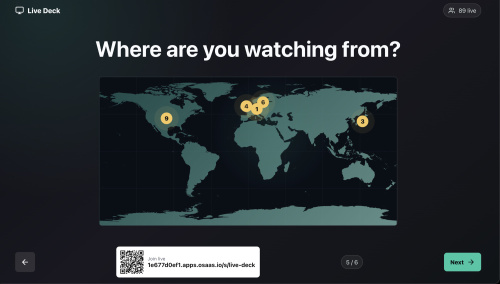
- The core brief Build Live Deck, a web app that turns a talk into a shared room. The presenter runs a full screen deck on the projector. The audience joins from their own phones by scanning a QR code, with no account and no install, and their phones follow whatever slide the presenter is on. On an interactive slide they answer from their own device, and the answers appear on the projected slide while the room watches.
It is for anyone who presents to a room and wants the room to take part: conference speakers, trainers, teachers, meetup hosts, internal all hands.
You are expected to make your own version of this. Differing in wording, layout, colour, copy, and small interactions is fine and expected. Nothing below is an inspection you have to pass.
The screens. Four, and you can ship something real with the first two.
Audience, /s/:slug on a phone. Join, follow the live slide, answer, ask. Presenter projection, /presenter/:slug on the projector. The slide, a QR join card, a slide counter, next and previous. Presenter notes second screen, /notes/:slug on the laptop. Speaker notes, up next, incoming questions, deck controls. Optional. Session summary, /stats/:slug after the talk. What the room did, plus a JSON download and a print stylesheet. Optional. The features that make it this app.
One room per slug. The audience joins with no account, and a nickname is optional and purely cosmetic. A QR code and a join URL on the projection, so joining costs one scan. The presenter advances the deck and every phone in the room follows within about a second, with no reload and no prompt. At least one interactive slide kind where the audience answers from their phone. Build the poll. It is the one that carries the product. Answers are counted server side and rendered live on the projection, so the room watches itself answer. One answer per person per slide, enforced by the database, so the numbers on the screen are believable. Changing your answer moves your vote rather than adding a second one. An audience member can browse ahead or back on their own phone without moving anyone else, and snap back to live from a visible button. A tap feels instant: apply it locally straight away, then let the authoritative server result overwrite it. Anonymous questions from the floor, tagged to the slide that was live when the question was asked. Optional, and cheap once the socket exists. The room upvotes questions, one upvote per person per question, and the highest voted rise to the top of a final Q&A slide. Optional. A "slow down" pace signal from the audience that the presenter sees on the notes screen, scoped to the current slide so it clears itself when the deck moves on. Optional. A projection stage locked to 16:9 whose type scales with the stage rather than the viewport, so one layout reads from the back of the room on any projector. A demo deck and a demo audience seeded on boot, so a freshly deployed instance is never an empty grey page. Everything recovers on its own. A dropped socket retries forever, and the page keeps showing the last known state instead of an error screen. Two large pieces are genuinely optional, and I want you to hear that plainly.
The presenter webcam relay in section 7.6 is a WebRTC publish and playback pipeline against an external media gateway plus a TURN relay, with its own permission handling, its own protocol dialect trap, and a draggable resizable video bubble on every phone. It is the single biggest piece of work in this document and most readers will not want it. Skip it. The app is complete and demonstrable without it, and the whole feature is dark by default when its two base URLs are unset.
The six slide kinds are separable, and a build with the poll alone is a complete, useful app. Tiles, word cloud, map, and Q&A are additions. Add the ones you want because you want them, not because the table in section 7.2 has six rows.
The feel. The projection is fast, loud, and confident: near black, one accent colour, very heavy type sized for the back row, and nothing moving on it except the data. The phone is quiet by comparison, one thing to do per slide, thumb reachable, floating controls in the bottom corners, and never a scroll to find the answer. Every interaction lands immediately and then quietly corrects itself, so the room never sits watching a spinner. The one moment worth animating properly is a result growing on the big screen the instant the room answers, because that is what people remember about the app.
Everything after this section is detail to draw on, not a specification to satisfy line by line.
- Fidelity: what must match, what must be right, and what is yours 2.1 Must match, or it is a different app The audience's phones follow the presenter's live slide. The presenter advances and the room moves. They take part from their own device with no account, no install, and no download. The presenter sees the results appear in the room, live, on the projected slide, while the audience is still tapping. That is the product. Three things. If your build does those, it is Live Deck, no matter what it looks like.
2.2 Must be right, or it breaks These are technical facts rather than taste. Getting one wrong gives you a broken app, not a different one.
One vote per participant per slide belongs in the database, not in your application code. The four UNIQUE (slide_id, participant_id) constraints on poll_votes, wordcloud_entries, map_votes, and pace_signals, plus UNIQUE (question_id, participant_id) on question_upvotes, are the whole vote integrity story (section 8). Enforcing it in application code instead is exactly how you get a rigged poll: a second tab, a refresh, a double tap, or two server replicas racing, and the count is silently wrong with no error anywhere. The upsert and ON CONFLICT DO NOTHING behaviour in section 10.3 depends on those constraints existing. Know what a participant actually is, because the reference answer is one per tab and it is minted on page load. Both halves were only visible on a real deployment, verified on 2026-08-19. First, the participant row is created when the audience page loads, before anybody submits the join form: a bare GET of the audience URL in a fresh tab took the count from 86 to 87 with nothing clicked. So every crawler, link preview, chat unfurl, and idle curious visitor becomes a "participant", and the live count on the projection and every engagement number on the stats page reads high for reasons nobody in the room can see. Create the row on submit instead, and the number means something. Second, identity lives in sessionStorage while the join hint lives in localStorage, so a second tab in the same browser skips the join gate and mints a fresh participant that can vote again. The constraints above are therefore one vote per tab, not one vote per person. That is a defensible trade for an app with no accounts and it is the one the original made, but it has two consequences you must respect: never describe it to a room as one vote per person, and never test the constraint by opening tabs, because a new tab succeeding is correct behaviour rather than a bug. Test it by reusing a participant id. If you want one vote per human you need real identity, which means accounts or at least a signed device token, and that is a different product. Mechanics in section 7.1. The presenter role needs authenticating, and this is worse than a design quibble. role: "presenter" is a string the client claims on the WebSocket join and the server never verifies, so anybody who opens /notes can drive the deck, cast a question to every phone in the room, and highlight tiles. Verified against the running deployment on 2026-08-19, and the HTTP surface is the bigger hole: POST /api/sessions/:slug/control/next, /prev, and /goto answer 200 to a plain curl with no token, no cookie, and no header, from anywhere on the internet. One command moves the slide for every phone in the room, and no WebSocket is involved at all. Worse, GET /api/sessions/:slug/video/presenter is also unauthenticated and hands back the WHIP publish bearer token and the TURN username and password in clear JSON, so a stranger can publish video into the presenter's channel. Put a presenter token on the socket URL, on all three control routes, and on both video endpoints, and check it before granting the role or returning any credential. Do this before the URL is reachable from the open internet, not after. The pace signal must be scoped per slide. Always record and read it against the presenter's live slide id, never a global counter. Scoped per slide it self resets: when the presenter advances, the audience member's raised flag no longer matches the live slide, so their button returns to its unpressed look and the presenter's chip clears with no cleanup job, no timer, and nobody tapping anything. A global flag needs an explicit reset and will be stale by slide three. The boot config check must fail loud, and you need to know what it disguises. src/config.js throws on a missing DATABASE_URL, VALKEY_URL, or S3_* rather than falling back to in memory state, because the silent fallback loses a room's worth of votes with the app looking healthy. Keep that. The thing to know at the same time: that same loud failure is indistinguishable from the platform's subPath bug. Deploying out of a monorepo subdirectory loads zero environment variables, and the app then dies with the exact same "Missing required Live Deck service configuration" message you get from a misspelled parameter store key. You will check the store, find every key present and correct, and have no idea why. Both facts belong together: keep the check, and if you ever see that error against a store you have already verified, suspect subPath before anything else. Details in section 14.2. The deployment contract in section 14.1. One deployable app at the repository root with both a build and a start script, both present even when one is a no-op. Bind the injected PORT on host 0.0.0.0 and never hardcode a port. Build the join URL and the presenter URL from the injected APP_URL, or the QR code will send the whole room to localhost. List every SPA path in the server catch all or deep links 404. No secrets in the repository, and nothing durable on local disk. Build the audience join URL in the browser, not from APP_URL. This one contradicts the obvious advice and was only visible on a real deployment. Verified on 2026-08-19: the platform injects APP_URL as the internal web runner hostname, so the server side joinUrl, presenterUrl, and qrPayload in the snapshot all came back pointing at a <tenant>-<app>.eyevinn-web-runner.auto.prod-se.osaas.io address rather than at the public <generated-prefix>.apps.osaas.io one the audience can actually reach. The live app only survives this because the QR code and the printed join line are generated client side from window.location.origin, which is correct by construction. Generate them in the browser, treat any server built absolute URL as untrustworthy, and if you must build one on the server, verify it against the public address rather than assuming APP_URL holds it. The rule in one line: the injected variable is for service to service callbacks inside the platform, and the browser's own origin is for anything a human has to reach. Mix those up and the app looks healthy while the room cannot get in. Cross process fan out, if you run more than one process. A write must reach sockets held by other replicas. The reference app publishes to Valkey and every process pattern subscribes back. The transport is yours (see 2.3), but skipping the fan out entirely works perfectly on one replica and silently splits the room in two on the second, which is a bug you will not see until the day it matters. Wrap async Express handlers. Express 4 does not catch rejections from async route handlers, so an unwrapped one takes the process down on a bad request. If you build the camera relay, four protocol facts are not negotiable: the gateway speaks the server offer WHEP dialect, so POST an empty body and let it offer first; drop any incoming stream whose id starts with feedback or the <video> renders a black dummy track; getUserMedia exists only on a secure context, so feature detect it and say so plainly instead of throwing on a plain http:// LAN address; and stop every track on stop and on unmount or the camera light stays on after the talk. The load bearing numbers, and they are the only ones. Everything else in this document is a starting point.
The column pairs in the unique constraints above. A constraint on the wrong pair is not a tuning choice, it is a broken vote count. The 12 hour expiry on the camera live flag in Valkey, if you build the relay. Without an expiry, a presenter who closes the tab without a clean stop leaves the room showing a dead "live" flag forever. The exact duration is taste, having one is not. The 2 second ICE gathering safety timeout, if you build the relay. Without a ceiling the publish can hang indefinitely waiting for candidates that will never arrive. The JSON body limit only insofar as it must exceed your largest real request. 2mb is arbitrary and generous. Set it under your largest real body and legitimate requests die with a 413 that reads like a client side bug and sends you looking in the wrong place. Country latitude and longitude, if you build the map, because the pin arithmetic in section 10.5 is derived from them. Wrong coordinates put Japan in the Atlantic. 2.3 Yours to change Generously, and this list is longer than the two above for a reason.
Which slide kinds exist. Build the poll and stop. Or build all six. Or invent kinds this document never mentions. Whether the camera relay exists at all. Default to no. Whether the stats page exists. It is a read only query over data you already have, so it is cheap, but nothing depends on it. The realtime fan out transport. The original chose Valkey pub/sub over ioredis, and that was one option among several rather than the answer. Postgres LISTEN/NOTIFY needs no extra service. A single sticky process with an in memory event bus is fine for a room of two hundred people and removes a dependency. A hosted realtime service, or Server Sent Events instead of WebSockets, both work. Pick whatever you already run. What matters is the behaviour in 2.1, not the pipe. The name, the branding, the palette, the fonts, the radii, the copy, and every word of UI text. Teal on near black is one answer to "readable from the back of a room", not the only one. The visual design entirely, including the tokens in section 11.1, the motion in 11.2, and the breakpoints in 11.4. The demo seed data. The deck, the nicknames, the vote counts, the questions, all of it. Section 10.4 gives exact numbers so your first screenshot looks like a real room, not because those numbers mean anything. The stack. The versions in section 5 are what the working app runs, not a requirement. Next.js, SvelteKit, Go, or Rails with the same behaviour is the same app. Layout, ordering, breakpoints, which extras ship, and every tuning number in this document except the load bearing ones named in 2.2. If this document and your own judgement disagree about anything in this last group, your judgement wins.
2.4 What has been checked against a running build This document was written from the source, and on 2026-08-19 the behavioural claims in it were walked against a live deployment of that same source with two independent browser clients plus direct API calls (source: a running Open Source Cloud app, checked 2026-08-19). That matters for how much weight to give what follows: the parts below were observed working, so if your build differs here, your build is wrong rather than merely different.
Confirmed working on the running app: /health returning 200 with PostgreSQL, Valkey, and object storage all true and no missing config; the six slide kinds in order with exactly the content shapes in section 8.1; the join gate copy and joining with the nickname left empty; the five step guided tour on first join, with its example tile slide standing in for the real one; a second client following the presenter's live slide, twice, including a slide change pushed while the page sat open; one vote per participant per slide, where re-voting a different option moved the count and re-voting the same option changed nothing, so the total held steady across four attempts; the vote buttons locking after voting and carrying live counts; the projection updating from another client's vote with no reload; the pace signal keyed per slide and clearing itself on advance with nobody tapping anything; all six browser storage keys under the exact names in sections 7.1 and 7.3; every SPA deep link answering 200 while an unknown path answers 404; and the export endpoint returning live-deck-results.json as an attachment with an exportedAt stamp.
Two documented gaps were confirmed as real rather than theoretical: the slide payload carries no notes field, so the speaker notes gap in section 8.1 is live, and the presenter routes are genuinely unauthenticated, as detailed in 2.2.
Not checkable by one person at one desk, so still unverified: fan out across more than one replica, the camera relay actually carrying video, the print stylesheet, the bubble drag and resize behaviour, reduced motion handling, and anything needing a projector or a room full of phones.
2.5 Build this in three stages, and stage 1 is small Do not try to build the whole document in one pass. The build is staged, and the full order is in section 16. What matters while you are still reading this far up:
Stage 1 is a room that joins by QR code and votes on one poll. Two slide kinds, title and poll. Two views, the audience phone and the presenter projection. One table of votes with its unique constraint. Deploy that and reach it on a real URL with two phones. At that point you already have all three of the must match behaviours in section 2.1, and everything after it is an improvement to something that works in front of people.
Stage 2 adds the rest of the core brief in section 1: browse mode, the other slide kinds, questions and upvotes, the notes screen, the pace signal, presenter authentication. Stage 3 is the visual design, the motion, accessibility, and the optional camera relay last of all.
If you only ever received section 1 and section 2 of this document, build stage 1 from them and stop. That is the intended way to use the short path, not a compromise.
- What you are building The same app as section 1, described at length. Read it as background and as a menu, not as a checklist: the parts that are not negotiable are the short lists in section 2, and everything else here is one worked example of how to do it.
Build me Live Deck, a web app that turns a talk into a shared room. The presenter runs a full screen deck on a projector. The audience joins from their phones by scanning a QR code, with no account and no app install. As the presenter advances slides, every phone follows in real time. On the interactive slides the audience taps vocabulary tiles, votes in a poll, submits one word to a word cloud, and drops a pin on a world map, and every one of those actions shows up live on the projected slide. A floating Ask button lets anyone submit an anonymous question tagged to the slide that was on screen when they asked, and the room upvotes questions so the highest voted ones rise to the top of a final Q&A slide. The presenter also gets a second screen with speaker notes, an up next preview, a toast for every incoming question with a one tap "cast to all screens" button, a "slow down" counter fed by the audience, and an optional live webcam relay that appears as a draggable, resizable circular bubble on every audience phone and in the corner of the projection. After the talk there is a session summary page with per slide engagement, ranked questions, a JSON download, and a print stylesheet.
It is for anyone who presents to a room and wants the room to participate: conference speakers, trainers, teachers, meetup hosts, internal all hands.
Be honest about what this is not. This is not a PowerPoint clone. There is no slide editor UI, no PowerPoint or PDF import, no PowerPoint or PDF export, no screen recording, no slide transitions, no per slide backgrounds or layouts, and no code block or video slide types. The deck is authored in code and synced to the database on boot. Do not add any of the missing pieces unless I ask.
- How to use this prompt Pick one of three paths.
(a) Liivo MCP connector, no local setup. Go to liivo.ai/connect and follow the instructions to add the connector at address my.liivo.ai/mcp in your AI desktop app. Then send as your first message:
Use setup-project for Live Deck, an interactive live presentation app and paste the rest of this prompt as your second message. The connector provisions the managed PostgreSQL, Valkey, and MinIO instances and deploys the app for you.
(b) Any AI in a local folder, then deploy. Create an empty folder, open it in your AI coding tool, paste this prompt, let it build and run locally against your own PostgreSQL, Valkey, and MinIO. When it works, push to a git repository and deploy it to Liivo as a private app using the deployment section below.
(c) Claude Code or Codex in a terminal. mkdir live-deck && cd live-deck, start the tool, paste this prompt. Add the Liivo MCP connector when you are ready to provision services and deploy.
- Tech stack These are the versions the working app runs, listed so you have a set that is known to fit together rather than a blank. They are a starting point, not a target. If you are faster in another stack, use it: nothing in section 2.1 depends on any of these choices. If you do follow this table, pin the majors, because the mix below is tested.
Piece Choice Why it matters Runtime Node.js 20 or newer, ES modules ("type": "module") Native node --test, top level await in the server entry Server Express 4.19 One process serves the API, the WebSocket upgrade, and the built frontend Realtime ws 8.17 for browser sockets, ioredis 5.4 for Valkey pub/sub The WebSocket layer is per process. Valkey pub/sub is what makes it correct across more than one replica Database PostgreSQL via pg 8.11, raw SQL, no ORM Schema is small and vote uniqueness is expressed as SQL unique constraints, which an ORM only gets in the way of Object storage @aws-sdk/client-s3 3.588 against MinIO S3 compatible, path style addressing Validation zod 3.23 on every request body and route param Frontend React 18.3 with react-dom, built by Vite 6 with @vitejs/plugin-react 5 Language TypeScript 5.7 strict for the frontend, plain JavaScript for the server The server is checked with node --check rather than compiled, which keeps npm start a single node invocation with no build artefact to stale out Icons lucide-react 0.468 QR codes qrcode 1.5 generated in the browser to a data URL No server round trip, no image hosting Security headers helmet 7.1 with contentSecurityPolicy: false The React bundle and WebRTC need inline behaviour that the default CSP blocks CSS One hand written stylesheet with CSS custom properties. No Tailwind, no CSS in JS Container queries (cqi, cqh) do the slide scaling, and a utility framework fights that package.json at the repository root:
{ "name": "live-deck", "version": "0.1.0", "private": true, "type": "module", "description": "Live Deck interactive presentation server.", "scripts": { "start": "node src/server.js", "dev": "node src/server.js", "build": "tsc && vite build", "check": "tsc --noEmit && node --check src/server.js && node --check src/config.js && node --check src/db.js && node --check src/realtime.js && node --check src/storage.js", "test": "node --test" }, "engines": { "node": ">=20" }, "dependencies": { "@aws-sdk/client-s3": "^3.588.0", "@vitejs/plugin-react": "^5.0.4", "cors": "^2.8.5", "express": "^4.19.2", "helmet": "^7.1.0", "ioredis": "^5.4.1", "lucide-react": "^0.468.0", "pg": "^8.11.5", "qrcode": "^1.5.4", "react": "^18.3.1", "react-dom": "^18.3.1", "vite": "^6.0.3", "ws": "^8.17.0", "zod": "^3.23.8" }, "devDependencies": { "@types/qrcode": "^1.5.5", "@types/react": "^18.3.12", "@types/react-dom": "^18.3.1", "typescript": "^5.7.2" } } vite.config.ts. Note outDir: "public" and publicDir: false: Vite builds straight into the folder that Express serves statically, so there is exactly one place the browser assets live.
import { defineConfig } from "vite"; import react from "@vitejs/plugin-react";
export default defineConfig({ plugins: [react()], publicDir: false, build: { outDir: "public", emptyOutDir: true }, server: { port: Number(process.env.PORT || 8080), host: "0.0.0.0" }, preview: { port: Number(process.env.PORT || 8080), host: "0.0.0.0" }, }); File layout:
/ index.html Vite entry, mounts #root, loads /src/main.tsx package.json vite.config.ts tsconfig.json .env.example .gitignore node_modules/ .env dist/ coverage/ public/ Vite build output, served by Express src/ server.js Express app, routes, WebSocket wiring, rate limit config.js Env reading, hard failure on missing services db.js Migrations, seed, snapshot and results queries realtime.js Valkey pub/sub plus the WebSocket server storage.js S3 client, bucket ensure and verify main.tsx Every view. One file, four route components liveDeckClient.ts Client side state store, socket, optimistic updates demoDeck.ts Frontend fallback deck and seeded demo state types.ts Shared types and the wire event unions webrtc.ts WHIP publish and WHEP playback helpers styles.css The whole design system assets/world-map-equirectangular.svg test/ config.test.js docs/ tsconfig.json: target ES2020, lib: ["DOM", "DOM.Iterable", "ES2020"], strict: true, module: ESNext, moduleResolution: Node, jsx: react-jsx, noEmit: true, isolatedModules: true, allowJs: false, include: ["src"]. Because allowJs is false and noEmit is true, tsc in the build script only type checks the TypeScript frontend and never touches the JavaScript server.
- Complete page and screen inventory There are exactly four views. The server sends public/index.html for every one of them and React picks the view from window.location.pathname. There is no router library.
function App() { const path = window.location.pathname; if (path.startsWith("/stats")) return <StatsView />; if (path.startsWith("/notes")) return <PresenterNotesView />; if (path.startsWith("/audience") || path.startsWith("/s") || path === "/") return <AudienceView />; return <PresenterView />; } The server must list every one of these paths explicitly in a catch all that sends the SPA shell, otherwise a deep link returns 404:
app.get(["/", "/s/:slug", "/presenter/:slug", "/notes", "/notes/:slug", "/stats", "/stats/:slug"], (_req, res) => { res.sendFile(path.join(publicDir, "index.html")); }); 6.1 Audience view, / and /s/:slug Mobile first, and the only view with both themes. It opens dark on a device that has never set a preference, and the toggle switches to the light palette and remembers the choice. This is the only view an audience member ever sees.
Join gate (empty state). Before joining, a centred card: a phone icon, a theme toggle, the heading "Live Deck", the line "Join the room and interact with the slides as they move.", a single optional nickname field labelled "Nickname optional" with placeholder "Ada", and a "Join room" submit button. Submitting writes a join hint to localStorage under live-deck:<slug>:audience-join so a refresh does not force a rejoin, then creates a participant row on the server.
Joined state. A three row grid: header, nav, slide stage.
Header: the word "Live Deck" in bold. Nav: a previous arrow button, a centre pill, a next arrow button. When the viewer is following the presenter the pill is a green "Live" chip with a flashing dot. The instant they press an arrow they enter browse mode, the pill becomes "Browsing 3 / 6", and a "Back to live" button appears above the footer showing which slide is live, for example "Back to live, slide 4". Arrows disable at the first and last slide. Stage: the current slide, rendered by kind (see section 7.2). The stage is a CSS container (container-type: size) and all type inside it scales with cqi and cqh so one layout works from a 360px phone to a desktop window. Bottom left floating cluster: a "Slow down" button and the theme toggle. Bottom right floating: the "Ask" button. Overlays: a question spotlight full screen card when the presenter casts a question, the presenter camera bubble when the camera is live, and a five step guided tour on the very first join. First join guided tour. On the first ever join on that device (keyed by live-deck:tutorial-seen in localStorage) the stage is replaced by a static example tile slide and a spotlight tour runs over the real controls. Five steps, in order, each targeting a live DOM selector so the highlight box tracks the real element:
.audience-nav, "Follow along": "You're following the presenter live. Tap the arrows to peek ahead or back. The pill shows where you are." .audience-stage, "The slide is interactive": "This is an example slide. Real ones let you tap tiles, vote in polls, send words, or drop map pins, and your taps show on the big screen." .ask-fab, "Ask anything": "Tap Ask to send an anonymous question, tagged to the current slide, for the final Q&A." .slow-fab, "Set the pace": "Going too fast? Tap Slow down to nudge the presenter. Tap again to take it back." .audience-fab-left .theme-toggle, "Light or dark": "Switch the theme any time for comfy viewing." The tour measures its target with getBoundingClientRect on mount, on resize, on scroll with capture, and on a 300ms interval so late layout shifts from fonts and slide changes do not leave the highlight behind. If the target is missing or taller than 55 percent of the viewport the tooltip pins to the bottom centre instead of pointing at it. If the target sits below 55 percent of the viewport the tooltip is placed above it. Steps have Back, Skip, Next, and Done on the last step. Clicking the mask advances.
Error and offline states. Every network call is wrapped and fails quietly: the page stays usable and shows the last known state rather than an error screen. The socket reconnects automatically 2.5 seconds after any close, forever.
6.2 Presenter projection view, /presenter/:slug Full screen, dark, fixed height, no page scroll. Three rows.
Top bar: brand lockup with a monitor icon and "Live Deck" on the left, and a live audience counter pill on the right reading "42 live". Be aware of what that number is. On the running deployment on 2026-08-19 it read "86 live" with exactly two clients connected, because it is fed by the snapshot's participant row total rather than by the presence:update socket count. It reads "0 live" for a moment on load and then jumps to the lifetime participant count, seeded demo rows included. If you want the pill to mean what it says, wire it to presence. Slide: a stage locked to 16:9 (see section 11.3) rendered by kind. The presenter stage never shows audience only controls. Footer: a previous icon button, a white join card holding the QR code image and the host relative join URL, a "3 / 6" slide counter, and a large "Next" button. Overlays: the cast question spotlight with a Close button that clears the cast for everyone, and the relayed camera in a fixed 16:9 corner panel at the top right. Below 760px wide the projection view unlocks its fixed height and 16:9 ratio, switches the tile grid to one column, and moves the join card to the top of the footer, so the presenter can drive the deck from a phone in a pinch.
6.3 Presenter notes second screen, /notes and /notes/:slug Optional. Everything here can also be driven from the projection view, so this is comfort for the presenter rather than product. Build it once the projection and the audience view work.
Dark, scrollable, designed for a laptop screen while the projector shows /presenter/:slug. Four rows.
Top bar: "Presenter notes", the slow down chip when anyone has raised it, a "Stats" link to /stats/:slug, and the slide counter. Now showing: an eyebrow reading "Now showing, poll" (the slide kind), the slide title, the subtitle, then an editable notes textarea, six rows. The footer line under it reads "Saved locally on this device", "Default notes", or "Empty", and offers "Reset to default" once you have edited it. Up next: the next slide title and its kind, or "End of deck". Camera panel: see section 7.6. Footer: previous icon button and a "Next slide" button. Incoming question toast. Any question that appears in the queue and was not already seen pops a toast at the top with the asker name when given, the question text, a "Cast to screens" button, and a dismiss cross. It auto hides after 30 seconds. While a question is cast, a casting bar shows Casting to all screens: "<text>" with a "Stop casting" button.
6.4 Session summary, /stats and /stats/:slug Optional. It is a read only render of a query over data you already have, so it is cheap, and nothing else in the app depends on it.
Dark, scrollable, printable. Read only. Sections in order:
Top bar: "Session summary", a "Download JSON" link pointing at the export endpoint, and a "Print" button calling window.print(). Hero: eyebrow "Recap, Room ldk42", the deck title (taken from slide 1), and the line "How the room responded, use it to tune the next talk." Four metric cards: Participants, Interactions, Questions, Question upvotes. Interactions is the sum of tile taps, poll votes, words, map pins, and the question count. Three highlight cards: Most engaged slide (excluding the title and Q&A slides), Winning poll answer, Top question. Each has its own empty copy: "No interactions captured yet", "No poll votes yet", "No questions asked". Engagement by slide: one card per slide with its index, title, kind, total, a proportional bar normalised against the busiest slide, and the top six items broken down. Questions by upvotes: an ordered list of every question with its source slide, optional asker name, and upvote count. Empty copy: "No questions were submitted in this session." The print stylesheet flips the page to a white background with dark text, hides the action buttons, and lightens the card borders, so "Print to PDF" gives a clean handout. That is the only PDF path in the app.
- Complete feature list 7.1 Session and join One session per slug. The seeded session slug is live-deck and everything falls back to it. Audience joins with no account. Nickname is optional and cosmetic. A participant row is created per browser tab session and its id is cached in sessionStorage under live-deck:<slug>:participant-id. A random UUID fingerprint is cached under live-deck:<slug>:fingerprint. sessionStorage rather than localStorage is deliberate: a new tab is a new voter. Two things about this that only a live deployment shows, both verified on 2026-08-19. First, the row is created on page load, before anybody submits the join form: a bare GET /s/live-deck in a fresh tab took the participant count from 86 to 87 with no click, so every crawler, link preview, and idle curious visitor becomes a "participant" and inflates the count on the projection pill and the stats page. Create the row on submit if you want the number to mean something. Second, because the join hint lives in localStorage while the participant id lives in sessionStorage, a second tab in the same profile skips the join gate and mints a fresh participant id, so it can vote again. The unique constraint is per participant row, which is per tab, and it is not per human. That is a deliberate trade in the original and it is the right one for a no-account app, but do not describe it to anyone as one vote per person. QR code generated client side from window.location.origin + "/s/" + slug, 180px wide, margin 1, dark #111111 on light #ffffff. If the slug in the URL disagrees with the short code the server returns, the cached join hint is discarded and the join form comes back. This check is gated on a sessionLoaded flag so the local fallback deck can never trigger it. 7.2 Slide kinds, all six Only the poll is essential. These six are separable and independent, and a build with title and poll alone is a complete, useful app that demonstrates everything in section 2.1. Treat the other four as a menu: pick the ones you want, skip the rest, or invent your own kind. Nothing in the realtime layer, the data model, or the deployment contract changes when a kind is absent.
Kind Presenter shows Audience does title Eyebrow "Interactive presentation", huge centred title, subtitle Reads it. Eyebrow says "Now presenting" tile Title plus a three column grid of headline only cards. Clicking one opens a detail modal and lights the matching card on every phone Taps a card. That records a tap and opens the same detail modal locally poll Title plus a live horizontal bar chart, bars normalised to the current leader Taps one option. The button fills with a progress bar and shows the live count. One vote per participant per slide, and the buttons lock after voting wordcloud Title plus the cloud, font size scaled by frequency Types one word, max 24 characters in the input, submits. The title and form collapse and the cloud expands to fill the freed space. Nothing enforces a single word: the live deployment contains the entry "old school", so it is a short phrase cloud in practice. Cap the length, and split on whitespace if you actually want one word map Title plus an equirectangular world map with a pulsing count badge per country Picks a country from a select and taps "Drop pin". One pin per participant per slide, changing it moves the pin qa Title "Final Q&A" plus a two column board of question cards sorted by upvotes descending Sees the same list and can upvote any question. One upvote per participant per question Tile fields: id, headline, description, optional imageUrl, optional learnMoreUrl which renders as a "Learn more" link with an external link icon opening in a new tab.
7.3 Realtime behaviour Presenter slide changes fan out to every client within one Valkey publish. Audience can browse ahead or back without moving anyone else, then snap back to live. Every interaction result is recomputed server side and republished, so a client that missed an event self heals on the next one. Optimistic local updates apply immediately so a tap feels instant, then the authoritative server results overwrite them. Presence: the WebSocket layer counts connected presenters and audience per session and broadcasts presence:update on connect and disconnect. Reconnect: on socket close, retry after 2500ms, indefinitely. The last slide index is mirrored into localStorage under live-deck:<slug>:last-slide so a reload restores position even with no backend snapshot to fetch. 7.4 Ask and upvote Q&A The Ask button is fixed bottom right on every audience slide. The sheet shows "Ask a question", the line "Tagged to: <live slide title>", a textarea with placeholder "What should the presenter answer?", the note "Your question is anonymous.", and a Submit button with a send icon. The question is always tagged to the presenter's live slide, not the slide the viewer happens to be browsing. Body is 1 to 1000 characters, trimmed. Author name is optional, max 80. After submitting, a green "Question sent" pill appears bottom right for 3 seconds. Upvotes are one per participant per question, enforced by a unique constraint and an ON CONFLICT DO NOTHING insert, so double tapping, refreshing, and opening a second tab cannot inflate the count. Sorting is upvotes descending, then oldest first. 7.5 Pace signal, the "slow down" button Bottom left on the audience view. Tapping it raises a per slide flag, tapping again lowers it. It always targets the presenter's live slide id, so it is scoped per slide and effectively self resets when the presenter advances: the local raise no longer matches the live slide, so the button returns to its unpressed look on its own. The notes view shows an amber chip "7 asking to slow down" which pulses with a 1.6 second box shadow animation, suppressed under prefers-reduced-motion. One signal per participant per slide, unique constrained. 7.6 Presenter camera relay, and the bubble Optional, and the largest single piece of work in this document. The default recommendation is to skip it. It is a full WebRTC publish and playback pipeline against an external media gateway and a TURN relay, with its own permission handling, its own protocol dialect trap, and a bespoke draggable resizable video widget on every phone. It is perhaps a third of the total build for a feature many readers will never turn on, and nothing else in the app depends on it. If you skip it, leave WHIP_BASE_URL and WHEP_BASE_URL unset and the whole feature stays dark while everything else boots and runs normally. Skip section 7.6, the two video endpoints in section 9.1, the video:* socket events in 9.2, src/webrtc.ts, and acceptance items 20 to 25.
If you do want it, read this whole subsection before writing any of it. The camera is not a local overlay and there is no recording. It is a live WebRTC relay: the presenter publishes their webcam once with WHIP to a media gateway, and both the audience phones and the projection view play it back with WHEP. The circular "bubble" is the audience side player.
The whole feature is optional and dark by default. If the WHIP and WHEP base URLs are not configured, video.enabled is false, the presenter camera panel does not render at all, and the app boots and runs normally without it.
Presenter side, in the notes view. A panel titled "Your camera" with a Hide/Show toggle and a Start camera / Stop camera button, over a 16:9 preview.
const stream = await navigator.mediaDevices.getUserMedia({ video: true, audio: true }); That is the exact constraint set. There is no device picker, no resolution or frame rate constraint, and no facing mode. The local preview is mirrored in CSS only (transform: scaleX(-1)) so it reads like a selfie camera. The published stream is not mirrored, so the audience sees the presenter the right way round.
Handle permissions properly, because this is the single most common failure for anyone rebuilding this:
getUserMedia only exists on a secure context. It is present on https:// and on http://localhost, and absent on a plain http:// LAN address. Feature detect navigator.mediaDevices?.getUserMedia and, when it is missing, say so plainly rather than throwing. The call rejects with a DOMException whose name tells you what happened. Map at minimum: NotAllowedError (the person denied it, or a permission policy blocks it) to "Camera access was blocked. Allow it in your browser's site settings and try again."; NotFoundError and OverconstrainedError to "No camera or microphone was found."; NotReadableError to "Your camera is in use by another app."; AbortError and anything else to the raw message. Wrap the whole start path in try/catch. On failure, stop every track you already got, clear the stream reference, set an error status, and render the message inside the preview panel. Never leave the button stuck on "Starting". Requesting audio and video together means one permission prompt but an all or nothing outcome. If you want the camera to survive a missing microphone, request video first and add audio in a second call. Always stop tracks on stop and on unmount: stream.getTracks().forEach(t => t.stop()). Skipping this leaves the camera light on after the talk ends. The four camera states are idle, starting, live, error. The button label follows them: "Start camera", "Starting…" and disabled, "Stop camera" in red #e11d48, and the preview hint carries the error text. When idle the hint reads "Camera off, audience won't see you yet." When live a red "On air" badge with a flashing dot sits at the top left of the preview.
Publishing, WHIP. Create an RTCPeerConnection with the configured ICE servers, add every track from the stream, createOffer, setLocalDescription, then wait for ICE gathering to complete with a hard 2 second safety timeout and publish whatever candidates you have. POST the SDP to the WHIP URL with Content-Type: application/sdp and a bearer token when one is configured. Set the remote description from the response body. Read the Location response header: that is the WHIP resource URL you must DELETE on stop, and its last path segment is the channel id the audience plays from. Resolve it as the segment two positions after whip in the path, that is /api/v2/whip/<type>/<resourceId> gives <resourceId>, and fall back to the last non empty segment, and then to the configured channel id.
Playing, WHEP. The gateway speaks the server offer WHEP dialect, not the client offer variant. Get this wrong and you will chase it for an hour. POST an empty body to the WHEP URL. The gateway answers 201 with its own SDP offer and a Location header. Create the peer connection, setRemoteDescription with that offer, createAnswer, setLocalDescription, wait for ICE gathering, then PATCH your answer SDP to the Location URL. A non empty POST body is rejected with "SDP offer generated by the WHEP player not supported".
When collecting tracks, drop any stream whose id starts with feedback. The gateway offers a dummy feedback video stream ahead of the real audio and video. If you attach it, the <video> element renders that empty track and stays black.
pc.addEventListener("track", (event) => { const streamId = event.streams[0]?.id; if (streamId && streamId.startsWith("feedback")) return; stream.addTrack(event.track); }); Go live signalling. Once publishing succeeds, the presenter sends video:live with the resolved channelId and the playback URL <whepBaseUrl>/whep/channel/<channelId>. The server stores that state in Valkey under video:<sessionId> with a 12 hour expiry, so a presenter who closes the tab without a clean stop does not leave a stale "live" flag forever, and publishes video:live to every client. video:offline deletes the key and publishes the counterpart. Only a socket that joined with role: "presenter" may send either.
The bubble, exact interaction spec. On the audience view the relayed camera renders in a circular, draggable, resizable floating bubble.
Shape: a perfect circle. border-radius: 50% on the wrapper and on the <video>, object-fit: cover, a 2px rgba(255,255,255,0.25) border, and a 0 16px 40px rgba(0,0,0,0.4) shadow. Default size 116px square. Minimum 80px. Maximum 320px. Width and height are always equal, so it stays circular at every size. Default position: right: 16px; bottom: 88px, which clears the Ask button. Drag: pointer events on the bubble itself with setPointerCapture, so the drag survives the pointer leaving the element. Record the grab offset inside the bubble on pointer down and, on move, set an absolute position clamped to [8, window.innerWidth - size - 8] and [8, window.innerHeight - size - 8]. Once dragged, switch from right/bottom anchoring to left/top with right: auto; bottom: auto. Set touch-action: none or the browser will scroll the page instead of dragging. Resize: a 26px circular handle at the bottom right corner with a nwse-resize cursor and a two line chevron drawn with ::after borders. Pointer down on the handle must stopPropagation so it does not start a drag, and must capture the pointer. On move, take delta = Math.max(clientX - startX, clientY - startY), which lets either axis drive the resize and feels right diagonally, and set size = clamp(80, startSize + delta, 320). Close: a 22px cross button at the top right. Its onPointerDown must stopPropagation or clicking it drags the bubble. Dismissing replaces the bubble with a small "Camera" pill in the same corner that restores it. The dismissed flag resets whenever the camera goes offline, so the next go live shows the bubble again. The bubble is not muted, so the audience hears the presenter. Late joiners: on mount, also GET /api/sessions/:slug/video and go live from that response, because a phone that joined mid talk never received the video:live broadcast. Projection corner. The same relayed stream plays in a fixed 16:9 panel at the top right of /presenter/:slug, clamp(180px, 18vw, 320px) wide, 14px radius. This one is muted, because the presenter is in the room and would otherwise hear themselves.
7.7 Tile highlight, the closest thing to a pointer When the presenter opens a tile detail on the projection, a tile:highlight event lights the matching card on every audience phone with a teal ring. Closing the detail clears it. It is ephemeral, never persisted, and presenter only. There is no laser pointer, no drawing, and no annotation.
7.8 Keyboard shortcuts, the complete list There are only three bindings and they exist on the presenter projection view and the presenter notes view. There are no audience shortcuts, and no other keys are bound anywhere in the app.
Key Where Action ArrowRight /presenter/:slug, /notes Next slide Space /presenter/:slug, /notes Next slide ArrowLeft /presenter/:slug, /notes Previous slide On the notes view the handler must bail out when the event target is an INPUT, a TEXTAREA, or isContentEditable, otherwise typing a space in the notes editor advances the deck. Index changes are clamped to [0, slides.length - 1].
Not implemented, do not add: Escape to exit, Home and End, digit keys to jump to a slide, F for fullscreen, B for blank, P for presenter mode, a slide overview or grid, swipe gestures, a countdown or elapsed timer, a Fullscreen API call, and a laser pointer. Fullscreen is whatever the browser's own control does. The only progress indicator is the "3 / 6" counter.
7.9 Theming, motion, and accessibility The audience view has a light and a dark theme, toggled by a button and persisted in localStorage under liveDeckTheme. Default is dark on first load, and light is the palette the tokens define. The presenter, notes, and stats views are dark only. Every animation lives behind @media (prefers-reduced-motion: no-preference), or has a prefers-reduced-motion: reduce override that removes the transition. aria-label on every icon only button, aria-pressed on the toggles, role="status" with aria-live="polite" on the pace chip and the toasts, role="dialog" on the spotlight and the tour. The audience shell uses height: 100dvh so the mobile browser chrome does not clip the floating buttons. 7.10 Seed data The app seeds a demo deck and a demo audience on boot so a freshly deployed instance is never an empty grey page. Exact numbers in section 10.4.
- Data model Raw SQL, run on every boot, idempotent via IF NOT EXISTS. There are no migration files and no migration table.
CREATE EXTENSION IF NOT EXISTS pgcrypto;
CREATE TABLE IF NOT EXISTS sessions ( id uuid PRIMARY KEY DEFAULT gen_random_uuid(), slug text UNIQUE NOT NULL, title text NOT NULL, current_slide_index integer NOT NULL DEFAULT 0 CHECK (current_slide_index >= 0), join_enabled boolean NOT NULL DEFAULT true, created_at timestamptz NOT NULL DEFAULT now(), updated_at timestamptz NOT NULL DEFAULT now() );
CREATE TABLE IF NOT EXISTS slides ( id uuid PRIMARY KEY DEFAULT gen_random_uuid(), session_id uuid NOT NULL REFERENCES sessions(id) ON DELETE CASCADE, position integer NOT NULL CHECK (position >= 0), type text NOT NULL CHECK (type IN ('title', 'tile', 'poll', 'wordcloud', 'map', 'qa')), title text NOT NULL, subtitle text, content jsonb NOT NULL DEFAULT '{}'::jsonb, created_at timestamptz NOT NULL DEFAULT now(), updated_at timestamptz NOT NULL DEFAULT now(), UNIQUE (session_id, position) );
CREATE TABLE IF NOT EXISTS audience_participants ( id uuid PRIMARY KEY DEFAULT gen_random_uuid(), session_id uuid NOT NULL REFERENCES sessions(id) ON DELETE CASCADE, nickname text, client_fingerprint text, last_seen_at timestamptz NOT NULL DEFAULT now(), created_at timestamptz NOT NULL DEFAULT now() );
CREATE TABLE IF NOT EXISTS tile_taps ( id uuid PRIMARY KEY DEFAULT gen_random_uuid(), session_id uuid NOT NULL REFERENCES sessions(id) ON DELETE CASCADE, slide_id uuid NOT NULL REFERENCES slides(id) ON DELETE CASCADE, participant_id uuid REFERENCES audience_participants(id) ON DELETE SET NULL, tile_id text NOT NULL, created_at timestamptz NOT NULL DEFAULT now() ); CREATE INDEX IF NOT EXISTS tile_taps_slide_tile_idx ON tile_taps(slide_id, tile_id);
CREATE TABLE IF NOT EXISTS poll_votes ( id uuid PRIMARY KEY DEFAULT gen_random_uuid(), session_id uuid NOT NULL REFERENCES sessions(id) ON DELETE CASCADE, slide_id uuid NOT NULL REFERENCES slides(id) ON DELETE CASCADE, participant_id uuid REFERENCES audience_participants(id) ON DELETE SET NULL, option_id text NOT NULL, created_at timestamptz NOT NULL DEFAULT now(), UNIQUE (slide_id, participant_id) );
CREATE TABLE IF NOT EXISTS wordcloud_entries ( id uuid PRIMARY KEY DEFAULT gen_random_uuid(), session_id uuid NOT NULL REFERENCES sessions(id) ON DELETE CASCADE, slide_id uuid NOT NULL REFERENCES slides(id) ON DELETE CASCADE, participant_id uuid REFERENCES audience_participants(id) ON DELETE SET NULL, word text NOT NULL CHECK (char_length(word) BETWEEN 1 AND 40), created_at timestamptz NOT NULL DEFAULT now(), UNIQUE (slide_id, participant_id) );
CREATE TABLE IF NOT EXISTS map_votes ( id uuid PRIMARY KEY DEFAULT gen_random_uuid(), session_id uuid NOT NULL REFERENCES sessions(id) ON DELETE CASCADE, slide_id uuid NOT NULL REFERENCES slides(id) ON DELETE CASCADE, participant_id uuid REFERENCES audience_participants(id) ON DELETE SET NULL, country_code text NOT NULL CHECK (char_length(country_code) BETWEEN 2 AND 3), country_name text NOT NULL, latitude numeric, longitude numeric, created_at timestamptz NOT NULL DEFAULT now(), UNIQUE (slide_id, participant_id) );
CREATE TABLE IF NOT EXISTS questions ( id uuid PRIMARY KEY DEFAULT gen_random_uuid(), session_id uuid NOT NULL REFERENCES sessions(id) ON DELETE CASCADE, slide_id uuid REFERENCES slides(id) ON DELETE SET NULL, participant_id uuid REFERENCES audience_participants(id) ON DELETE SET NULL, author_name text, body text NOT NULL CHECK (char_length(body) BETWEEN 1 AND 1000), answered_at timestamptz, created_at timestamptz NOT NULL DEFAULT now() );
CREATE TABLE IF NOT EXISTS question_upvotes ( id uuid PRIMARY KEY DEFAULT gen_random_uuid(), question_id uuid NOT NULL REFERENCES questions(id) ON DELETE CASCADE, participant_id uuid REFERENCES audience_participants(id) ON DELETE SET NULL, created_at timestamptz NOT NULL DEFAULT now(), UNIQUE (question_id, participant_id) );
CREATE TABLE IF NOT EXISTS pace_signals ( id uuid PRIMARY KEY DEFAULT gen_random_uuid(), session_id uuid NOT NULL REFERENCES sessions(id) ON DELETE CASCADE, slide_id uuid NOT NULL REFERENCES slides(id) ON DELETE CASCADE, participant_id uuid NOT NULL REFERENCES audience_participants(id) ON DELETE CASCADE, created_at timestamptz NOT NULL DEFAULT now(), UNIQUE (slide_id, participant_id) ); Design notes worth honouring:
tile_id and option_id are text, not foreign keys, because tiles and poll options are stable author chosen strings living inside slides.content. The four UNIQUE (slide_id, participant_id) constraints are the whole vote integrity story. Polls, words, and map pins upsert on conflict, so a second vote changes the answer instead of adding one. Pace signals and question upvotes do nothing on conflict. tile_taps deliberately has no unique constraint. Tapping a tile is a curiosity signal and repeat taps are meaningful. answered_at on questions exists in the schema and is never written. Leave it, or drop it, but do not build a UI for it and claim it works. 8.1 The slide format, exactly The deck is not markdown, JSON files, or HTML fragments. A slide is a table row: a type from a six value enum, a title, an optional subtitle, and a content JSONB blob whose shape depends on the type. The authoritative deck is a JavaScript function in src/db.js that returns an array, and on every boot the server writes it into the database, updating existing rows in place by position so slide UUIDs survive and all the votes stay attached, inserting rows that are new, and deleting trailing rows the deck no longer has.
This is the complete set of content shapes. There is nothing else. No image slides, no code blocks, no video, no per slide background, no transition, no layout key.
// type: "title" content: {} // type: "tile" content: { tiles: [{ id, headline, description, imageUrl?, learnMoreUrl? }] } // type: "poll" content: { variant: "bar", options: [{ id, label }] } // type: "wordcloud" content: { variant: "wordcloud", maxLength: 40 } // type: "map" content: { variant: "map" } // type: "qa" content: { sort: "upvotes_desc" } variant, maxLength, and sort are stored but not read by the renderer: the type alone drives which component renders. Keep them, they document intent and give you the hook if you add a second poll style later.
Complete worked example deck. Paste this as demoSlides() in src/db.js and you have a running deck.
function demoSlides() { return [ { type: "title", title: "How to level your presentation", subtitle: "An AI assistant plus a deploy platform turns passive slides into a shared room.", content: {} }, { type: "tile", title: "Vocabulary", content: { tiles: [ { id: "live-deck", headline: "Live Deck", description: "Slides the room can tap, vote on, and ask about, in real time.", learnMoreUrl: "https://example.com/live-deck" }, { id: "vibe-coding", headline: "Vibe coding", description: "Building software by shaping intent, checking behavior, and iterating quickly with AI assistance." }, { id: "whip", headline: "WHIP", description: "WebRTC HTTP Ingestion Protocol. One HTTP POST of an SDP offer starts a live publish." }, { id: "whep", headline: "WHEP", description: "WebRTC HTTP Egress Protocol. The viewer side counterpart to WHIP." }, { id: "pubsub", headline: "Pub/sub", description: "One process publishes an event and every subscriber receives it, which is how all the phones stay in sync." }, { id: "upsert", headline: "Upsert", description: "Insert, or update the row that is already there. It is what makes a second vote replace the first instead of adding one." } ] } }, { type: "poll", title: "Biggest presentation pain?", content: { variant: "bar", options: [ { id: "attention", label: "People stop paying attention" }, { id: "static", label: "Slides are too static" }, { id: "qa", label: "Q&A gets messy" }, { id: "landed", label: "I never know what landed" } ] } }, { type: "wordcloud", title: "Describe your last slide deck in one word.", content: { variant: "wordcloud", maxLength: 40 } }, { type: "map", title: "Where are you watching from?", content: { variant: "map" } }, { type: "qa", title: "Final Q&A", subtitle: "Highest-upvoted questions rise to the top.", content: { sort: "upvotes_desc" } } ]; } Speaker notes are a known gap and you should close it. In the reference app, notes live only in the frontend fallback deck and in per device localStorage under liveDeckNotes:<slideId>. The slides table has no notes column and the snapshot mapper does not carry one, so once the real database snapshot loads, the authored notes are gone and only a locally typed override shows. Do it properly: add notes text to the slides table, include it in the deck definition and the boot sync, and map it in the client snapshot alongside title and subtitle. Keep the localStorage override on top of it as a per device edit.
8.2 Shared TypeScript types export type SlideKind = "title" | "tile" | "poll" | "wordcloud" | "map" | "qa";
export type Tile = { id: string; headline: string; description: string; imageUrl?: string; learnMoreUrl?: string }; export type PollOption = { id: string; label: string };
export type Slide = { id: string; kind: SlideKind; title: string; subtitle?: string; tiles?: Tile[]; pollOptions?: PollOption[]; notes?: string; };
export type Question = { id: string; slideId: string; slideTitle: string; text: string; name?: string; upvotes: number; askedAt: string; };
export type CountryPin = { id: string; countryCode: string; country: string; x: number; y: number; count: number; };
export type SessionState = { sessionId: string; shortCode: string; currentSlideIndex: number; slides: Slide[]; audienceCount: number; tileTaps: Record<string, number>; pollVotes: Record<string, number>; wordCloud: Record<string, number>; mapPins: CountryPin[]; paceSignals: Record<string, number>; // keyed by slide id questions: Question[]; spotlightQuestion?: Question | null; // ephemeral, never persisted highlightedTileId?: string | null; // ephemeral, never persisted sessionLoaded: boolean; // true once a real snapshot merged in video?: { live: boolean; channelId?: string; whepUrl?: string }; }; 9. API contract 9.1 HTTP :slug is validated as /^[a-z0-9-]+$/, 1 to 80 characters, on every route. Nothing is authenticated. A zod failure returns 400 {"error":"Validation failed","details":{...}}. A missing session returns 404 {"error":"Session not found: <slug>"}. Every other thrown error returns its error.status or 500.
Method Path Request body Response Codes GET /health { ok, serviceConfigMissing: string[], checks: { postgres, valkey, minio }, app: "Live Deck" } 200 when everything passes, 503 otherwise GET /api/session Snapshot of the live-deck session 200, 404 GET /api/sessions/:slug { session, slides, currentSlide, results } with absolute joinUrl, presenterUrl, qrPayload 200, 404 GET /api/sessions/:slug/results { session, results } 200, 404 POST /api/sessions/:slug/participants { nickname?, clientFingerprint? } { participant: { id, sessionId, nickname, createdAt } } 201, 400, 404, 429 POST /api/sessions/:slug/control/goto { index: int >= 0 } Updated snapshot 200, 400, 404, 429 POST /api/sessions/:slug/control/next Updated snapshot 200, 404, 429 POST /api/sessions/:slug/control/prev Updated snapshot 200, 404, 429 POST /api/sessions/:slug/slides/:slideId/tiles/:tileId/tap { participantId?: uuid } { results } 201, 400, 404, 429 POST /api/sessions/:slug/slides/:slideId/vote { participantId: uuid, optionId: string 1..120 } { results } 201, 400, 404, 429 POST /api/sessions/:slug/slides/:slideId/word { participantId: uuid, word: trimmed 1..40 } { results } 201, 400, 404, 429 POST /api/sessions/:slug/slides/:slideId/map { participantId: uuid, countryCode: 2..3, countryName: 1..100, latitude?: -90..90, longitude?: -180..180 } { results } 201, 400, 404, 429 POST /api/sessions/:slug/slides/:slideId/pace { participantId: uuid, active: boolean } { results } 201, 400, 404, 429 POST /api/sessions/:slug/questions { body: trimmed 1..1000, slideId?: uuid, participantId?: uuid, authorName?: max 80 } { results } 201, 400, 404, 429 POST /api/sessions/:slug/questions/:questionId/upvote { participantId: uuid } { results } 201, 400, 404, 429 GET /api/sessions/:slug/video { enabled, live, channelId, whepUrl, iceServers } 200, 404 GET /api/sessions/:slug/video/presenter { enabled, whipUrl, whipKey, whepBaseUrl, channelId, iceServers } or { enabled: false } 200, 404 Authenticate this one. Verified unauthenticated on the running deployment on 2026-08-19: it returns the WHIP bearer token and the TURN username and password to any caller. GET /api/sessions/:slug/video leaks the TURN credentials too, and the audience genuinely needs those, so at minimum keep the publish key behind the presenter token. GET /api/sessions/:slug/export/results.json Full snapshot plus exportedAt, with Content-Disposition: attachment 200, 404 The results shape returned by every mutating route:
{ "tileTaps": { "<slideUuid>": [{ "tile_id": "liivo", "count": 12 }] }, "pollVotes": { "<slideUuid>": [{ "option_id": "static", "count": 18 }] }, "wordCloud": { "<slideUuid>": [{ "word": "clunky", "count": 12 }] }, "mapVotes": { "<slideUuid>": [{ "country_code": "SE", "country_name": "Sweden", "latitude": 60.13, "longitude": 18.64, "count": 6 }] }, "paceSignals": { "<slideUuid>": 7 }, "questions": [{ "id": "...", "sessionId": "...", "slideId": "...", "slidePosition": 2, "slideTitle": "Biggest presentation pain?", "authorName": "Mira", "body": "...", "upvotes": 12, "createdAt": "..." }], "participantCount": 70 } Word cloud counts are grouped on lower(word) in SQL, so casing merges automatically. Questions come back pre sorted by upvotes DESC, created_at ASC.
9.2 WebSocket, /ws One endpoint. Message frames are { "event": string, "payload": object } in both directions. On connect the server sends {"event":"connection:ready","payload":{"protocol":"live-deck.v1"}}.
The client must send join before anything else, or every later event is rejected with "Join a session before sending realtime events."
Client to server:
Event Payload Notes
join { sessionId, role: "presenter" \ "audience", participantId? }
presenter:next {}
presenter:prev {}
presenter:goto { index }
tile:tap { slideId, tileId, participantId? }
poll:vote { slideId, optionId, participantId } 400 without a participant
wordcloud:submit { slideId, word, participantId } 400 without a participant
map:vote { slideId, countryCode, countryName, participantId } 400 without a participant
question:create { slideId, body, authorName?, participantId? }
question:upvote { questionId, participantId } 400 without a participant
pace:toggle { slideId, active, participantId } 400 without a participant
question:cast { question } 403 unless role is presenter
question:cast:clear {} 403 unless role is presenter
tile:highlight { slideId, tileId \ null }
video:live { channelId, whepUrl } 403 unless role is presenter, 400 if either is empty
video:offline {} 403 unless role is presenter
Anything else throws Unknown WebSocket event: <name> back as an error frame.
Server to client: connection:ready, session:joined, presence:update ({ sessionId, presenters, audience }), slide:changed and deck:updated (full snapshot), tile:taps, poll:results, wordcloud:results, map:results, questions:updated, pace:updated (each { sessionId, results }), question:cast, question:cast:clear, tile:highlight, video:live, video:offline, error.
Fan out, and why it needs Valkey. A handler writes to PostgreSQL, recomputes the results, then PUBLISHes to the Valkey channel sess:<sessionId>:events. Every server process holds a second Valkey connection that is PSUBSCRIBEd to sess:*:events and, on each message, forwards the frame to its own local sockets whose sessionId matches. Skip that and it works perfectly on one replica and silently splits the room in two on the second.
ioredis needs two connections. A connection in subscriber mode cannot run normal commands, so create a publisher and a subscriber, both with lazyConnect: true and maxRetriesPerRequest: 2, and connect them together at boot.
Security gap, be honest about it. role: "presenter" is claimed by the client and never verified, so anyone who opens /notes can drive the deck and cast questions. That is acceptable for a talk where the URL is not shared, and it is not acceptable if you put this on the open internet. If you need it locked, add a presenter token as a query parameter on the socket URL and check it in the join handler before setting the role.
- Business logic and the real numbers Everything in this section is a tuned default. These are the values the original settled on after real use in real rooms, which makes them a good place to start and a bad thing to treat as a requirement. Change anything that feels wrong to you: the rate limit, the seed counts, the top N caps, the font size curves, and every duration in 10.6. The rules that are not tuning, and that will break the app if you change them, are named in section 2.2, and the only load bearing numbers here are the constraint column pairs, the camera live flag expiry, the ICE gathering timeout, and the map coordinates.
10.1 Rate limiting A Valkey backed fixed window limiter on /api only. GET, HEAD, and OPTIONS are exempt. The key is rate:<sanitised route path>:<ip>, the limit is 120 requests per 60 seconds, and over the limit returns 429 {"error":"Too many requests. Please wait a moment and try again."}. Implement it as INCR, then EXPIRE only when the counter came back as 1.
The window is per IP, so a whole room behind one conference NAT shares one budget. In practice this is survivable because audience interactions travel over the WebSocket, not the HTTP API, and the only routine POST is the one participant creation per device. If you move interactions onto HTTP, raise the limit or key it on the participant id.
10.2 Slide index clamping Never trust the incoming index. Clamp it in SQL against the real slide count in one statement, so two presenters racing cannot desync:
UPDATE sessions SET current_slide_index = greatest(0, least($2, (SELECT count(*) - 1 FROM slides WHERE session_id = $1))), updated_at = now() WHERE id = $1 RETURNING *; 10.3 Vote and result rules Poll: ON CONFLICT (slide_id, participant_id) DO UPDATE SET option_id = excluded.option_id, created_at = now(). Word: same conflict target, updates the word, and stores word.trim().slice(0, 40). Map: same conflict target, updates code, name, latitude, longitude. Country code is upper cased in SQL with upper($4). Group the map results on the country code alone. A live defect, observed on the running deployment on 2026-08-19: the results grouped Germany into two separate rows, one with coordinates and a count of 5 and one with latitude: null, longitude: null and a count of 1, because the grouping includes the coordinate columns and latitude and longitude are optional in the request body. Any client that posts a vote without coordinates splits that country in two, and the null row then renders as a second badge at the { x: 50, y: 50 } unknown code fallback, in the middle of the Atlantic. Either group on country_code and take the coordinates from your own lookup table, or make the coordinates required. Question upvote and pace signal: DO NOTHING. Lowering a pace signal is a DELETE, not an update. Tile tap: plain insert, repeats count. Bar chart and vote button fills normalise against Math.max(1, ...counts), so the current leader is always full width and an empty poll does not divide by zero. Word cloud font size, compact (audience, before submitting): ${1 + ratio 1.2}rem. Expanded (presenter, and audience after submitting): clamp(${1.3 + ratio 0.7}rem, calc(${1.5 + ratio 2}cqi + ${3 + ratio 4}cqh), ${2.6 + ratio * 3.2}rem) where ratio = count / maxCount. Cap the cloud at the top 24 words. Stats breakdown lists show the top 6 items per slide. 10.4 Seed data, exact numbers All of this is yours. The numbers are exact so that your first screenshot looks like a real room rather than a set of zeroes, not because any of them mean anything. Replace the deck, the nicknames, the counts, and the questions with your own. The only part worth keeping is the shape: seed on boot, and guard it so a restart cannot wipe or duplicate a live audience.
Seeding runs on boot and is idempotent by a marker: it creates 70 participants whose client_fingerprint is seed-0 through seed-69, and it bails out immediately if any participant with a fingerprint LIKE 'seed-%' already exists. That guard is what stops it wiping a real live audience on a restart.
On the first run only, and before inserting, it deletes any stray pre seed activity so the demo numbers come out exact. Delete in foreign key order: question_upvotes for this session's questions, then questions, poll_votes, tile_taps, wordcloud_entries, map_votes, audience_participants.
Because each participant may vote at most once per slide, 70 participants is sized to cover the busiest slide. Distribute votes to participants 0..n-1 per slide.
Nicknames, cycled: Mira, Devin, Priya, Sam, Noa, Leo, Aria, Theo, Ivy, Jonas, Elin, Omar, Yuki, Kai, Lina, Max, Sofia, Ben, Nora, Ravi. Tile taps: 12, 19, 9, 7, 14, 6 across the six tiles in order. Poll votes: attention 11, static 18, qa 15, landed 8. Word cloud: clunky 12, meetings 8, stale 7, template 5, chaos 4, bullets 11, necessary 3, slow 6. Map pins: SE 6, US 9, GB 4, DE 5, JP 3, with latitude and longitude SE 60.13/18.64, US 37.09/-95.71, GB 55.38/-3.44, DE 51.17/10.45, JP 36.2/138.25. Questions with upvote counts: "Can this export the poll results after the talk?" by Mira on the poll slide, 12. "How much of this is configurable per presenter?" anonymous on the tile slide, 7. "Can latecomers still join with the QR code?" by Devin on the map slide, 9. "Does the word cloud merge duplicate words automatically?" anonymous on the word cloud slide, 5. "Is the audience view usable on older phones?" by Priya on the Q&A slide, 4. Insert the bulk rows with a single multi row INSERT ... VALUES (...), (...) or with unnest($1::uuid[], $2::text[], $3::text[]). Seventy round trips per table is a slow boot.
10.5 Map pin placement The map is a 360 by 180 equirectangular SVG used as a CSS mask over a gradient, so pin placement is pure arithmetic and needs no projection library. For a country with latitude lat and longitude lon:
x_percent = (lon + 180) / 360 * 100 y_percent = (90 - lat) / 180 * 100 Position each pin with left: x%; top: y% and transform: translate(-50%, -50%). Ship a lookup table of the countries in the select and their percentages, so the client can place a pin the moment a vote lands without waiting for a round trip. The ten in the reference app:
const countryMap: Record<string, { country: string; x: number; y: number }> = { SE: { country: "Sweden", x: 55.0, y: 17.0 }, US: { country: "United States", x: 22.6, y: 27.9 }, GB: { country: "United Kingdom", x: 49.4, y: 19.7 }, DE: { country: "Germany", x: 52.9, y: 21.6 }, FR: { country: "France", x: 50.6, y: 24.3 }, BR: { country: "Brazil", x: 35.6, y: 57.9 }, IN: { country: "India", x: 71.9, y: 38.6 }, JP: { country: "Japan", x: 88.4, y: 29.9 }, AU: { country: "Australia", x: 87.2, y: 64.1 }, ZA: { country: "South Africa", x: 56.7, y: 66.1 }, }; Unknown codes fall back to { x: 50, y: 50 }. Source any public domain equirectangular world SVG with a 0 0 360 180 viewBox, put it in src/assets/, and import it with Vite so it is hashed into the bundle. Check the licence of whatever file you use.
10.6 Timings Tuned defaults, every one of them. They feel right in a room, and they are a good starting point rather than a target, so change any that feel wrong to you. Two exceptions are load bearing, for the reasons in section 2.2: the camera live state expiry must exist at all, and the ICE gathering timeout must have some ceiling.
Thing Value WebSocket reconnect delay 2500ms, indefinite retries New question toast lifetime 30000ms "Question sent" pill lifetime 3000ms Camera live state expiry in Valkey 43200s, 12 hours ICE gathering safety timeout 2000ms Guided tour re measure interval 300ms Rate limit window 60s, 120 requests PostgreSQL pool max 10, idle timeout 30000ms, connection timeout 10000ms Bar fill transition 450ms ease Word cloud font size transition 1000ms cubic-bezier(0.65, 0, 0.35, 1) Tile hover transition 160ms ease Vote button transition 180ms cubic-bezier(0.22, 1, 0.36, 1) Tour spotlight move transition 220ms ease Pace chip pulse 1600ms infinite Map pin pulse 1800ms infinite Live dot flash see section 11 11. Look and feel This whole section is one answer, not the answer. The palette, the type weights, the radii, the motion timings, and the two breakpoints below are the values the original settled on after presenting with it, which makes them a working starting point rather than a target. Every one of them is yours to change, and you should change anything that feels wrong to you. The only things worth carrying over are the reasons behind them: the projection has to be readable from the back of a room, which is what drives the near black background, the single high contrast accent, and the very heavy weights; and the slide has to rescale as one unit, which is what drives the container query units in 11.3.
11.1 Design tokens One accent, warm off white light theme, near black dark theme, 8px radius almost everywhere, 999px for pills, and heavy weights (800 to 900) for anything readable from the back of a room.
:root { color: #101217; background: #f6f3ee; font-family: Inter, ui-sans-serif, system-ui, -apple-system, BlinkMacSystemFont, "Segoe UI", sans-serif; font-synthesis: none; text-rendering: optimizeLegibility; -webkit-font-smoothing: antialiased; }
/* Audience, light. This is the token contract every audience component reads. */ .audience-shell { --audience-bg: #f6f3ee; --audience-text: #111714; --audience-muted: #5f6762; --surface: #ffffff; --surface-solid: #ffffff; --surface-border: #e5e0d7; --surface-shadow: 0 24px 70px rgba(33, 28, 20, 0.08); --input-bg: #fbfaf7; --input-border: #d8d4cb; --tile-bg: #ffffff; --tile-border: #dfe5df; --accent: #19c7a4; --accent-on: #071210; --accent-soft-bg: #e7f6f2; --accent-soft-fg: #0f4d42; --modal-backdrop: rgba(17, 23, 20, 0.58); --close-bg: #f2f0ea; --close-fg: #111714; --fieldset-border: #e1ded6; --question-meta: #6b756f; --link-fg: #0f6f60; }
/* Audience, dark. Only the tokens change. */ .audience-shell[data-theme="dark"] { --audience-bg: radial-gradient(circle at 10% 5%, rgba(35, 163, 141, 0.18), transparent 32rem), linear-gradient(140deg, #0e1117 0%, #18181f 48%, #101417 100%); --audience-text: #f8fafc; --audience-muted: #c7d2d9; --surface: rgba(255, 255, 255, 0.06); --surface-solid: #1a1d24; --surface-border: rgba(255, 255, 255, 0.12); --surface-shadow: 0 24px 70px rgba(0, 0, 0, 0.45); --input-bg: rgba(255, 255, 255, 0.06); --input-border: rgba(255, 255, 255, 0.18); --tile-bg: rgba(255, 255, 255, 0.08); --tile-border: rgba(255, 255, 255, 0.12); --accent-soft-bg: rgba(25, 199, 164, 0.18); --accent-soft-fg: #a7f0dc; --modal-backdrop: rgba(0, 0, 0, 0.65); --close-bg: rgba(255, 255, 255, 0.1); --close-fg: #f8fafc; --fieldset-border: rgba(255, 255, 255, 0.12); --question-meta: #b9c5c1; --link-fg: #5ee0c1; background-attachment: fixed; } Fixed colours outside the token set:
Use Value Presenter, notes, and stats background radial-gradient(circle at 10% 5%, rgba(35,163,141,0.18), transparent 32rem) over linear-gradient(140deg, #0e1117 0%, #18181f 48%, #101417 100%) Presenter text #f8fafc, muted #c7d2d9 Accent, everywhere #19c7a4 on #071210 Eyebrow labels #19c7a4, 0.82rem, weight 800, letter-spacing: 0.12em, uppercase Bar fill gradient linear-gradient(90deg, #19c7a4, #f5c85b) Map pin background #f5c85b, text #111111, weight 900 Pace chip and active slow down button background #f5a623, text #2a1a05 Camera live and stop button #e11d48 Ask button background #111714, text #ffffff "Question sent" pill background #1f7a4d, text #ffffff Word cloud words #fbf6e9, weight 900 World map plate #081017 with a 12.5 percent by 25 percent grid of rgba(255,255,255,0.035) lines, land masked with linear-gradient(135deg, #1d6b63, #94ded0) at opacity: 0.62 Tour spotlight 2px #19c7a4 border plus box-shadow: 0 0 0 9999px rgba(8,12,14,0.66), 0 0 0 4px rgba(25,199,164,0.35) Radii: 8px default, 12px on tour tooltips and the camera preview, 14px on the projection camera corner, 16px on vote buttons and the notes camera panel, 50 percent on the bubble, 999px on all pills and chips. Modal backdrops use backdrop-filter: blur(6px) with the -webkit- prefix.
11.2 Motion Every one of these sits behind @media (prefers-reduced-motion: no-preference) or has a reduce override.
pace-pulse: 1.6s infinite, box shadow 0 to 0.5rem of rgba(245,166,35,0.55) fading to transparent. pulse on map pins: 1.8s infinite, at 70 percent box-shadow: 0 0 0 1.2rem rgba(245,200,91,0). live-flash on the live dot. ask-sent-in: 220ms cubic-bezier(0.22, 1, 0.36, 1), from opacity 0, translateY(8px) scale(0.96). modal-backdrop-in, modal-pop-in, modal-content-rise: the tile detail modal scales out from the card that was clicked, driven by --modal-ox and --modal-oy custom properties set from the clicked element's centre as a percentage of the viewport. question-toast-in on the notes view toast. The word cloud grows over a full second when the audience submits, at the same time the title and the form collapse. That transition is the single nicest moment in the app, so give it the full 1s and the cubic-bezier(0.65, 0, 0.35, 1). 11.3 Aspect ratio and screen handling The presenter stage is locked to 16:9. This is what makes it look right on a projector and screen shot cleanly.
.title-stage, .presenter-content { width: min(100%, calc((100vh - 11rem) * 16 / 9)); aspect-ratio: 16 / 9; container-type: size; display: flex; flex-direction: column; justify-content: center; padding: 4cqh 5cqi; overflow: hidden; } 11rem is the top bar plus footer plus padding, so the stage is as wide as a 16:9 box can be in the remaining height. Because it declares container-type: size, every type size inside it is a container query unit and scales with the stage rather than the viewport: slide h1 is 11cqh, the title subtitle is 4.5cqh, tile cards are 6cqh, bar labels 3.6cqh, bar tracks 5cqh tall, the tile grid gap 2cqi. Change the stage size and the whole slide rescales in proportion with no media queries.
body:has(.presenter-shell) { overflow: hidden } and .presenter-shell { height: 100vh } stop the projection from ever scrolling.
The audience stage is also a size container but has no fixed ratio: it fills whatever the phone gives it, justify-content: safe center, overflow: auto, and 5rem of bottom padding to clear the floating buttons. Its h1 is clamp(2rem, 9cqi, 5.5rem).
Be honest with yourself about recording. There is no vertical or 9:16 mode, no safe area guides, no aspect ratio switcher, and no env(safe-area-inset-*) handling. The presenter stage is 16:9 and the audience stage is fluid, and that is the whole story. If you want a 9:16 capture, change the aspect-ratio and the width expression on .title-stage, .presenter-content and re check the cqh sizes, because they were tuned against 16:9.
11.4 Breakpoints There are only two, plus print.
min-width: 720px on the audience view: side padding grows to clamp(2.8rem, 6vw, 6rem), the floating buttons move in to match, the tile grid goes to two columns, and modals centre instead of sitting at the bottom. max-width: 760px on the presenter view: the shell stops being fixed height, the stage drops aspect-ratio and container-type, tile grid and question board go to one column, the footer wraps with the join card first, and the container query type sizes are replaced with fixed rem values, h1 at 2.6rem. @media print on the stats view: white background, dark text, action buttons hidden, borders lightened to #d8d2c7, muted text to #5b626d. Mobile floating layout: Ask button right: 1rem; bottom: 1rem, the left cluster left: 1rem; bottom: 1rem, the camera bubble right: 16px; bottom: 88px. Z index ladder: floating buttons 9, sent toast 10, modal backdrop 20, tour 40, projection camera corner 40, camera bubble 60.
- External services Four of them, and three are required. The app fails to boot if the required configuration is missing, on purpose, rather than silently falling back to in memory state and losing a room's worth of votes.
Service What it does here Required Swap it for PostgreSQL Every durable row: sessions, slides, participants, taps, votes, words, pins, questions, upvotes, pace signals Yes Any PostgreSQL 13 or newer. Neon, Supabase, RDS, a local container. The schema uses only pgcrypto and standard SQL Valkey or Redis Pub/sub fan out across processes, the camera live flag, and the rate limit counters Yes Any Redis 6 or newer, or Valkey. ioredis speaks both. Upstash works if it supports pub/sub on your plan S3 compatible object storage Bucket create and verify at boot, and it backs the /health storage check. Intended for uploaded slide images and exported reports Yes to boot Real AWS S3, Cloudflare R2, Backblaze B2, any MinIO. Set S3_FORCE_PATH_STYLE=false for real AWS S3 WHIP and WHEP media gateway plus a TURN relay The presenter camera relay No, optional Any WHIP ingest and WHEP egress pair, or replace the whole relay with an LiveKit or Cloudflare Calls room Be honest about the storage requirement. In the reference app nothing is ever uploaded to the bucket. The S3 client only creates and head checks the bucket at boot and answers the health check. If you are not going to implement slide image upload and report export, either implement them or make the S3 configuration optional so a reader does not have to stand up MinIO to see a slide. Do not pretend the bucket is doing work it is not.
On Liivo and Open Source Cloud, ask the MCP connector to provision these rather than assuming they exist, and give it the exact catalog ids. Verified live in the catalog on 2026-08-19 (source: mcp.osaas.io 2026-08-19):
Purpose Catalog service id PostgreSQL birme-osc-postgresql Valkey valkey-io-valkey MinIO minio-minio WHIP ingest gateway eyevinn-smb-whip-bridge WHEP egress gateway eyevinn-wrtc-egress Symphony Media Bridge SFU, which both gateways point at eyevinn-docker-wrtc-sfu TURN relay through a single UDP port srperens-uturn Instance names must be lowercase alphanumeric only and at most 20 characters. Both media gateways take a SmbUrl pointing at the same SFU instance. Every provisioned credential is shown exactly once and cannot be recovered, so save it the moment it appears.
- Environment variables Placeholders only. Never commit a real value. Ship this as .env.example and add .env to .gitignore.
NODE_ENV=development PORT=8080
Injected by the platform in production. Locally, your own address.
APP_URL=http://localhost:8080
Required in every non-test runtime. The server throws on boot without these.
DATABASE_URL=postgres://YOUR_DB_USER:YOUR_DB_PASSWORD_HERE@localhost:5432/livedeck VALKEY_URL=redis://localhost:6379/0 S3_ENDPOINT=http://localhost:9000 S3_BUCKET=livedeck-assets S3_ACCESS_KEY_ID=YOUR_S3_ACCESS_KEY_HERE S3_SECRET_ACCESS_KEY=YOUR_S3_SECRET_KEY_HERE S3_REGION=us-east-1
true for MinIO and most S3 clones. false for real AWS S3.
S3_FORCE_PATH_STYLE=true
Optional presenter camera relay. Leave all of these unset and the camera
feature stays dark while the rest of the app boots and runs normally.
WHIP_BASE_URL=https://YOUR_WHIP_GATEWAY_HOST_HERE WHEP_BASE_URL=https://YOUR_WHEP_GATEWAY_HOST_HERE WHIP_PUBLISH_KEY=YOUR_WHIP_BEARER_TOKEN_HERE
The WHIP gateway registers a fixed plugin or resource type. This path segment
must be that type, not an arbitrary channel name.
WHIP_RESOURCE_TYPE=sfu-broadcaster
Comma separated. Without TURN, media that cannot reach the SFU's single UDP
port directly never connects and the audience sees nothing.
TURN_URL=turn:YOUR_TURN_HOST_HERE:3478,turns:YOUR_TURN_HOST_HERE:5349 TURN_USERNAME=YOUR_TURN_USERNAME_HERE TURN_PASSWORD=YOUR_TURN_PASSWORD_HERE
Only needed if you serve the frontend from a different origin than the API.
Vite bakes these at build time, so they cannot come from a runtime store.
VITE_API_BASE= VITE_WS_URL= src/config.js must enforce the contract:
const requiredRuntimeEnv = [ "DATABASE_URL", "VALKEY_URL", "S3_ENDPOINT", "S3_BUCKET", "S3_ACCESS_KEY_ID", "S3_SECRET_ACCESS_KEY", "S3_REGION" ];
export function getConfig(env = process.env) {
const nodeEnv = env.NODE_ENV || "development";
const missing = requiredRuntimeEnv.filter((key) => !env[key]);
if (nodeEnv !== "test" && missing.length > 0) {
throw new Error(
Missing required Live Deck service configuration: ${missing.join(", ")}. +
"Provision PostgreSQL, Valkey, and MinIO/S3 before starting; no local substitutes are allowed."
);
}
return {
nodeEnv,
port: Number(env.PORT || 8080),
appUrl: env.APP_URL || http://localhost:${env.PORT || 8080},
databaseUrl: env.DATABASE_URL,
valkeyUrl: env.VALKEY_URL,
s3: {
endpoint: env.S3_ENDPOINT,
bucket: env.S3_BUCKET,
accessKeyId: env.S3_ACCESS_KEY_ID,
secretAccessKey: env.S3_SECRET_ACCESS_KEY,
region: env.S3_REGION || "us-east-1",
forcePathStyle: env.S3_FORCE_PATH_STYLE !== "false"
},
video: buildVideoConfig(env)
};
}
NODE_ENV=test skips the requirement so unit tests can construct a config without any infrastructure. Test that behaviour, it is the one thing worth a unit test in the server.
- Deploying to Liivo This app is not static and cannot be served as static files. It needs a Node process for three reasons that cannot move to the browser: the WebSocket endpoint, the Valkey pub/sub fan out, and the PostgreSQL writes that make votes count once. There is a BroadcastChannel fallback in the client that keeps several tabs on one machine in sync when no backend answers, which is convenient while you are building the UI, but it cannot cross devices and must never be presented as a working mode.
14.1 The deployment contract One deployable app at the repository root. A single root package.json carrying both a build script and a start script. The platform clones the repository and then runs all three of these, all from the repository root (verified against the platform's own deploy guide on 2026-08-19): �20� There is no per-workspace build configuration and no manifest file that changes this, and the whole repository is part of the build context. This app satisfies the contract as written: build is tsc && vite build, which type checks the frontend and emits the browser bundle into public/, and start is node src/server.js, which is a long running server rather than a command that exits. Both scripts must exist even when one has nothing to do. If you ever strip the frontend build, replace it with a no-op such as "build": "echo no build step" rather than deleting the script. Bind the injected port. const port = Number(process.env.PORT || 8080) and listen on it. In production also bind host 0.0.0.0. Never hardcode a port. No secrets in the repository. Everything comes from environment variables injected from the platform parameter store at runtime. Commit .env.example with placeholders, never .env. Nothing important on local disk. Container storage is ephemeral and a restart wipes it. All durable state goes to the managed PostgreSQL through the injected DATABASE_URL, and files go to the S3 bucket. A local SQLite file or a local uploads folder is acceptable for local development only. No Dockerfile needed. This is a plain Node app with no system package requirements. If you add one later for something like ffmpeg, do not set DATABASE_URL in it, because that would override the injected value. Migrations run at start. Here they run inside createApp() before the server listens: await migrate(pool), then await seedDemoDeck(pool), then await storage.ensureBucket(), then await realtime.connect(). There is no manual step. / must answer 200 quickly so the platform sees the app as healthy. It does, because it sends the static SPA shell. Keep /health separate and honest: it returns 503 when PostgreSQL, Valkey, or S3 is unreachable, so use it for your own checks and not as the platform liveness probe if a 503 would stop the rollout. The public URL is generated and looks like https://<generated-prefix>.apps.liivo.io, or .apps.osaas.io on Open Source Cloud. Never hardcode it. This app needs its own address for the QR code and the join link, and the server rewrites the relative joinUrl and presenterUrl into absolute URLs using config.appUrl before sending a snapshot. Do not trust that rewrite, and do not use it for the QR code. Verified on the running deployment on 2026-08-19: APP_URL was injected as the internal web runner hostname, so every server built absolute URL in the snapshot pointed at <tenant>-<app>.eyevinn-web-runner.auto.prod-se.osaas.io while the address the audience can actually reach was the <generated-prefix>.apps.osaas.io one. The live app is saved only by generating the QR code and the printed join line in the browser from window.location.origin. Do that, and treat APP_URL as a hint worth logging rather than as the public address. Get this wrong and the QR code sends the whole room somewhere it cannot reach, which is the same failure as pointing it at localhost and is harder to spot because the hostname looks plausible. 14.2 One app per repository, and the monorepo trap Keep this app in its own repository. Do not deploy it as a workspace inside a monorepo, and do not reach for the platform's subPath setting.
subPath plus the parameter store silently loads zero environment variables. The start command runs from inside the subdirectory, which bypasses the root level config fetch, so the app boots with none of its secrets. This is a known platform limitation and not something you can configure away.
For this app in particular that failure is nastier than it sounds, and it is worth knowing before you lose an afternoon to it. Because src/config.js deliberately throws at boot on missing service configuration, a subPath deployment dies with
Missing required Live Deck service configuration: DATABASE_URL, VALKEY_URL, ... which is the exact same message you get when the parameter store was never attached or a key name is misspelled. So you will go and check the store, find every key present and correct, and have no idea why the app cannot see them. If you see that error with a store you have already verified, suspect subPath before anything else.
You also gain nothing from it: the whole monorepo is still cloned and npm install still runs from the root. If you are genuinely forced into it, fetch the config yourself at the top of the start script using the injected APP_CONFIG_URL before the Node process starts. Otherwise, one repository, one app, one public URL.
14.3 Sequence Ask the MCP connector to provision the three required services by their exact catalog ids from section 12. Use lowercase alphanumeric instance names, at most 20 characters. Save every credential the moment it is shown, it cannot be retrieved again. Create a parameter store and put DATABASE_URL, VALKEY_URL, and the five S3_* values in it, plus NODE_ENV=production. Do not put PORT, APP_URL, or AUTH_URL there, the platform injects those and a stored copy will fight the injected one. VITE_* values are baked at build time and cannot come from a runtime parameter store. Leave them empty and let the client default to same origin, which is what you want when one process serves both. Push the repository. Create the app as a private app, Node.js runtime, alphanumeric name such as livedeck, pointing at your repository and your parameter store. Wait for readiness and take the ready URL as the stable address. Do not use a builder, runner, or orchestrator URL. Smoke test on the real URL: open /presenter/live-deck on a desktop and /s/live-deck on two separate phones or two isolated browser profiles, then walk the acceptance checklist in section 15. For code updates, restart the app and wait for readiness again. If a restart is needed more than once, run the platform diagnose tool before retrying, and read the app logs. Report the concrete failure rather than rebuilding blindly. 14.4 When it fails Symptom Cause Fix Crashes at boot with "Missing required Live Deck service configuration" Parameter store not attached, or a key name is wrong, or the app was deployed with subPath out of a monorepo, which loads zero variables and produces this identical message Compare the store keys against requiredRuntimeEnv character for character. If they all match, you are hitting the subPath trap in section 14.2 Boots, then /health returns 503 with postgres: false Wrong host, wrong credentials, or the instance is still starting Check the connection string, then retry after the instance is ready /health returns 503 with valkey: false VALKEY_URL scheme wrong. ioredis wants redis://host:port/db Fix the scheme, including the database number /health returns 503 with minio: false Bucket name has an illegal character, or the keys lack CreateBucket Use a lowercase name with hyphens, and confirm the key can create buckets The app serves but the QR code points at localhost APP_URL is not injected or is being overridden Remove any APP_URL from the parameter store and let the platform inject it The QR code points at a plausible hostname that nobody in the room can load The injected APP_URL is the internal web runner address, not the public one. Observed on a real deployment on 2026-08-19 Build the QR payload and the join line client side from window.location.origin, see section 14.1 A country shows twice on the map, once mid Atlantic Map results are grouped including the coordinate columns and a client posted a vote without coordinates Group on country_code alone, see section 10.3 A deep link like /notes/live-deck 404s The route is not in the SPA catch all array Add it to the array in the server and to the router in App() Slide changes reach some phones and not others More than one replica, and the Valkey pub/sub fan out is missing or the pattern is wrong Confirm PSUBSCRIBE sess:*:events and that publish uses sess:<sessionId>:events The process dies on a bad URL Express 4 does not catch rejections from async route handlers Wrap every async handler so rejections reach the error middleware, see section 17 Camera button never appears WHIP_BASE_URL or WHEP_BASE_URL unset, so video.enabled is false Set both, or accept that the camera stays off Audience camera bubble is black The dummy feedback stream was attached, or ICE never connected Drop streams whose id starts with feedback, and configure TURN WHEP POST returns an error mentioning an unsupported player offer You sent an SDP body on the POST Send an empty body and let the gateway offer first 15. Acceptance checklist Walk it in order on the deployed URL, with one desktop and two phones or two isolated browser profiles. Cut the items for anything you chose not to build. Skipped the camera relay: drop 20 to 25. Built the poll only: drop 9, 10, 13, 14, 18, and the parts of 26 about the kinds you do not have. Items 1 to 8, 11, 12, and 29 to 31 are the ones that check section 2.1 and section 2.2, so those are the ones worth being strict about. The rest describe the reference build.
GET /health returns 200 with checks.postgres, checks.valkey, and checks.minio all true and serviceConfigMissing empty. Starting the server with DATABASE_URL removed throws "Missing required Live Deck service configuration: DATABASE_URL" and exits. It does not start with an in memory fallback. / shows the join card with a nickname field and a "Join room" button. Joining with the field empty works. On the very first join, a five step tour runs, the highlight box sits over the real nav, stage, Ask, Slow down, and theme controls in that order, and it never returns after you finish or skip it. /presenter/live-deck shows a full screen dark title slide with a QR code in the footer and a "1 / 6" counter. Scanning the QR on a phone lands on /s/live-deck. Pressing ArrowRight on the presenter view advances the counter to "2 / 6" and both phones move to the tile slide within about a second, with no reload. Pressing Space also advances. Pressing ArrowLeft goes back. At slide 1, ArrowLeft does nothing. At slide 6, ArrowRight does nothing. Typing a space inside the notes textarea on /notes/live-deck inserts a space and does not advance the deck. On the tile slide, tapping "Vibe coding" on phone A opens a detail modal that scales out from the card you tapped, and the presenter tile counter for that tile increases by exactly one. Tapping it four more times increases it by four. Clicking a tile on the presenter view lights that same card with a teal ring on both phones. Closing the detail removes the ring on both. On the poll slide, voting "Slides are too static" on phone A fills that button, locks all four buttons, and the presenter bar chart grows that bar, with the leading bar always at full width. Reloading phone A cannot add a second poll vote, and the total on the presenter stays the same. Voting again with the same participant id moves the vote to the new option rather than adding one, so the total is still unchanged. A third tab is a different test and it will succeed in voting, because a new tab mints a new participant id by design, see section 7.1. Check the constraint by reusing a participant id, not by opening tabs. On the word cloud slide, submitting "clunky" from phone A increments the existing clunky count rather than adding a second entry, and submitting "CLUNKY" from phone B also merges into the same word. The audience title and form collapse over one second while the cloud grows. On the map slide, choosing Japan and dropping a pin makes a pulsing badge appear at roughly 88 percent across and 30 percent down the presenter map, and the number on it increments. Changing to Germany moves that participant's pin instead of adding one. Tapping Ask on phone B while the presenter is on the map slide, submitting a question, produces a green "Question sent" pill for three seconds, and the question appears on the notes view as a toast tagged "Where are you watching from?". Tapping "Cast to screens" on that toast puts the question full screen on both phones and on the projection. Clicking Close on the projection, or "Stop casting" on the notes view, removes it everywhere. Browsing to slide 3 on phone A with the arrows shows a "Browsing 3 / 6" pill, does not move phone B or the projection, and shows a "Back to live, slide 5" button that returns it. On the Q&A slide, upvoting a question on phone A reorders the list on the presenter within about a second. A second upvote from the same participant, including after a reload, does not change the count. Tapping "Slow down" on both phones shows an amber "2 asking to slow down" chip on the notes view. Advancing the slide clears the chip and returns both buttons to their unpressed look with no further tapping. With the camera relay configured, "Start camera" on the notes view prompts for permission once, shows a mirrored local preview with a red "On air" badge, and within a few seconds a circular unmuted bubble appears on both phones and a 16:9 muted panel appears at the top right of the projection. Dragging the bubble moves it and it can never be pushed more than 8px past any viewport edge. Dragging its corner handle grows and shrinks it, it stays a perfect circle at every size, and it stops at 80px and at 320px. Tapping the cross on the bubble replaces it with a small "Camera" pill without moving the bubble, and tapping the pill brings it back. Denying the camera permission leaves the button on "Start camera", shows a readable message in the preview panel, never sticks on "Starting", and does not leave the camera indicator light on. Loading a phone for the first time after the camera went live still shows the bubble, proving the mount time video state fetch works. "Stop camera" removes the bubble and the projection panel on every client, and the camera indicator light on the presenter machine goes out. /stats/live-deck shows four metric cards whose Interactions equals the sum of the tile taps, poll votes, words, map pins, and question count, three highlight cards, one card per slide with a proportional bar, and every question ranked by upvotes. "Download JSON" downloads a file named live-deck-results.json containing an exportedAt timestamp plus the full session, slides, and results. "Print" opens a print dialog whose preview is white with dark text and no action buttons. The audience view has no horizontal scrolling at 360x740, 390x844, and 430x932, and the presenter view clips nothing at 1024x768, 1440x900, and 1920x1080. Restarting the server does not wipe the live audience's votes, and does not duplicate the seeded demo numbers. Editing a slide title in the deck definition and restarting shows the new title while every existing vote, tap, word, pin, and question stays attached to that slide. 16. Staged build order Three passes, not one sitting. Get a URL at the end of stage 1 and everything after that is an improvement to something that already works in front of people.
A note on this document's length. You do not have to hand over all of it at once. Paste section 1, the core brief, on its own and build stage 1 from that alone. It is written to stand up by itself. Then come back and paste or refer to the rest for stages 2 and 3. That is the practical answer to a long brief, and it usually produces a better stage 1 than dropping seventeen sections on the table.
16.1 Stage 1: the audience joins by code and votes on one poll The whole magic of the product in the smallest possible build. A room joins, votes, and watches the bar grow on the projector.
Scaffold. package.json, tsconfig.json, vite.config.ts, index.html, .gitignore, .env.example. Confirm npm run build produces public/. Config and its test. src/config.js plus test/config.test.js covering the missing key list, the production throw, and the NODE_ENV=test escape. This is the cheapest guard against the worst failure mode, and it is the check described in section 2.2. Data layer, the minimum. src/db.js with createPool, migrate for sessions, slides, audience_participants, and poll_votes, a two slide deck (a title and a poll), the boot sync by position, getSessionSnapshot, getSessionResults, and recordPollVote with its ON CONFLICT upsert. Prove the unique constraint by trying to double vote in psql before you trust the UI. Server and API, the minimum. src/server.js: helmet, cors, the JSON body limit of 2mb, the async handler wrapper, static serving, /health, GET /api/sessions/:slug, POST .../participants, POST .../control/next and /prev, POST .../slides/:slideId/vote, the SPA catch all, and the error middleware. Verify with curl before any UI exists. Realtime. src/realtime.js and the socket handlers for join, presenter:next, presenter:prev, and poll:vote, with the cross process fan out from section 2.2. Verify with two wscat sessions that a presenter:next from one reaches the other. Two views, plain markup. src/types.ts, src/liveDeckClient.ts, and just AudienceView and PresenterView in src/main.tsx. The join card with an optional nickname, the live pill, the poll buttons with their optimistic fill, and on the projection the QR code, the counter, next and previous, and the bar chart. Enough CSS to be legible, no design system yet. Seed a small demo audience so the first screenshot is not four zeroes. Deploy it and reach it at a URL. Provision the services from section 12, follow the contract in section 14.1 and the sequence in 14.3, then walk acceptance items 1, 2, 3, 5, 6, 11, and 12 on the real address with two phones. Stop here and show somebody. At this point you have all three of the must match behaviours from section 2.1: the phones follow the live slide, they vote with no account, and the presenter watches the bar grow.
16.2 Stage 2: the rest of the core brief Everything from section 1 that stage 1 left out. Pick from this list rather than working through all of it, and deploy again after each item so the URL is never broken for long.
Audience browse mode, the "Browsing 3 / 6" pill, and the "Back to live" button. Core brief item 8, and cheap now that the socket exists. More slide kinds, in this order of value for effort: tile with its detail modal and the presenter tile highlight, wordcloud with the lower(word) grouping, map with the arithmetic pin placement from section 10.5. Each one is a table, an insert with a conflict clause, a renderer pair, and one socket event. Ask and upvote Q&A. The Ask sheet, the questions and question_upvotes tables, the qa slide sorted by upvotes descending, and the "Question sent" pill. The presenter notes second screen, with speaker notes, up next, the incoming question toast, and cast to all screens. Fix the notes gap described at the end of section 8.1 while you are here: put notes in the slides table rather than only in localStorage. The pace signal, scoped per slide as section 2.2 requires. Presenter authentication. Do not leave this for stage 3 if the URL is public. The rate limiter, the slide index clamp in SQL, and the export endpoint. The stats page, if you want it. 16.3 Stage 3: the feel, the polish, and the back of the document Now that the behaviour is right, make it feel like the app described in section 1.
src/styles.css properly. Tokens first, then the 16:9 presenter stage and its container query type scale from section 11.3, then the audience stage, then components, then the two breakpoints and the print block. This is the single biggest jump in how the app reads in a room. Motion, from section 11.2, all of it behind prefers-reduced-motion. The word cloud growth and the tile modal scaling out of the card you tapped are the two worth the effort. Accessibility and mobile shell details from section 7.9: labels on icon buttons, live regions on the chip and the toasts, 100dvh so the floating buttons clear the browser chrome. The guided tour. Self contained and easy to get wrong, so do it once everything it points at exists and is in its final position. Object storage, if you kept it required. src/storage.js with the S3 client, ensureBucket, and verifyBucket, treating only a 404, NotFound, or NoSuchBucket as "create it" and rethrowing everything else, plus the storage leg of /health. Then either implement slide image upload and report export so the bucket does real work, or make it optional as section 12 says, rather than making a reader stand up MinIO just to see a slide. If you keep it required, move this into stage 1 step 4, because the boot check in src/config.js demands the S3_* variables before the server will start at all. The camera relay, last and only if you want it, per section 7.6. It is the only part with an external dependency and the only part that is fully optional. Walk the whole of section 15 on the deployed URL, minus the items for anything you chose not to build. Defer or skip: slide image upload to the bucket, session report export to the bucket, the answered_at question workflow, multi session creation from a UI, and a slide editor, unless I ask for them. Do not stub them and describe them as done.
- Hard won facts and gotchas Reference material for when something goes wrong, not part of the build sequence. Skip it on the way through and come back when a symptom here matches yours. Each one cost real time to find, and none of it is guessable from the specification above.
17.1 Express 4 will take the whole process down for you Express 4 does not catch a rejected promise from an async route handler. There is no error, no 500, and no log line from Express: the unhandled rejection kills the Node process, so one bad request ends the talk for everybody. In the reference app a 404 thrown inside an async snapshot lookup was enough.
Wrapping each handler by hand works and you will forget one. Patch the route registrars once, immediately after creating the app, and every route registered afterwards is covered:
for (const method of ["get", "post", "put", "patch", "delete"]) { const original = app[method].bind(app); app[method] = (routePath, ...handlers) => original(routePath, ...handlers.map((handler) => handler.length >= 4 ? handler : (req, res, next) => Promise.resolve(handler(req, res, next)).catch(next) )); } The handler.length >= 4 test is the load bearing part. Express identifies error middleware by its four parameter signature, so wrapping one in a three parameter arrow function makes Express stop treating it as error middleware and your error handling silently disappears. Express 5 catches async rejections itself and makes the whole patch unnecessary.
17.2 A dev server that answers your API with HTML Most frontend dev servers answer any unmatched path, including /api/*, with index.html and a 200. A naive if (response.ok) return response.json() then either throws a JSON parse error on <!doctype html> or, worse, succeeds against some other shape and overwrites your working state with nonsense. Check the content type before you trust a response as an authoritative snapshot:
if (!response.headers.get("content-type")?.includes("application/json")) return null; Without that check the failure appears only in development, looks like a backend bug, and disappears the moment you build for production, which is the worst possible debugging loop.
17.3 Ephemeral state has to be carried forward by hand The cast question and the highlighted tile id live in client state and are never persisted, so they are not in a server snapshot. Merge a fresh snapshot naively on slide:changed and both vanish: the presenter casts a question, the deck moves, and the question disappears from every phone for no visible reason. Copy the ephemeral fields forward explicitly in the merge, and clear them only on the events that are supposed to clear them.
17.4 Without TURN the camera fails as the wrong error Camera relay only. The SFU exposes a single UDP port, so media that cannot reach it directly never connects, and the failure then cascades into something that points you in the wrong direction. The SFU tears the conference down, the WHIP bridge reaps the WHEP channel, and the audience side fails complaining about a channel that does not exist rather than about ICE. You will go looking for a channel id bug that is not there. Configure TURN on both the publish leg and the play leg before you debug anything else. TURN_URL may be a comma separated list, for example turn:host:3478,turns:host:5349, so you can offer both UDP and TLS.
17.5 The Location header may be relative Camera relay only. Gateways are allowed to return a relative Location, and some do. Concatenating it onto a base URL by hand gives a doubled path segment or a missing one, and the failure lands on the PATCH of the WHEP answer or the DELETE on stop, both far from the cause. Resolve it properly the moment you read it: new URL(location, baseUrl).toString().
17.6 Stopping the camera is two independent things Camera relay only. DELETE the WHIP resource so the gateway tears the publish down cleanly, and separately stop every track and close the peer connection. Only the second one actually stops the media and turns the camera light off. If the DELETE fails, on a dropped network or a gateway restart, and you have not separated them, the camera keeps running and the indicator light stays on after the talk. Wrap the DELETE in try/catch and always run the track stop and the peer close in the finally.
17.7 Committed build output is a silent stale deploy The reference repository commits its built public/ folder and does not ignore it. It survives only because the platform runs npm run build and overwrites it. The risk is any workflow that does not, at which point you are serving a bundle from whenever somebody last committed, your change is genuinely not deployed, and every piece of evidence points at the platform instead of at git. Either ignore the build output directory, or commit it deliberately and refresh it in the same commit as every change. Do not leave it half ignored.
17.8 The presenter keyboard effect looks like a bug The presenter keyboard useEffect has no dependency array, so it re registers its listener on every render. It is correct, because the handler needs the current slide index in its closure and a stale closure would advance from the wrong slide, but it reads as a mistake in review and somebody will helpfully add [] and break the arrow keys in a way that is hard to attribute. Hold the index in a useRef, or list it as a dependency, so the code says what it means.